Best Flip Phones for Seniors: SOS Buttons and Plans
By Finn Albar
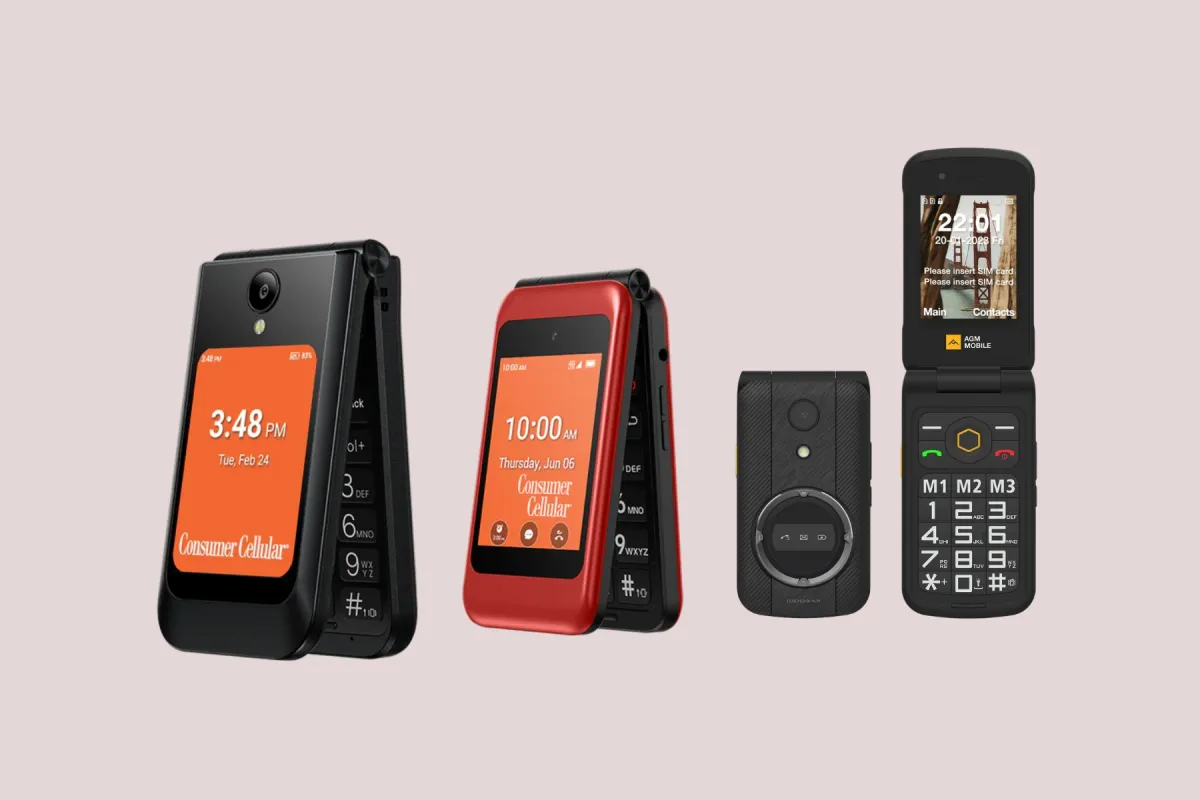
The best flip phone for seniors who want a help button that reaches a live agent is the Jitterbug Flip3. For big backlit keys and a plain menu with no paid help service, choose the Consumer Cellular Iris Easy Flip 2. If your family is on Verizon, the TCL Flip 3 keeps one carrier and adds an outside SOS button.
Each phone needs a plan, and the plan matters as much as the phone. Lively charges extra for its agent service, while the other buttons call a person you choose or 911. None of these phones runs WhatsApp.
A flip is a firm way to pause: calls, texts, and a camera stay, and most apps go. If a parent needs a bank app or video calls, a minimalist launcher on a smartphone is the lighter step. For flips ranked by price and carrier, see best cheap flip phones.
| Phone | Form factor | Input | Network | Wi-Fi | Battery | Screen | GPS | Hotspot | |
|---|---|---|---|---|---|---|---|---|---|
| Lively Jitterbug Flip3 | Flip | Keypad | 5G | Yes | 3,000 mAh | 3.2 in | No | No | No |
| Consumer Cellular Iris Easy Flip 2 | Flip | Keypad | 5G | Yes | 3,000 mAh | 3.2 in | No | No | No |
| TCL Flip 3 | Flip | Keypad | 4G | Yes | 1,850 mAh | 3.2 in | Yes | Yes | No |
| AGM M8 Flip | Flip | Keypad | 4G | No | 1,500 mAh | 2.8 in | No | No | No |
| Consumer Cellular Iris Easy Flip | Flip | Keypad | 4G | Yes | 2,000 mAh | 2.8 in | No | Yes | No |
How we picked
Every flip here meets five conditions:
- You can order it new in the US from its maker or a carrier.
- It runs on 4G or 5G and has no open app store.
- It has a published hearing aid compatibility rating.
- It has a help button, an SOS key, or an emergency contact you can reach from the keypad.
- It has big or backlit keys.
The two 2026 phones built for older adults come first. A Verizon flip, a flip you bring to your own carrier, and the older Iris model follow.
Two familiar flips are out. The AGM M10 has no published hearing aid compatibility and no named US carrier, and its outside SOS key starts switched off, as our AGM M10 review explains. The AGM M8 Flip Security+ disables the camera, picture messages, and Bluetooth, so it suits a workplace better than a family.
The Nokia 2660 Flip, the HMD 2660 Flip 4G, and the Opel TouchFlip 4G are senior flips sold outside the US, so they are not here. Several senior roundups still feature the Jitterbug Flip2, but Lively’s store now promotes the Flip3, which it calls all-new.
The best flip phones for seniors
1. Lively Jitterbug Flip3: best for a help button with a live agent
Lively
Jitterbug Flip3
Available$80
- Network
- 5G
- Wi-Fi
- Yes
- Battery
- 3,000 mAh
- Screen
- 3.2 in
5G · Wi-Fi · Camera · Headphone jack · Keypad · SOS button · Hearing aid
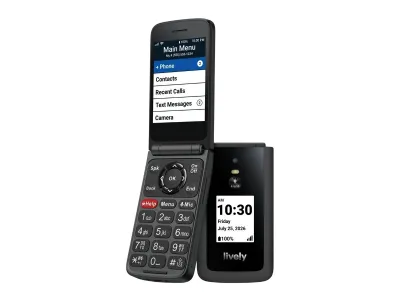
The Jitterbug Flip3 is the only flip here whose button reaches a trained agent. With Lively’s Urgent Response service, the agent confirms your location and gets you help, and the Lively Link app can alert family. It also has backlit tactile buttons, a high-contrast screen with large text, and a loud speaker.
It suits someone who lives alone and wants a person on the other end of the button, and a family that wants to set up contacts from afar. Skip it if you want to keep your carrier, because the phone cannot be used with other carriers.
The help service costs extra, and that is the real drawback. Lively disables the button without Urgent Response, which comes only on its Preferred and Premium plans.
On hearing, the Flip3 has a conversational gain of 6.91 dB with a hearing aid, the smallest figure of the three phones here that publish one.
2. Consumer Cellular Iris Easy Flip 2: best plain menu with no add-on fee
Consumer Cellular
Iris Easy Flip 2
Available$100
- Network
- 5G
- Wi-Fi
- Yes
- Battery
- 3,000 mAh
- Screen
- 3.2 in
5G · Wi-Fi · Camera · Headphone jack · Music · FM radio · Keypad
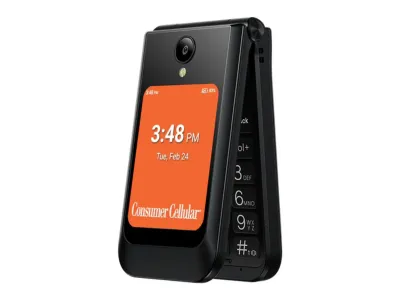
The Iris Easy Flip 2 has the plainest menu here. It has large backlit buttons, front volume keys, and a home screen you can set to a list or a grid. Neither a browser nor an app store appears in its feature list or user guide.
For help, it relies on people you choose rather than a paid service. You can set an In Case of Emergency (ICE) contact and save favorites for one-button calling. A magnifier uses the camera to show small details up close.
It suits someone on Consumer Cellular or ready to move, since the carrier requires activation on its network and a data plan at purchase. It is the wrong pick if a parent needs an operator to answer the button.
Its conversational gain is 11.70 dB with a hearing aid.
3. TCL Flip 3: best for a family on Verizon
TCL
Flip 3
Available$100
- Network
- 4G
- Wi-Fi
- Yes
- Battery
- 1,850 mAh
- Screen
- 3.2 in
4G · Wi-Fi · GPS · Hotspot · Camera · Headphone jack · Music
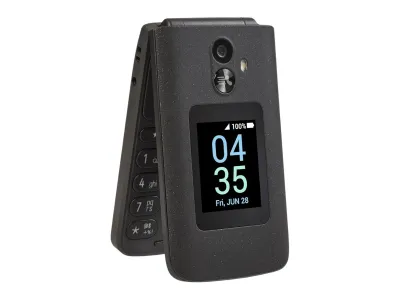
The TCL Flip 3 is the Verizon pick here, so a family on Verizon can keep one carrier. It has large, easy-to-read keys, text size you can adjust, and a dedicated external SOS button. Verizon also sells it to existing customers as well as new ones.
The SOS button needs no service, but it is plain. Officially, it is a Quick Dial Button: you switch it on, save one number, and three quick presses call that number on speakerphone. It calls whatever number you save and no agent answers, but you can also save five ICE contacts.
On hearing, the Flip 3 has the highest conversational gain of the three phones with a published figure, and it still carries an M4/T4 rating. The catch is the internet, because it has a web browser and email. That makes it a softer boundary than the Jitterbug or the Iris.
4. AGM M8 Flip: best for a loud speaker and no browser
AGM
M8 Flip
Available$99
- Network
- 4G
- Wi-Fi
- No
- Battery
- 1,500 mAh
- Screen
- 2.8 in
4G · Camera · Water resistant · Headphone jack · FM radio · Keypad · Rugged
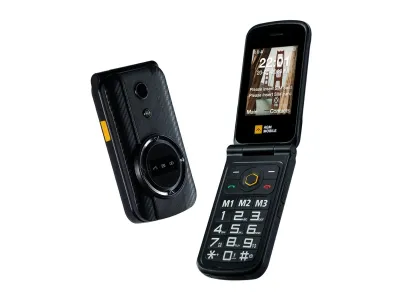
The AGM M8 Flip is the only phone here with a loudness figure: a 104 dB speaker. It also has a big keypad, hearing aid compatibility, and IP68 and IP69K ratings. Its side SOS key dials 911 by default in the Americas after a five-second press, and you can change that number.
It suits someone who wants no web access at all, because the phone has no internet browser and apps cannot be installed. It also suits a family that wants to pick its own carrier and plan. Three memory keys each hold a number for a long press.
Carrier fit is the risk, because AGM sells it directly and Tello is the only carrier named for it. VoLTE calling also works only in some areas and with some SIM cards. So ask your carrier about this exact model before you port a number.
No M and T rating or conversational gain is published for it in the US either.
5. Consumer Cellular Iris Easy Flip: the older model with M4/T4
Consumer Cellular
Iris Easy Flip
Available$60
- Network
- 4G
- Wi-Fi
- Yes
- Battery
- 2,000 mAh
- Screen
- 2.8 in
4G · Wi-Fi · Hotspot · Camera · Headphone jack · Music · FM radio
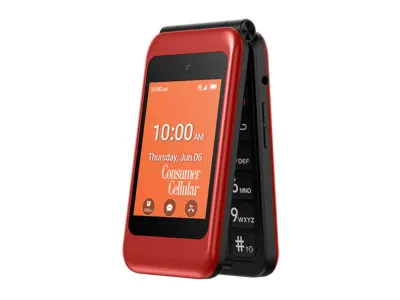
The original Iris Easy Flip is the model several senior guides still recommend, and Consumer Cellular sells it beside the Flip 2. It has a backlit keypad with large letters, a favorites key, an emergency contacts group, and an M4/T4 hearing aid rating.
It suits a Consumer Cellular customer who wants a lower price than the Flip 2. Someone whose hearing aid has worked well with phones on the older M and T scale may prefer it too. Skip it if you want a firm limit on the internet.
That is its drawback. This 4G model offers internet browsing and a hotspot, while the Flip 2 has neither, and both need a Consumer Cellular data plan. We would buy the Flip 2 unless the price gap decides it.
Hearing aid labels: M4/T4 or conversational gain
The M4/T4 rating that many buying guides quote comes from an older standard. The FCC says the newest standard, the 2019 ANSI standard, does not use M and T ratings. Phones that meet it carry a plain “hearing aid compatible” label instead.
On the older scale, M covers interference in acoustic mode and T covers telecoil use, and 4 is the best. The FCC treats M3 and T3 as the minimum for a compatible phone. The 2019 standard adds a volume requirement called conversational gain, which the package must show with and without a hearing aid.
Here are the published figures, with a hearing aid first:
- Jitterbug Flip3: 6.91 dB and 13.00 dB.
- Iris Easy Flip 2: 11.70 dB and 16.90 dB.
- TCL Flip 3: 17.78 dB and 23.11 dB in the manual, though the product page still shows M4/T4.
- AGM M8 Flip: hearing aid compatible, with no rating or gain published in the US.
- Iris Easy Flip: M4/T4.
A higher gain means the phone can amplify a call more, but a number on paper is not a test. The FCC encourages you to try a phone with your hearing aids in the store, and carriers must let you. Also try calls in different places to listen for noise.
Emergency buttons and what they need
Every phone here can call 911 from the keypad. The buttons differ in who answers them and what they cost:
- Jitterbug Flip3: the Urgent Response button reaches a Lively agent around the clock. It needs the Preferred or Premium plan, and the button is disabled without that service.
- Iris Easy Flip 2 and Iris Easy Flip: the favorites key and an ICE contact call people you choose. They come with no monitored service and no extra fee.
- TCL Flip 3: the Quick Dial Button calls one saved number on speaker after three presses. You switch it on under Settings, Device, Assistance.
- AGM M8 Flip: the SOS key dials 911 by default after a five-second press. You change the number under Settings, SOS Settings.
Lively says Urgent Response is not a substitute for 911. So for a fire, a heart attack or stroke, or a break-in, call 911 directly. If an agent decides you have an emergency, the agent helps connect you to 911.
So the agent service fits the unsure moments, such as Lively’s examples of being lost, locked out, or smelling gas. If a family mainly wants a fast call to a daughter or a neighbor, a free button that dials a saved number does that job.
What each plan costs
The phone is the small cost, and the plan is the one you pay every month. Here is what each carrier charges for these phones.
Lively plans for the Jitterbug Flip3
Lively’s three flip plans include its Ask Lively operators, and they differ in the safety services:
- Basic: $14.99 a month with paperless billing, for 300 minutes and 300 texts. Urgent Response and family alerts are not included.
- Preferred: $34.99 a month, which adds Urgent Response and Lively Link family alerts.
- Premium: $44.99 a month, which adds Nurse On-Call and Care Advocate.
Unlimited talk and text adds $5 a month to any of them. Without paperless billing, each plan costs $5 more. Each plan also carries a $3.23 monthly admin fee, surcharges, and taxes, plus a one-time $35 activation fee.
That makes Urgent Response a $20 monthly step up from the Basic plan. The phone still works on Basic for calls and texts, so you can start there and upgrade later. Lively plans also have no long-term contract and no cancellation fee.
Consumer Cellular plans for the Iris phones
Consumer Cellular requires a data plan when you buy either Iris phone. Its plans include unlimited talk and text and differ by data:
- 1GB: $20 a month.
- 5GB: $25 a month.
- Unlimited, account holder 50 or older: $35 a month.
- Unlimited, ages 18 to 49: $60 a month.
Those plan prices include a $5 credit for AutoPay and eBilling. Consumer Cellular adds a $3.99 monthly operational compliance fee per phone and a $10 network activation fee per line. The age rule matters if an adult child opens the account for a parent.
Consumer Cellular also lets you cancel within 30 days of activation and pay nothing beyond third-party charges and device upgrade fees, if data use stays at 500MB or less.
Verizon and other carriers
Verizon sells the TCL Flip 3 to new and existing customers, so it can join a family’s Verizon account. Verizon waives activation fees for new customers and its Loyalty members. Otherwise, a one-time fee of $40 may apply.
Verizon also sells two other basic flips, covered in our Orbic Journey Pro review and Kazuna eTalk review. If the family is on T-Mobile, our TCL Flip 4 5G review covers the flip we pick for that network. The AGM M8 Flip takes a SIM from the carrier you choose, so the cost depends on that carrier’s plan.
Setting up a flip phone for a parent
A family member can do most of the setup before the phone changes hands. Do it in this order:
- Check coverage at the parent’s home. Lively, Consumer Cellular, and Verizon each offer a coverage check on their sites.
- Keep the old line active until the number moves. Do not cancel the old service, because the number must stay active during the transfer.
- Gather the account number and transfer PIN. Most PINs expire within days, so request one close to the switch. On Verizon you can dial #PORT (#7678).
- Port during checkout or activation. With Lively, the number can move if the current carrier approves it and the number is eligible.
- Set the help keys. Save the ICE contact, the quick-dial number, or the SOS number before the parent uses the phone.
- Load the contacts. Lively lets someone you trust edit contacts in its online account, and the changes sync to the phone within minutes.
On the Jitterbug Flip3, the owner can also dial 0 to have a Lively operator update contacts. If you turn on its Wi-Fi calling, Lively asks for the address that emergency services should use. Our guide to switching to a dumbphone covers porting in more detail.
How to choose a flip phone for a senior
Five things decide which flip fits, and the help button comes first.
- Who answers the button. Pick the Jitterbug Flip3 and Lively’s Preferred plan if you want an agent. Pick a phone with an ICE contact or a quick-dial key if a family member will answer.
- Hearing. Look for a “hearing aid compatible” label or an M4/T4 rating, then try calls with the hearing aid within the return window.
- Keys, screen, and menu. The Jitterbug and the Iris Easy Flip 2 have backlit keys and simple menus. The TCL Flip 3 lets you raise the text size, and the AGM M8 Flip has a 104 dB speaker.
- Carrier and plan. Lively and Consumer Cellular need their own plans, Verizon sells the TCL Flip 3, and the AGM M8 Flip needs a carrier check first.
- How much internet you want. The Jitterbug, the Iris Easy Flip 2, and the AGM M8 Flip have no browser. The TCL Flip 3 and the original Iris Easy Flip keep one.
When a flip phone is not enough
A flip falls short if a parent needs video calls with family, a bank app, a pharmacy app, or a ride app. None of the phones here runs those apps or WhatsApp.
In that case a smartphone with fewer apps on the home screen works better. Start with a minimalist launcher, which keeps the apps that matter and hides the rest.
If you want a stricter phone than any flip here, see phones that only call and text.
Common questions
Does the Jitterbug Flip3 work without Urgent Response?
Yes, for calls and texts. Lively’s Basic plan runs the phone and includes its Ask Lively operators, but Lively disables the Urgent Response button without that service. In an emergency you dial 911.
What is the easiest flip phone for seniors to use?
The Jitterbug Flip3 and the Iris Easy Flip 2 come closest, because both have big backlit keys, simple menus, and no browser. The Flip3 adds voice dialing: press the Mic key and say “Dial” with a name. The Dumbphone Finder filters phones built for older adults.
What does M4/T4 mean on a cell phone?
It is a hearing aid rating from older ANSI standards. M covers interference in acoustic mode and T covers telecoil use, and 4 is the best on each scale. Phones tested under the 2019 standard skip M and T and report conversational gain instead.
Can I keep my number on a senior flip phone?
Yes, in most cases. Lively and Consumer Cellular both let you keep your number, but with Lively your current carrier must approve the transfer. Keep the old line active until the move is done.
Is there a senior flip phone with an SOS button and no monthly fee?
Yes, if a family member or 911 will answer. The TCL Flip 3’s Quick Dial Button calls one saved number, and the AGM M8 Flip’s SOS key dials 911 by default. Both still need a phone plan, and neither reaches an agent.
Which senior flip phones work on Verizon?
The TCL Flip 3 is the pick that Verizon sells. Verizon also sells the Orbic Journey Pro and the Kazuna eTalk, which are hearing aid compatible but general-purpose flips. The Jitterbug Flip3 and the Iris phones need their own carriers’ plans.
Which flip suits your parent
If you live alone, or are buying for a parent who does, and want a person to answer, choose the Jitterbug Flip3 on Lively’s Preferred plan. For the plainest menu with no add-on fee, choose the Iris Easy Flip 2 and a Consumer Cellular plan.
If your family is on Verizon, the TCL Flip 3 keeps one carrier, but it keeps a browser too. If you want a loud speaker and no internet, pick the AGM M8 Flip after your carrier confirms it works. Whichever you choose, set the help keys and test a call with the hearing aid before the return window closes.