TCL Flip 4 5G Review: A KaiOS Flip With a Browser
By Finn Albar
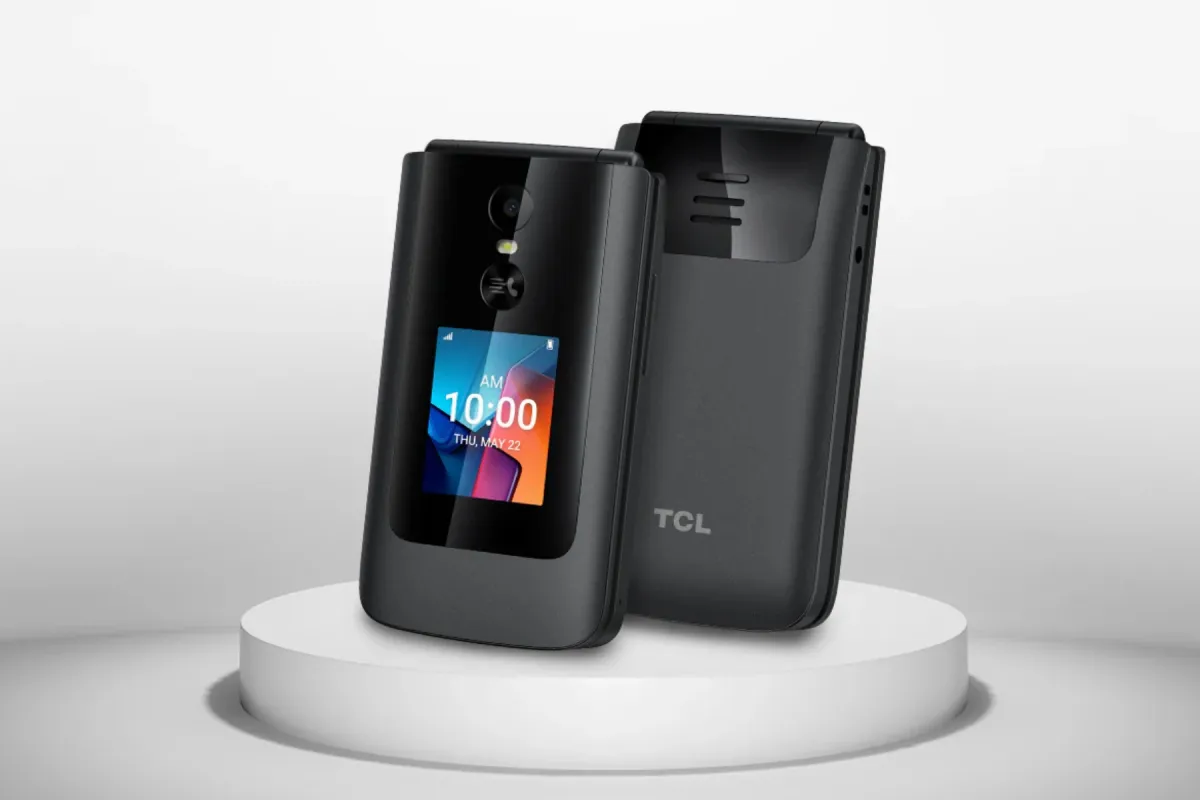
The TCL Flip 4 5G is a 5G flip phone on KaiOS 4.0 that keeps a web browser, a hotspot, and shortcuts to YouTube and Google Maps. It suits someone on T-Mobile or Metro by T-Mobile who wants a plain flip, and it is the wrong pick if you want no internet at all.
It is a stronger step than a launcher, but a softer one than a phone with no browser. If you want a hard stop, best phones without internet access is the next step.
Who the TCL Flip 4 5G is for
The TCL Flip 4 5G suits someone on T-Mobile or Metro by T-Mobile who wants a small 5G flip. Both carriers list it as the TCL FLIP 4 with 5G and a mobile hotspot, and TCL’s own page names no carrier.
It may also interest a parent comparing first phones, because TCL’s manual has a Kid mode entry. That entry is one short paragraph, so treat it as a lead, not a promise.
Skip it if you want no internet at all, because TCL lists a built-in web browser. Skip it too if you need WhatsApp, because we cannot confirm it works on this phone.
Price and availability
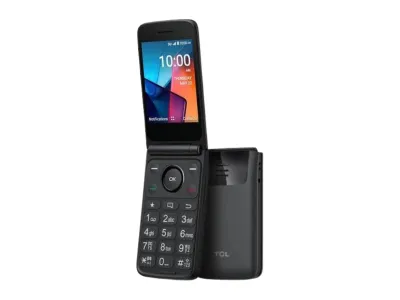
TCL
Flip 4 5G
Available$90
- Network
- 5G
- Wi-Fi
- Yes
- Battery
- 3,000 mAh
- Screen
- 3.2 in
5G · Wi-Fi · GPS · Hotspot · Camera · eSIM · Headphone jack
T-Mobile and Metro by T-Mobile both list the phone as the TCL FLIP 4. Both pages mention a one-time connection or activation fee, so ask for the total before you order.
TCL’s return policy applies only to purchases from us.tcl.com, not to carrier purchases, so ask your carrier for its own return terms. The policy also defers to the warranty papers that come with the product, and TCL’s store banner mentions a one-year warranty across its products.
The box holds a USB-C cable and a SIM pin but no charger, and the manual suggests a 10W charger.
What matters
Carrier fit and bands
T-Mobile and Metro both list the phone as the TCL FLIP 4, with 4G LTE and 5G. TCL’s own page names no carrier, and the manual it links is named TMO_T440W, so it may be the T-Mobile edition.
TCL lists LTE bands 1, 2, 4, 5, 12, 25, 26, 41, 66, and 71, plus 5G SA on n25, n41, n66, and n71. Its list shows no Band 13. Verizon’s basic phones page lists the Flip 3 and Flip Pro but not this phone, which says what that list holds, not whether the phone would work there.
If you want another carrier’s SIM, ask that carrier whether it accepts this exact model first.
Calls, Wi-Fi calling, and accessibility
TCL lists HD Voice, VoLTE, and Wi-Fi calling, with dual microphones for noise cancelation. The manual says opening the flip answers a call, and a Flip definition setting turns that off. A small outer screen previews the caller before you open the phone.
A front Quick Dial Button calls one saved contact on speaker after three quick presses, once you switch it on in settings. TCL also lists hearing aid compatibility, and the manual covers RTT, TTY, large text, readout, and captions.
Typing and keys
TCL’s page describes large keys, with dedicated keys for favorite contacts and messages. The manual lists multi-tap, predictive, number, and symbol modes, and it lists no voice typing.
Multi-tap is slow by design. The manual’s own example is that an s takes four presses of the 7 key, so predictive mode matters if you text often.
The browser and YouTube shortcuts
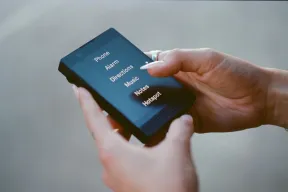
TCL’s page lists a built-in web browser. It says a shortcut on the navigation pad opens a carousel of popular Google apps, email accounts, and the browser. The manual says pressing left opens the KaiStore, Internet, YouTube, Google Maps, and Google.
That is a soft boundary. The manual lists no setting to hide the Internet app or the left-key shortcuts. Turning off Data Connection stops mobile data, but Wi-Fi still works, because the manual says Wi-Fi lets you surf without your mobile network.
Kids Mode
TCL’s Flip 4 5G page links a manual with a one-line Kid mode entry under Settings, then Account. It says that for users under 18, the phone operates in Kids Mode, restricting apps such as the KaiStore, social media, and games, and blocking browser access.
The manual does not explain how the phone decides a user is under 18, or whether a parent can lock the setting. With so little detail, confirm how it works before you rely on it.
KaiStore and WhatsApp
The manual lists a KaiStore shortcut. TCL lists no store contents, and the KaiOS help center describes the KaiStore as carrying apps such as Facebook and Google Maps. We cannot say which apps this phone’s store offers, so we cannot confirm any app, an authenticator app included.
WhatsApp is the open question. The KaiOS help center says WhatsApp announced the sunset of its service on KaiOS. It says WhatsApp is no longer supported on devices never logged in, effective June 25, 2024, and that older logged-in devices keep it only until early 2025.
Its apps page says WhatsApp is not available on KaiOS 3.0, and it is silent about KaiOS 4.0, which TCL lists here. TCL lists no WhatsApp either. We cannot confirm it, so do not count on it.
The manual’s File Manager note says an app moved from a computer can be found there but not installed. So you cannot add apps that way.
Hotspot and eSIM
TCL lists a mobile hotspot, and the manual’s Internet sharing entry covers a Wi-Fi hotspot and USB tethering. TCL’s general flip phone support page says a hotspot can serve up to ten devices over Wi-Fi and that your carrier may charge extra. T-Mobile and Metro both mark the phone as hotspot capable, so ask which plan includes hotspot data.
The phone takes a nano SIM and lists an embedded eSIM. The manual tells you to check eSIM availability with your carrier.
Camera
TCL lists a 5 MP rear camera with fixed focus, 480p video capture, and 720p playback. Its spec page lists the flash as N/A, while the manual shows a Flash setting in the camera options. The manual also describes a flashlight on a long press of the Quick Dial Button.
Pressing right on the navigation pad opens the camera. With the flip closed, pressing the Quick Dial Button twice opens a camera on the outer screen, and a volume key takes the photo. TCL lists a microSD slot for cards up to 1TB.
Battery and charging
TCL rates the battery at up to 40 hours of talk time on 4G and says it lasts more than two days on a charge. It lists standby at up to 15 days, and a footnote adds that results vary with use and settings.
TCL’s page says it charges in under two hours over USB-C, while the manual’s battery tips list a maximum charge time of 2.5 hours. The manual’s Power Saving Mode turns off data, Bluetooth, and geolocation to stretch the battery.
Software updates and support
The manual puts updates under Settings, Device, Software update, then Check for updates. It says a new mandatory update starts downloading on its own, and you then choose Install. TCL lists no update schedule or security patch period, and KaiOS says device makers deliver updates over the air.
TCL’s support site files the phone under EOL Service and Support, and it has similar pages for several other flip phones. The page promises replacement parts and/or services for at least three years after production of the T440W ends, and it gives no end-of-production date. It lists parts such as the battery and speaker and says nothing about software.
What it leaves out
TCL’s spec page marks fingerprint, facial recognition, and NFC as No, and it lists touch technology as N/A. We cannot confirm WhatsApp or an authenticator app, because TCL lists no KaiStore contents.
The Messages app handles SMS and MMS, so codes sent by text can arrive. Google Maps is on the left-key list, so maps are not missing.
Limitations
The browser comes first. TCL lists it, and the manual lists no setting to hide it or the YouTube shortcut. Wi-Fi also works without a data plan, so a plan alone does not keep the phone offline.
Apps and details come next. We cannot confirm WhatsApp or an authenticator app, and the manual gives Kids Mode one short entry. TCL also publishes no update schedule.
If you want a boundary the phone enforces, choose a phone with no browser. The best minimalist launchers for Android are the lighter first step if you only want fewer apps on a phone you own.
Pros
- 5G, VoLTE, and Wi-Fi calling in a small flip
- Hotspot, eSIM, microSD slot, and a 3.5 mm headphone jack
- A Kid mode entry in TCL's manual that blocks the browser for users under 18
- Google Maps on a shortcut key
- Hearing aid compatibility, RTT, and TTY listed
Cons
- Built-in browser and YouTube shortcut
- WhatsApp and an authenticator app cannot be confirmed
- Kids Mode has one short manual entry and no described parent lock
- No update schedule or security patch period from TCL
- TCL names no carrier, and the manual may be the T-Mobile edition
- Flash listed two ways: N/A on the spec page, a setting in the manual
Alternatives
Pick a phone from best phones without internet access if you want a hard stop. Its list includes the Sunbeam F1 Pro, which leaves out the browser and the app store. The same roundup notes that AGM’s FAQ says the M8 Flip has no browser.
Start from best cheap flip phones if you want to choose by carrier. That roundup names the flips that T-Mobile, Verizon, and AT&T sell, and it picks the Flip 4 5G for T-Mobile.
Choose the Wisephone II if WhatsApp decides it, because it keeps WhatsApp inside a locked system. It needs a monthly WiseOS plan, though. For a child’s phone, best dumbphones for kids compares the TCL flips with AGM and Sunbeam phones.
Common questions
Does the TCL Flip 4 5G have a web browser?
Yes, TCL lists a built-in web browser, and the manual’s Internet app takes a web address or a search. Wi-Fi works without a data plan, so turning off mobile data does not stop it. For phones whose makers list no browser, see best phones without internet access.
Does the TCL Flip 4 5G have WhatsApp?
We cannot confirm it, because TCL lists no WhatsApp and the KaiOS help center says WhatsApp announced the sunset of its KaiOS service. That page says it is not available on KaiOS 3.0 and says nothing about KaiOS 4.0. If WhatsApp decides it, our Wisephone II review covers a phone that keeps it.
Which carriers sell the TCL Flip 4 5G?
T-Mobile and Metro by T-Mobile list it as the TCL FLIP 4. TCL’s page names no carrier, and the manual it links is named TMO_T440W, so it may be the T-Mobile edition. For other carriers, best cheap flip phones names the flips each one sells.
What does Kids Mode do on the TCL Flip 4 5G?
TCL’s manual has a one-line Kid mode entry under Settings, then Account. It says users under 18 get restricted apps and blocked browser access, but not how the phone decides a user’s age or whether a parent can lock it. For a wider comparison of phones for children, see best dumbphones for kids.
Can the TCL Flip 4 5G work as a hotspot?
Yes. TCL and both carriers list a mobile hotspot, and the manual covers a Wi-Fi hotspot and USB tethering. The menu is Settings, Network & Connectivity, then Internet Sharing, and TCL’s general flip phone support page says your carrier may charge extra.
Does the TCL Flip 4 5G get software updates?
TCL’s manual describes over-the-air updates, but TCL lists no schedule or security patch period, so we cannot say how long they will come. You can look under Settings, Device, Software update, then Check for updates. TCL’s EOL page promises parts and/or services for at least three years after production ends, which is a repair promise, not a software one.
Final thoughts
The TCL Flip 4 5G pauses your phone by making it small and plain, not by blocking the internet. It keeps a browser, YouTube, and Google Maps behind the left key, so the boundary is yours to keep.
If you want a phone that enforces the boundary, a phone with no browser is the stronger step. The Dumbphone Finder can narrow the field to flips on 5G.