The Best Dumbphones for Kids: 7 Flips and Keypad Phones
By Finn Albar

The best dumbphones for kids are flips and keypad phones with an emergency key and no open app store. The AGM M8 Flip is the first one we would buy. AGM’s FAQ says it has no internet browser and that apps cannot be installed, and its SOS key can be set to call a parent instead of 911.
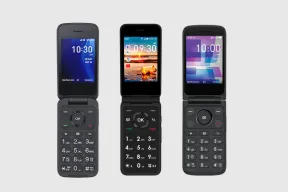
The TCL Flip 4 5G and Flip 3 are the easier buy if you want a carrier to set the phone up. T-Mobile and Metro sell the Flip 4 5G, and Verizon sells the Flip 3. They keep a browser, though, and only the Flip 4 5G’s manual describes a Kids Mode.
None of the makers’ pages describes a parent app. For that, see safe phones for kids. If your child already has an Android smartphone, our minimalist launcher guide is the lighter step.
| Phone | Form factor | Input | Network | Wi-Fi | Battery | Screen | GPS | Hotspot | |
|---|---|---|---|---|---|---|---|---|---|
| AGM M8 Flip | Flip | Keypad | 4G | No | 1,500 mAh | 2.8 in | No | No | No |
| AGM M8 Flip Security+ | Flip | Keypad | 4G | No | 1,500 mAh | 2.8 in | No | No | No |
| TCL Flip 4 5G | Flip | Keypad | 5G | Yes | 3,000 mAh | 3.2 in | Yes | Yes | No |
| TCL Flip 3 | Flip | Keypad | 4G | Yes | 1,850 mAh | 3.2 in | Yes | Yes | No |
| AGM M10 | Flip | Keypad | 4G | No | 1,200 mAh | 2.4 in | No | No | No |
| AGM M9 | Bar | Keypad | 4G | No | 1,000 mAh | 2.4 in | No | No | No |
| Sunbeam F1 Pro | Flip | Keypad + touch | 4G | Yes | 2,200 mAh | 2.8 in | Yes | Yes | No |
How we picked
A phone makes this list only if it passes four tests:
- It is a keypad or flip phone with no open app store. KaiOS has its own app store, so each entry says what a child can still reach.
- You can order it new in the US from the maker or a main carrier.
- It runs on 4G or 5G. US carriers shut down their 3G networks, so a 3G phone cannot make calls.
- The maker’s pages or guide describe the parts a child touches, such as a browser, a camera, or an emergency key.
Some familiar names are missing. HMD scaled back its US business in 2025, and its US site now redirects to its international pages. The Nokia 2780 Flip and the HMD Barbie Phone have no US buy page.
Gabb’s phones show Out of Stock on gabb.com with no restock date. HMD’s 105 4G School Edition has a parent PIN that blocks Bluetooth, MMS, and the radio. But HMD’s page shows no price or buy button, and its spec page lists European bands only.
The order follows what we would look at first. The two AGM phones whose FAQ says there is no browser come first, then the two carrier-sold TCL flips, then two cheaper AGMs. The Sunbeam is last because it costs far more than the rest.
The best dumbphones for kids
1. AGM M8 Flip: best first phone
AGM
M8 Flip
Available$99
- Network
- 4G
- Wi-Fi
- No
- Battery
- 1,500 mAh
- Screen
- 2.8 in
4G · Camera · Water resistant · Headphone jack · Keypad · Rugged · SOS button
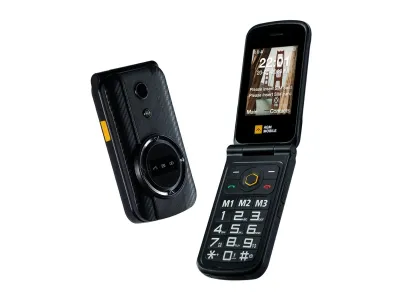
The AGM M8 Flip is the phone we would start with, because AGM answers the parent’s question outright. AGM’s FAQ says the phone has no internet browser and apps cannot be installed. AGM says it withstands dust, water, and shocks, and the guide lists a camera, picture messages, and quick-dial keys.
The SOS key is the feature built for kids. Held for five seconds, it dials 911 by default in the Americas, and the guide says you can save another number under Settings. Decide before the first day whether it should reach 911 or a parent, because holding it by accident dials whatever is saved.
It suits a child who walks or rides to school, and a parent who wants one obvious way to ask for help. The weakness is the carrier. AGM names only Tello, which it says runs on T-Mobile’s network, and its guide says 4G calling works only in some areas and with some SIM cards.
2. AGM M8 Flip Security+: the strictest
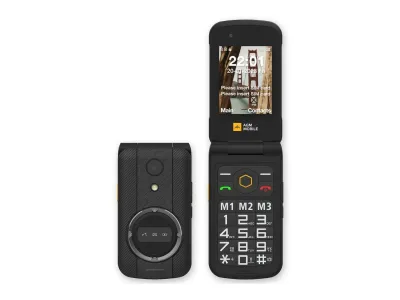
AGM
M8 Flip Security+
Available$99
- Network
- 4G
- Wi-Fi
- No
- Battery
- 1,500 mAh
- Screen
- 2.8 in
4G · Water resistant · Headphone jack · Keypad · Rugged · SOS button · Hearing aid
The Security+ is the M8 Flip with the extras switched off. AGM’s quick-start guide lists Bluetooth, cellular data, MMS, the camera, USB data transfer, and the microSD slot as disabled. AGM’s FAQ repeats that it has no browser and no way to install apps.
What is left is calls, plain text messages, quick-dial keys, a torch, and the same SOS key. It suits a younger child, a school that bans cameras, and a parent who wants no photos and no picture messages at all. AGM’s guide describes no setting that turns them back on.
That is also the cost. Friends cannot send your child a photo, and you cannot add a camera later. The carrier caveat from the M8 Flip applies in full, so ask your carrier about this exact model and about 4G calling before you order.
3. TCL Flip 4 5G: for T-Mobile and Metro families
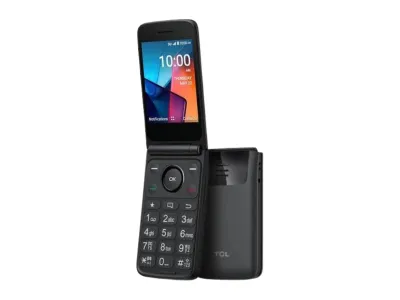
TCL
Flip 4 5G
Available$90
- Network
- 5G
- Wi-Fi
- Yes
- Battery
- 3,000 mAh
- Screen
- 3.2 in
5G · Wi-Fi · GPS · Hotspot · Camera · eSIM · Headphone jack
The TCL Flip 4 5G is the flip a carrier will activate for you. T-Mobile and Metro by T-Mobile list it as the TCL Flip 4, and Verizon’s basic-phone list does not. Once set up, a front Quick Dial Button calls one saved number after three quick presses.
TCL’s Flip 4 5G page links a manual that describes Kids Mode. It says users under 18 get restricted apps, such as KaiStore, social media, and games, with browser access blocked. The manual does not say how the phone decides a user is under 18 (account setup asks for a year of birth) or whether a parent can lock it.
It suits a family on T-Mobile or Metro, and the battery is the biggest on this list. The catch is what stays reachable outside Kids Mode: the manual says the left key opens shortcuts to the KaiStore, the web browser, YouTube, and Google Maps. The phone also has Wi-Fi, so a plan without data does not keep it offline.
4. TCL Flip 3: for Verizon families
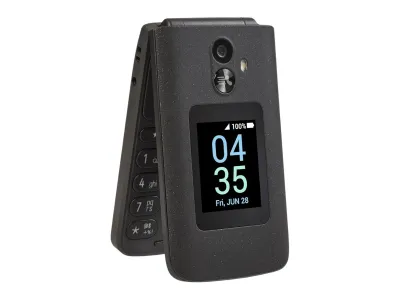
TCL
Flip 3
Available$100
- Network
- 4G
- Wi-Fi
- Yes
- Battery
- 1,850 mAh
- Screen
- 3.2 in
4G · Wi-Fi · GPS · Hotspot · Camera · Headphone jack · Music
The TCL Flip 3 is the Verizon option, sold in Verizon’s basic-phone line. TCL’s page says it has a dedicated external SOS button. TCL’s manual describes a front Quick Dial Button that calls one saved number on speaker after three quick presses.
Its parent feature is a SIM service called Fixed Dialing Numbers. TCL’s manual says it limits outgoing calls to a list, and that parents most often use it to restrict who a child can dial. Turning it on needs the SIM’s PIN2, which the manual says usually comes from the carrier or SIM maker, so ask Verizon first.
The browser is the weakness. TCL’s page promises an easy-to-use browser, and the left key opens the same shortcuts as on the Flip 4 5G. Limiting dialing does nothing about that, so this phone suits an older child more than a young one.
5. AGM M10: cheapest flip with an SOS key
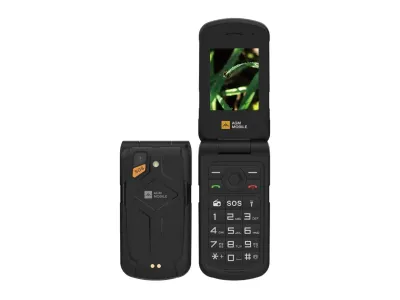
AGM
M10
Available$69
- Network
- 4G
- Wi-Fi
- No
- Battery
- 1,200 mAh
- Screen
- 2.4 in
4G · Camera · Water resistant · Headphone jack · FM radio · Keypad · Rugged
The AGM M10 is a rugged flip with an SOS key, a camera, an FM radio, and room for two SIM cards. It costs less than either M8 phone. The guide describes the same 911 default and the same way to change the number.
The trap is that the guide says the external SOS button is off until you turn it on under Settings, then SOS. Do that first. It suits a child who is hard on things and a parent who wants a low-cost flip.
AGM never says outright that the M10 has no browser, and its guide shows none. AGM’s pages name no US carrier, and the guide warns that 4G calling works only in some areas and with some SIM cards. Check your carrier first.
6. AGM M9: cheapest keypad spare
AGM
M9
Available$49
- Network
- 4G
- Wi-Fi
- No
- Battery
- 1,000 mAh
- Screen
- 2.4 in
4G · Camera · Water resistant · Headphone jack · FM radio · Keypad · Rugged
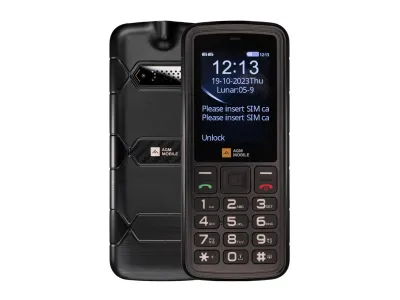
The AGM M9 is the cheapest phone here: a rugged bar phone with a removable battery, an FM radio, and a torch. It suits a spare for the phone that gets lost, or a first phone for a child who only needs to reach you.
AGM’s page labels one version US T-Mobile, but it does not say the phone is approved on any carrier.
It is the wrong pick if you want an emergency key, because AGM’s guide lists none. A bar phone also has no lid to protect the keys and no outer screen that shows who is calling.
As with the M10, AGM never states that there is no browser. The guide shows a camera and picture messages, and it carries the same warning about 4G calling. If your carrier is not T-Mobile, ask it about the exact model before you order.
7. Sunbeam F1 Pro: the maker says no browser, at a price
Sunbeam
F1 Pro
Available$359
- Network
- 4G
- Wi-Fi
- Yes
- Battery
- 2,200 mAh
- Screen
- 2.8 in
4G · Wi-Fi · GPS · Hotspot · Camera · Headphone jack · Music
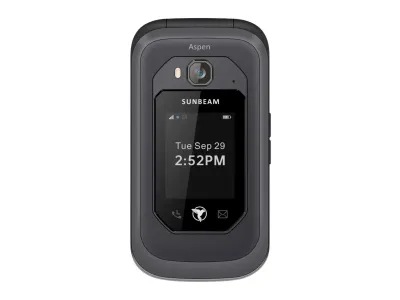
Sunbeam says plainly what the F1 Pro leaves out: no web browser, no social media apps, no app store, and no video. It sells the phone in models, so you choose what a child gets. The Redwood model keeps a camera and picture messaging, the Elm model keeps text but drops both, and the Cedar model only makes calls.
Sunbeam calls the F1 Pro rugged and water-resistant. Sunbeam’s product pages say phones bought after July 1, 2026 carry a two-year warranty, though its returns policy still says one year.
It suits a parent who wants the maker, not a setting, to enforce the limits and will pay for it. It costs far more than every other phone here.
Sunbeam sells no phone service, so you bring a carrier. Its coverage page says the phones are unlocked but marks some networks as not working, such as Spectrum. Sunbeam also says its phones cannot send or receive RCS messages, so a group chat may need friends to switch to MMS.
How to choose a dumbphone for a kid
- Emergency key. The AGM M8 phones and the M10 have an SOS key that dials 911 by default and can be changed, and the M10’s external key ships off. The TCL Flip 3 has a dedicated external SOS button, and both TCL flips have a front Quick Dial Button that calls one saved number. The Sunbeam F1 Pro has an SOS setting in its menu that calls up to five saved numbers, but Sunbeam says it does not notify 911. The M9 lists no emergency key.
- Browser and shortcuts. AGM says the M8 phones have no browser, and Sunbeam says the F1 Pro has none. The TCL flips carry a browser and shortcuts to YouTube and the KaiStore. AGM’s guides for the M10 and M9 show no browser but never say so.
- Camera and picture messages. The Security+ drops both, and so do Sunbeam’s Oak, Elm, Cedar, and Willow. Other phones keep a camera. The AGM M8 Flip, M10, and M9 take picture messages, which AGM says can depend on your carrier’s settings.
- Parent controls. None of the makers’ pages describes a parent app. The Flip 3 manual describes dialing limits through the SIM, and the Flip 4 5G manual describes a Kids Mode. Everything else you set by hand, such as the SOS number and speed dial keys.
- Carrier and plan. T-Mobile and Metro sell the Flip 4 5G, and Verizon sells the Flip 3. AGM names Tello, sells a T-Mobile version of the M9, and warns about 4G calling. Sunbeam is unlocked and publishes a chart of working carriers.
- Toughness. AGM and Sunbeam both sell their phones as rugged. TCL lists no water or drop rating for either flip. Both TCL manuals warn against moisture and liquids, and the Flip 3 manual also says not to drop it.
When to pick a managed phone instead
A dumbphone gives a parent a few tools: an SOS number, speed dials, a SIM dialing limit on the Flip 3, and a Kids Mode on the Flip 4 5G. If you need location sharing, approved contacts managed from your own phone, or alerts when your child arrives somewhere, a managed phone is the better buy.
Our safe phones for kids list compares them, with what each costs. If your child needs only calls and texts, see phones that only call and text. For more carrier-sold flips, see cheap flip phones.
Common questions
What is the best dumb phone for a kid?
For most families, the AGM M8 Flip. Its maker says there is no browser and no way to install apps, and its SOS key can call a parent. If you want a carrier to activate it, choose a TCL flip instead.
Do dumbphones have parental controls?
Rarely. None of the makers’ pages describes a parent app. TCL’s Flip 3 manual describes dialing limits set through the SIM, and its Flip 4 5G manual describes a Kids Mode.
What age is right for a kid’s first dumbphone?
Whenever your child needs to reach you and you are not ready for a smartphone. A younger child suits the strictest phones, such as the Security+ or a Sunbeam Elm model. An older child can handle a TCL flip that keeps a browser.
Can a kid’s dumbphone be tracked?
Not by a parent. The makers’ pages for these phones describe no parent app and no way for a parent to see where the phone is. For tracking, use a managed phone from our safe phones for kids list.
Do dumbphones for kids have a camera?
Most do. The AGM M8 Flip Security+ disables its camera, and Sunbeam’s Oak, Elm, Cedar, and Willow models have none. The rest, including the Sunbeam Redwood model, have one.
How do I keep a kid’s flip phone offline?
Pick a phone whose maker says there is no browser, such as the AGM M8 pair or the Sunbeam F1 Pro. On a TCL flip, Wi-Fi works without a data plan, so a plan alone does not keep it offline.
Final thoughts
Start with the AGM M8 Flip, or the Security+ if you want no camera at all. Choose a TCL flip if T-Mobile, Metro, or Verizon is your carrier. Keep the AGM M9 as a spare, and consider the Sunbeam F1 Pro if you want the maker to enforce the limits.
Ask your carrier about 4G calling on the exact model before you order an AGM or a Sunbeam. Every phone above is in the Dumbphone Finder with its full specifications.