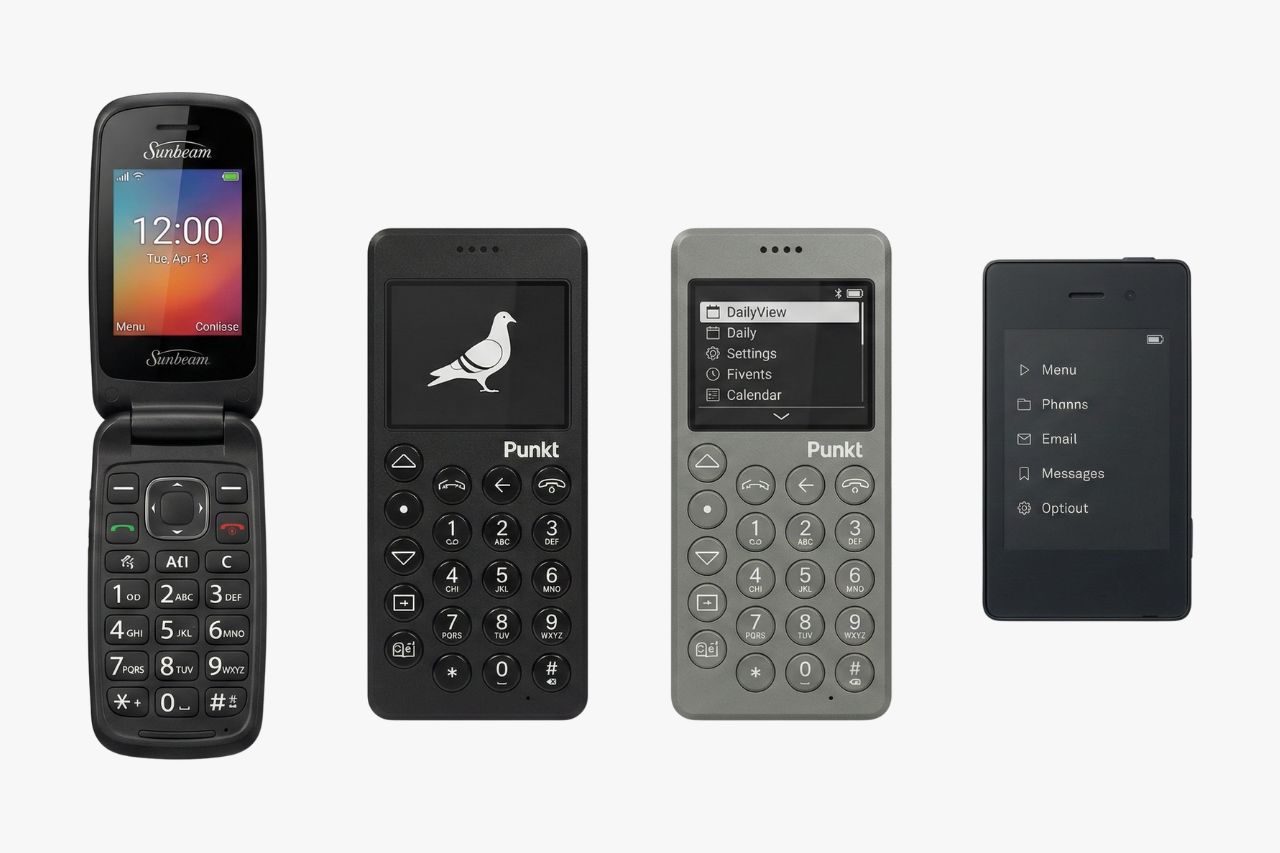
If you have been feeling tethered to your smartphone lately, you are not alone. In 2026, a growing number of people are putting down their always-connected devices and picking up something simpler on purpose. The dumbphone movement is no longer a quirky niche. It is a practical choice embraced by students, parents, professionals, and anyone who wants to reclaim a bit of quiet in their day.
The reasons are straightforward. Fewer notifications mean fewer distractions. A smaller screen means more time looking up. Battery life measured in days instead of hours means one less thing to worry about. And with no social media apps or ad-tracking software baked in, your privacy gets a meaningful upgrade too.
Today’s dumbphones are not the clunky relics you might remember. The market in 2026 stretches from affordable flip phones under $50 all the way to premium minimalist devices with e-ink displays and curated tool sets. Some run KaiOS, others use stripped-down Android, and a few operate on custom software built from scratch for focused living. Whether you want a phone that only makes calls or one that keeps GPS, music, and hotspot while cutting out the noise, there is a device designed for exactly that.
This guide covers the 15 best dumbphones available right now and walks you through our dumbphone finder.
How We Chose the Best Dumbphones in 2026
Picking the right dumbphone matters more than it might seem. A bad choice can leave you stuck with a device that drops calls, locks you out of your carrier’s network, or frustrates you into returning to a smartphone within a week. To prevent that, every phone on this list was evaluated against a clear set of criteria.
Only the newest available model from each brand made the cut. If a manufacturer released an updated version, the older one was excluded. Discontinued devices and phones with uncertain long-term availability were also removed, because buying a phone you cannot get support or replacement parts for defeats the purpose.
Here is what shaped the rankings:
- Call quality: Clear, reliable voice calls are the core function. Phones with poor call audio or frequent drops were ranked lower.
- Battery life: Devices were compared based on real-world standby and talk time. Multi-day battery life is expected at this level.
- Ease of use: Menus, texting, and contacts should feel intuitive whether you are tech-savvy or not.
- Software experience: Smooth, responsive software with minimal lag or bugs earned higher marks.
- Build quality: Materials, hinge durability on flip phones, and general sturdiness were all considered.
- LTE/4G compatibility: Every phone listed works on current U.S. LTE networks. No 2G-only or 3G-only devices are included.
- Privacy features: Phones that limit tracking, skip app stores, or avoid ad-supported software scored higher.
- Value for money: Price was weighed against the features and build quality you actually receive.
- Long-term availability: Devices from established brands with ongoing production and support were prioritized.
Best Dumbphones in 2026 Compared
| Phone | Brand | Form Factor | Network | Battery | Camera | GPS | Hotspot | Approx. Price | Best For | |
|---|---|---|---|---|---|---|---|---|---|---|
| Light Phone III | Light | Candy bar | 4G LTE | 2+ days | No | Yes | Yes | No | $599-$799 | Premium digital detox |
| HMD 2660 Flip | HMD | Flip | 4G LTE | 3+ days | Yes | No | No | No | $35-$50 | Budget simplicity |
| Nokia 3210 (2024) | Nokia | Candy bar | 4G LTE | 3+ days | Yes | No | No | No | $60-$80 | Nostalgia with reliability |
| Punkt. MP02 New Generation | Punkt. | Candy bar | 4G LTE | 5+ days | No | No | Yes | No | $299-$350 | Calls and texts only |
| Mudita Kompakt | Mudita | Candy bar | 4G LTE | 2+ days | No | Yes | Yes | No | $399-$499 | E-ink minimalism |
| Wisephone II | Techless | Candy bar | 4G LTE | 2+ days | Yes | Yes | Yes | No | $399-$449 | Families and beginners |
| Sunbeam F1 Pro | Sunbeam | Candy bar | 4G LTE | 1-2 days | Yes | Yes | No | No | $249-$274 | Ethical, no-internet phone |
| Kyocera DuraXA Equip | Kyocera | Flip | 4G LTE | 4+ days | Yes | Yes | Yes | No | $80-$120 | Rugged durability |
| CAT S22 Flip | CAT | Flip | 4G LTE | 2+ days | Yes | Yes | Yes | Yes | $80-$120 | Tough use with apps |
| AGM M9 | AGM | Candy bar | 4G LTE | 3+ days | No | No | No | No | $60-$80 | Ultra-basic and rugged |
| Easyfone Prime A7 | Easyfone | Candy bar | 4G LTE | 4+ days | Yes | Yes | No | No | $50-$70 | Seniors |
| Emporia TOUCHsmart.2 | Emporia | Candy bar | 4G LTE | 3+ days | Yes | No | No | Yes | $120-$160 | Seniors wanting touchscreen |
| Maxwest Neo Flip LTE | Maxwest | Flip | 4G LTE | 3+ days | Yes | No | No | No | $30-$45 | Ultra-budget flip |
| TTfone TT970 | TTfone | Flip | 4G LTE | 3+ days | Yes | No | Yes | Yes | $70-$90 | WhatsApp on a flip |
| Opel TouchFlip 4G | Opel Mobile | Flip | 4G LTE | 3+ days | Yes | No | No | No | $50-$70 | Simple flip with touchscreen |
The 15 Best Dumbphones in 2026
These 15 devices represent the strongest options available right now, ranked from the best all-around pick to more specialized choices. Each phone serves a different type of user, so read through the details to find your match.
Light Phone III
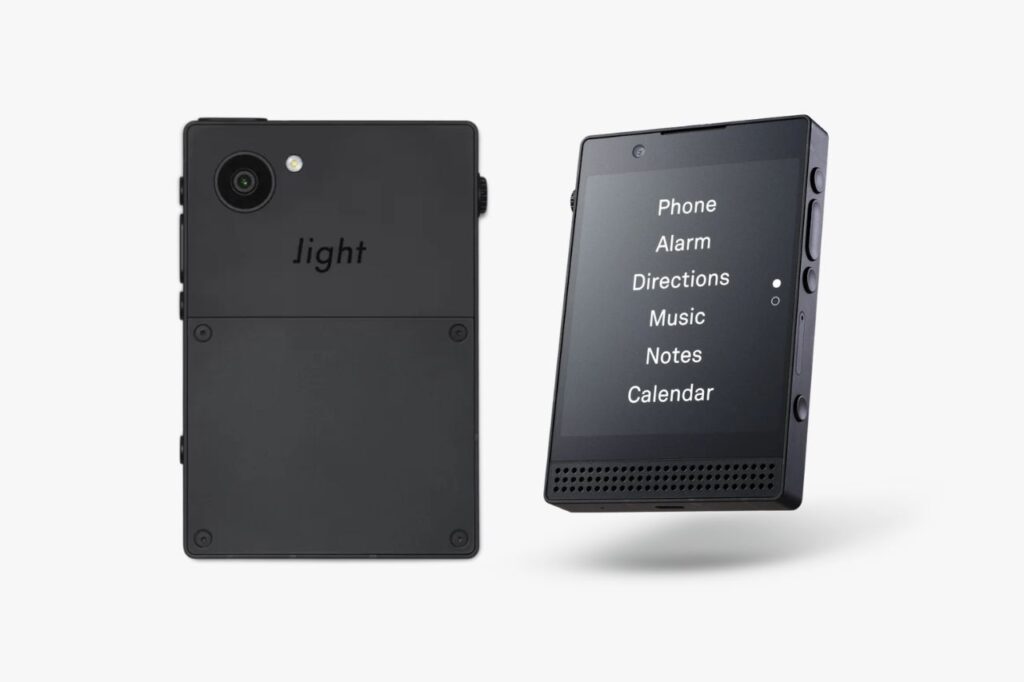
The Light Phone III is the flagship of the minimalist phone world. Built by a Brooklyn-based team laser-focused on intentional technology, it offers a carefully curated set of tools without any social media, web browser, or advertising. If you want a premium device that feels like a real commitment to simpler living, this is the one to start with.
Key Features:
- Display: E-ink touchscreen, sunlight-readable
- Battery: 2+ days of typical use
- Connectivity: 4G LTE, Wi-Fi, Bluetooth, USB-C
- Operating system: Custom Light OS
- Camera: None
- Storage: Limited internal storage for music and notes
- Unique features: Built-in directions, podcast player, music player, hotspot, calculator, alarm, and voice memos; no app store
Pros:
- Beautiful, distraction-free design
- E-ink display is easy on your eyes
- Hotspot lets you use a tablet or laptop when needed
- Strong privacy with no tracking or ads
Cons:
- No autocorrect on the keyboard
- Very expensive compared to other dumbphones
- Some promised features have been slow to arrive
- No camera at all
Best For: People who want a refined, premium digital detox device and are willing to invest in it.
Approximate Price: $599-$799
The Light Phone III earns the top spot because it delivers the most polished, purpose-built experience in the dumbphone space. It is not cheap, but every design choice reflects a clear philosophy: give you only the tools you need and nothing you do not.
HMD 2660 Flip
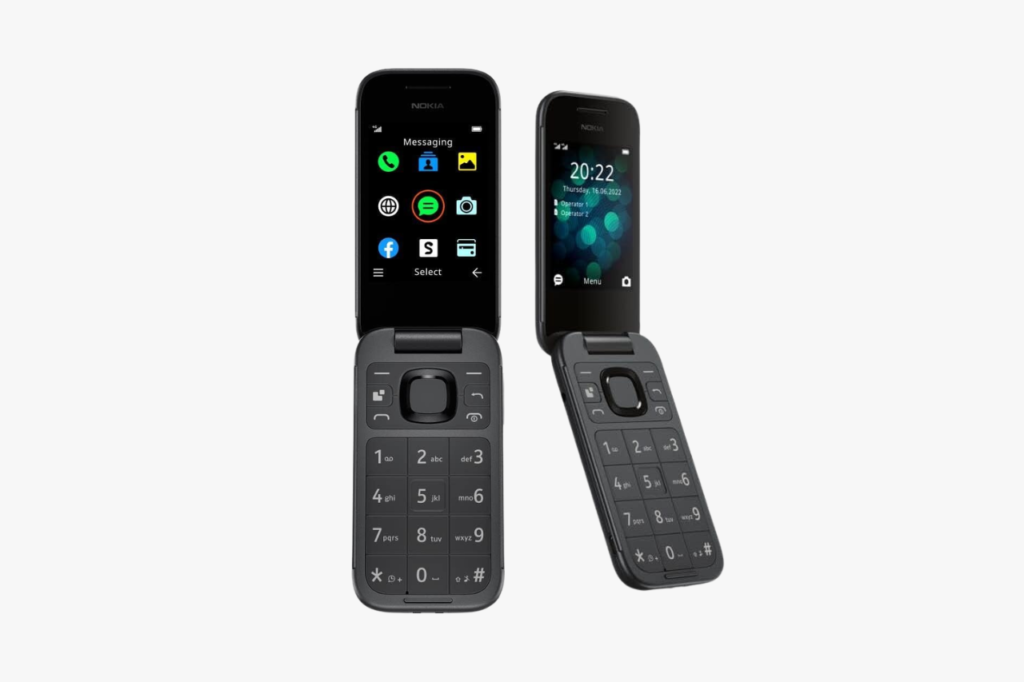
The HMD 2660 Flip is a no-frills clamshell phone that gets the basics right at a price most people can afford without thinking twice. If you want to test the dumbphone waters without a big financial commitment, this is one of the easiest entry points.
Key Features:
- Display: 2.8-inch internal color screen, small external display
- Battery: 3+ days standby
- Connectivity: 4G LTE, Bluetooth, FM radio
- Operating system: S30+
- Camera: Basic rear camera
- Storage: MicroSD expandable
- Unique features: Classic Snake game, FM radio, LED flashlight
Pros:
- Very affordable
- Satisfying flip-to-answer, flip-to-hang-up experience
- Long battery life
- Compact and pocket-friendly
Cons:
- No GPS or navigation
- No WhatsApp or messaging apps
- Camera quality is very basic
- No hotspot capability
Best For: First-time dumbphone users who want a cheap, reliable flip phone for calls and texts.
Approximate Price: $35-$50
The HMD 2660 Flip stands out for its combination of low price and dependable performance. You get a phone that does exactly what a phone should do, and nothing more.
Nokia 3210 (2024)
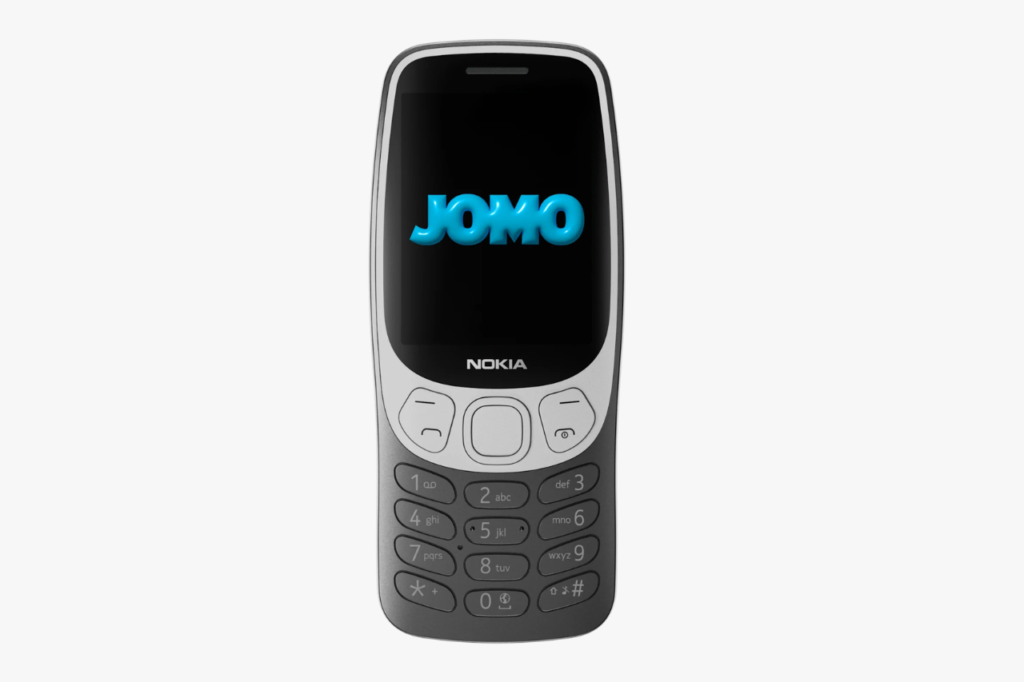
The Nokia 3210 reboot carries one of the most recognizable names in mobile history. This 2024 re-release keeps the iconic candy bar shape and adds 4G LTE support so you can actually use it on modern networks. It blends nostalgia with genuine daily utility.
Key Features:
- Display: 2.4-inch color screen
- Battery: 3+ days on a single charge
- Connectivity: 4G LTE, Bluetooth, FM radio
- Operating system: S30+
- Camera: 2MP rear camera
- Storage: MicroSD expandable
- Unique features: Snake game, swappable Xpress-on covers, built-in FM radio
Pros:
- Iconic design with modern network support
- Excellent battery life
- Durable polycarbonate body
- Fun customization with interchangeable covers
Cons:
- No GPS or mapping
- No app support beyond pre-installed software
- Small screen can make texting slow
- No hotspot
Best For: Anyone who values reliability and a touch of classic design in a modern network-compatible phone.
Approximate Price: $60-$80
The Nokia 3210 remains a crowd-pleaser because it strips mobile life back to essentials while still working perfectly on today’s LTE networks.
Punkt. MP02 New Generation
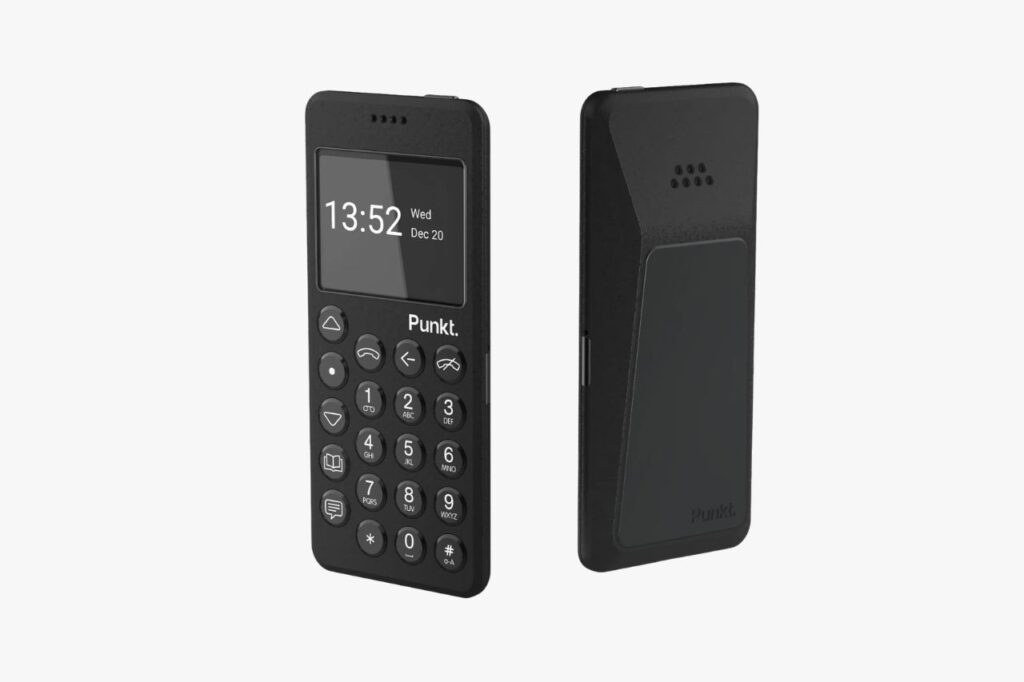
The Punkt. MP02 New Generation is a Swiss-designed phone built on one idea: your phone should be for talking and texting, and that is it. There is no camera, no browser, and no apps. What you get is an exceptionally well-built device with outstanding call quality and a battery that lasts nearly a week.
Key Features:
- Display: 2-inch monochrome LCD
- Battery: 5+ days standby
- Connectivity: 4G LTE, Bluetooth, USB-C, tethering/hotspot
- Operating system: Custom firmware (based on Android, locked down)
- Camera: None
- Storage: Minimal internal storage
- Unique features: Pigtail secure tethering for private hotspot use, signal privacy features, BlackBerry-heritage secure communications
Pros:
- Exceptional build quality with premium materials
- Industry-leading battery life for a dumbphone
- Hotspot mode lets you stay connected via a laptop
- Strong focus on communication privacy
Cons:
- No GPS or navigation
- No group messaging support
- Expensive for what it offers on paper
- Very limited functionality beyond calls and texts
Best For: Professionals and privacy-conscious users who want a beautifully crafted phone that does almost nothing.
Approximate Price: $299-$350
The Punkt. MP02 is for people who see restraint as a feature. If your goal is a device that stays out of your way and lasts all week, this delivers exactly that.
Mudita Kompakt
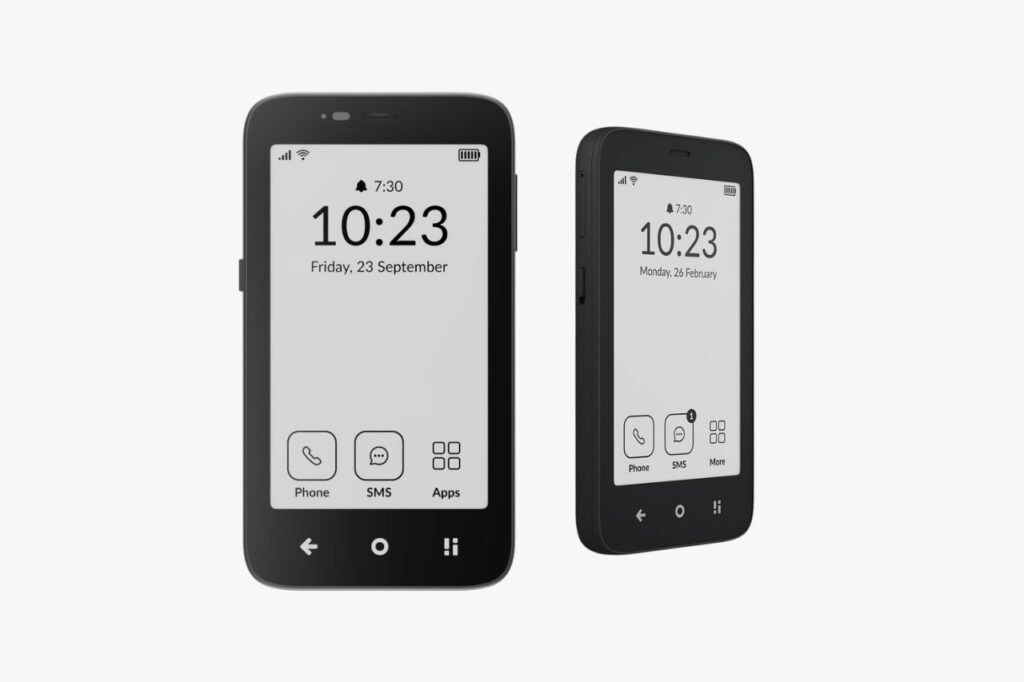
The Mudita Kompakt comes from a Polish company focused on digital wellbeing. It features an e-ink touchscreen, a clean custom interface, and a small selection of useful tools. The device sits in the sweet spot between a true dumbphone and a minimalist smartphone.
Key Features:
- Display: E-ink touchscreen
- Battery: 2+ days typical use
- Connectivity: 4G LTE, Wi-Fi, Bluetooth, USB-C
- Operating system: Mudita OS (custom)
- Camera: None
- Storage: Internal storage for music and files
- Unique features: Navigation support, hotspot, meditation timer, focus-oriented UI
Pros:
- E-ink screen is gentle on your eyes and visible in sunlight
- Includes GPS and navigation
- Hotspot capability for when you need a laptop online
- Thoughtful, calm user interface
Cons:
- No camera
- Smaller app ecosystem than Android-based options
- Relatively new brand with less long-term track record
- Mid-high price range
Best For: Wellness-focused users who want a minimalist phone with navigation and hotspot but no camera or social media.
Approximate Price: $399-$499
The Mudita Kompakt earns its place by offering a genuinely thoughtful balance between simplicity and usefulness, especially if GPS and hotspot are must-haves for you.
Wisephone II
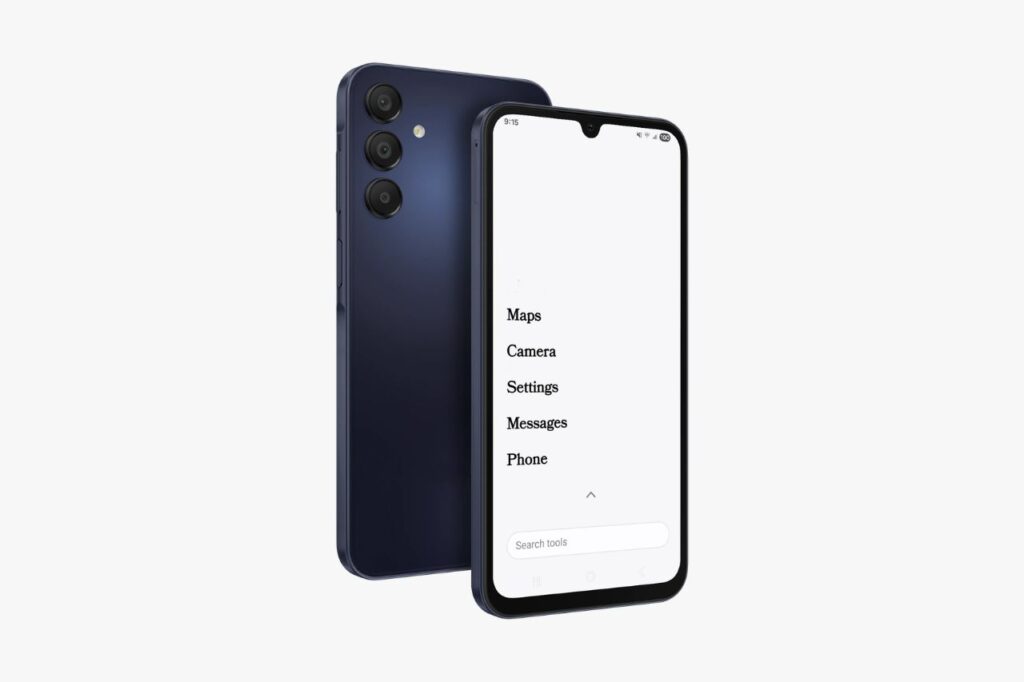
The Wisephone II by Techless is designed specifically for families and people making the switch from a smartphone for the first time. It looks and feels like a modern smartphone with a touchscreen and familiar navigation, but it locks out social media, web browsing, and app stores entirely.
Key Features:
- Display: 6.2-inch color touchscreen
- Battery: 2+ days with moderate use
- Connectivity: 4G LTE, Wi-Fi, Bluetooth, USB-C
- Operating system: WiseOS (custom Android-based)
- Camera: Rear and front cameras
- Storage: Internal storage, not expandable
- Unique features: Built-in GPS navigation, music player, camera, phone-locator tool, hotspot; no app store, no web browser
Pros:
- Smartphone-like feel makes the transition easier
- Includes camera, GPS, and hotspot
- Family-friendly with parental controls
- Clean, intuitive interface
Cons:
- No WhatsApp or third-party messaging apps
- Limited customization compared to a full smartphone
- Higher price than basic dumbphones
- Battery life shorter than some competitors
Best For: Parents buying for teens, or anyone who wants a smartphone-shaped device without the distractions.
Approximate Price: $399-$449
The Wisephone II is a smart pick if you want the comfort of a touchscreen without the pull of social media and endless scrolling. It bridges the gap between smartphone convenience and dumbphone discipline.
Sunbeam F1 Pro
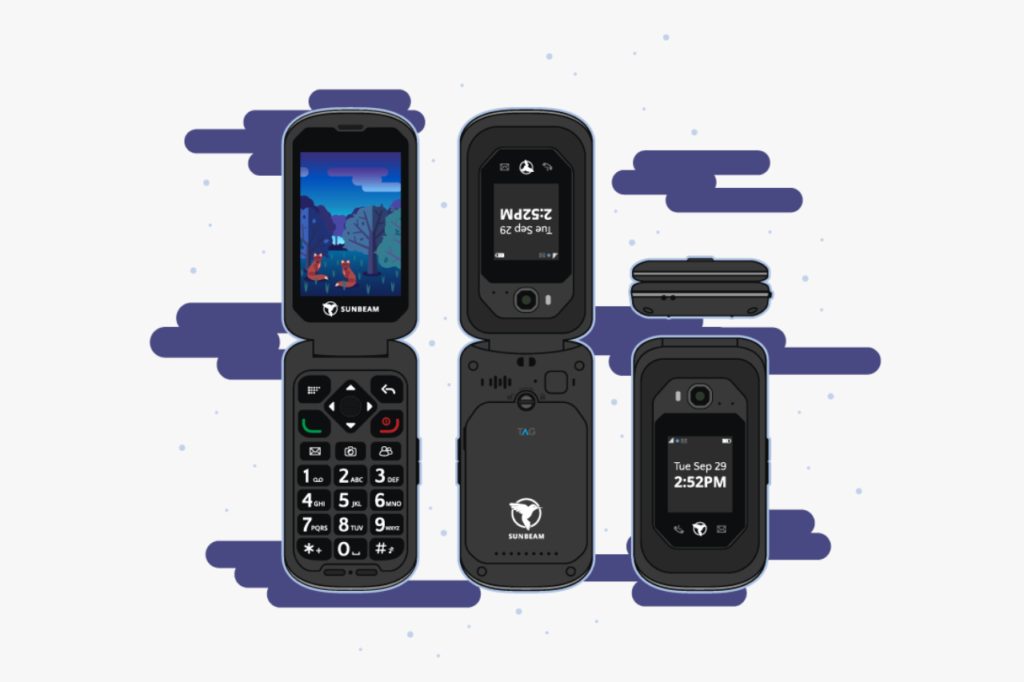
The Sunbeam F1 Pro comes from a small U.S.-based company that builds phones with no internet browser and no app store. It is designed around the idea that your phone should be a tool, not a portal to the entire internet. You get a physical keyboard, maps, and a music player, but nothing that tempts you to scroll.
Key Features:
- Display: 3.2-inch color touchscreen
- Battery: 1-2 days depending on use
- Connectivity: 4G LTE, Bluetooth, Wi-Fi
- Operating system: Sunbeam OS (locked Android-based)
- Camera: Rear camera
- Storage: Internal with microSD expansion
- Unique features: Google Maps and Waze for navigation, music player, weather app, no internet browser
Pros:
- GPS navigation included
- Physical keyboard for tactile typing
- No internet or social media access at all
- U.S.-based company with responsive customer support
Cons:
- Battery life is shorter than most dumbphones
- Build quality could feel more premium at this price
- No hotspot
- Pricier than basic feature phones
Best For: People who want navigation and music without any internet access.
Approximate Price: $249-$274
The Sunbeam F1 Pro is worth considering if maps and music are your non-negotiables but you want zero temptation to browse. Its locked-down approach is one of the strictest in the space.
Kyocera DuraXA Equip
The Kyocera DuraXA Equip is a rugged flip phone built to survive job sites, outdoor adventures, and everyday drops. It carries MIL-STD-810H certification for shock, dust, and water resistance. If you need a phone that can handle rough conditions, this one is built for it.
Key Features:
- Display: 2.6-inch internal display, small external screen
- Battery: 4+ days standby
- Connectivity: 4G LTE, Wi-Fi, Bluetooth
- Operating system: Android-based (locked)
- Camera: 5MP rear camera
- Storage: Internal with microSD slot
- Unique features: Mil-spec rugged rating, GPS, programmable PTT button, hotspot capable
Pros:
- Extremely durable and water resistant
- Outstanding battery life
- GPS and hotspot included
- Large, tactile buttons
Cons:
- Bulkier than non-rugged phones
- Limited app support
- Camera is basic
- Design is purely functional, not stylish
Best For: Outdoor workers, hikers, and anyone who needs a phone that can take a beating.
Approximate Price: $80-$120
The DuraXA Equip gives you peace of mind in tough environments. Its combination of ruggedness, GPS, hotspot, and long battery life is hard to match at this price.
CAT S22 Flip
The CAT S22 Flip is another rugged flip phone, but it runs a more open version of Android that lets you sideload select apps. That means you can add WhatsApp, a music player, or other essentials while still keeping the flip phone form factor and durability.
Key Features:
- Display: 2.8-inch internal touchscreen, external display
- Battery: 2+ days standby
- Connectivity: 4G LTE, Wi-Fi, Bluetooth
- Operating system: Android 11 Go
- Camera: 5MP rear camera
- Storage: 16GB internal, microSD expandable
- Unique features: Android Go allows WhatsApp and select app installs, rugged MIL-SPEC certified, touchscreen plus physical keypad, hotspot capable
Pros:
- Supports WhatsApp and select Android apps
- Tough, water-resistant build
- Touchscreen plus physical keys give flexibility
- Hotspot and GPS included
Cons:
- Android access could tempt you to install distracting apps
- Heavier and thicker than standard flip phones
- Software can feel sluggish
- Battery life is shorter than simpler dumbphones
Best For: People who need WhatsApp or specific apps but still want a rugged, compact flip phone.
Approximate Price: $80-$120
The CAT S22 Flip is a strong middle-ground device. It lets you keep WhatsApp and maps without the full smartphone experience, all inside a body that can handle almost anything.
AGM M9
The AGM M9 is a stripped-down, rugged candy bar phone with a big focus on durability and battery life. There is no camera, no GPS, and no apps. It is about as close to a “just calls and texts” phone as you can get, wrapped in a body that resists water, dust, and drops.
Key Features:
- Display: 2.4-inch color screen
- Battery: 3+ days standby
- Connectivity: 4G LTE, Bluetooth, FM radio
- Operating system: Proprietary
- Camera: None
- Storage: Minimal
- Unique features: IP68/IP69K water and dust resistance, MIL-STD-810H, loud speaker, flashlight, FM radio
Pros:
- Very durable with high water resistance
- Long battery life
- Affordable
- Extremely simple to use
Cons:
- No camera at all
- No GPS or navigation
- No apps or smart features
- Small screen
Best For: Anyone who wants the most basic, toughest phone possible for calls and texts.
Approximate Price: $60-$80
The AGM M9 is the right pick if you want a phone that survives anything and does almost nothing beyond its core job. It is simple, rugged, and affordable.
Easyfone Prime A7
The Easyfone Prime A7 is purpose-built for seniors and people who want the largest buttons, simplest menus, and easiest setup available. It includes an SOS button, a charging dock, and a pre-programmed contact list on the home screen.
Key Features:
- Display: 2.4-inch color screen with large fonts
- Battery: 4+ days standby
- Connectivity: 4G LTE, Bluetooth
- Operating system: Proprietary
- Camera: Rear camera with flash
- Storage: MicroSD expandable
- Unique features: SOS emergency button, charging cradle, hearing aid compatible, large keypad with big numbers, GPS for location sharing
Pros:
- Extremely easy to use for non-tech-savvy users
- SOS button for emergencies
- Charging dock included
- Great battery life
Cons:
- Not designed for younger users who want modern features
- No WhatsApp or app support
- No hotspot
- Basic camera quality
Best For: Seniors or anyone who needs the simplest, most accessible phone possible.
Approximate Price: $50-$70
The Easyfone Prime A7 is thoughtfully designed for users who find most phones confusing. If you are buying for an elderly parent or someone who just wants calls, texts, and safety, this delivers exactly that.
Emporia TOUCHsmart.2
The Emporia TOUCHsmart.2 is an Austrian-made phone designed for older adults who want a simple touchscreen experience with physical buttons as a backup. It includes WhatsApp support and a clean, icon-based interface that feels welcoming rather than intimidating.
Key Features:
- Display: 3.25-inch color touchscreen
- Battery: 3+ days standby
- Connectivity: 4G LTE, Wi-Fi, Bluetooth
- Operating system: Android-based (simplified)
- Camera: Rear camera with flash
- Storage: Internal with microSD expansion
- Unique features: WhatsApp pre-installed, SOS button, simplified touchscreen interface, physical home button, hearing aid compatible
Pros:
- WhatsApp support keeps you connected with family
- Clean, easy-to-learn interface
- Touchscreen plus physical buttons for accessibility
- SOS emergency function
Cons:
- No GPS navigation
- Design looks dated compared to competitors
- Limited to basic apps
- Not widely available in all U.S. carriers
Best For: Seniors who want WhatsApp access on a simple, accessible device.
Approximate Price: $120-$160
The Emporia TOUCHsmart.2 fills a specific gap by combining senior-friendly design with WhatsApp messaging. For families that rely on WhatsApp group chats, this keeps everyone in the loop.
Maxwest Neo Flip LTE
The Maxwest Neo Flip LTE is one of the cheapest 4G flip phones you can find. It covers the basics, including calls, texts, FM radio, and a basic camera, all in a compact clamshell body that fits easily into any pocket.
Key Features:
- Display: 2.4-inch internal color screen, small external display
- Battery: 3+ days standby
- Connectivity: 4G LTE, Bluetooth, FM radio
- Operating system: Proprietary
- Camera: Rear camera
- Storage: MicroSD expandable
- Unique features: Dual SIM support, FM radio, flashlight
Pros:
- Extremely affordable
- Dual SIM support
- Long battery life
- Very lightweight and compact
Cons:
- No GPS, no WhatsApp, no hotspot
- Camera quality is very low
- Build quality is basic plastic
- Limited carrier compatibility in some areas
Best For: Budget-conscious buyers who just need a working flip phone.
Approximate Price: $30-$45
The Maxwest Neo Flip LTE wins on price alone. If you want the cheapest way to go flip, this gets the job done without pretending to be anything it is not.
TTfone TT970
The TTfone TT970 is a flip phone that runs KaiOS and supports WhatsApp, making it one of the few basic flip phones where you can still use the popular messaging app. It also offers hotspot capability, which is surprisingly rare in this price range.
Key Features:
- Display: 2.8-inch internal color screen
- Battery: 3+ days standby
- Connectivity: 4G LTE, Wi-Fi, Bluetooth
- Operating system: KaiOS
- Camera: 2MP rear camera
- Storage: MicroSD expandable
- Unique features: WhatsApp support, Wi-Fi hotspot, Google Maps (basic), FM radio
Pros:
- WhatsApp works on this phone
- Hotspot mode for connecting other devices
- Affordable for the feature set
- Familiar flip phone feel
Cons:
- KaiOS can feel laggy at times
- WhatsApp experience is not as smooth as on a smartphone
- Camera is very basic
- Build quality is average
Best For: People who need WhatsApp and hotspot on a budget flip phone.
Approximate Price: $70-$90
The TTfone TT970 earns its spot by offering WhatsApp and hotspot at a price that undercuts most competitors with those same features. If WhatsApp is a dealbreaker for you, this is worth a close look.
Opel TouchFlip 4G
The Opel TouchFlip 4G rounds out the list as a straightforward flip phone with a small internal touchscreen and physical keypad. It is a solid, uncomplicated device for people who want a flip phone experience without any extra complexity.
Key Features:
- Display: 2.8-inch internal touchscreen, small external display
- Battery: 3+ days standby
- Connectivity: 4G LTE, Bluetooth
- Operating system: Proprietary
- Camera: Rear camera
- Storage: MicroSD expandable
- Unique features: Internal touchscreen plus physical buttons, SOS button, FM radio, flashlight
Pros:
- Touchscreen gives you some flexibility
- SOS button for emergencies
- Simple and intuitive to use
- Affordable
Cons:
- No GPS or navigation
- No WhatsApp or app support
- No hotspot
- Limited availability in some U.S. markets
Best For: People who want a basic flip phone with the added convenience of a touchscreen.
Approximate Price: $50-$70
The Opel TouchFlip 4G is a no-fuss option if you like the flip phone format and want a small touchscreen for easier menu navigation. It does the basics well and stays out of your way.
Buying Guide: How to Choose the Right Dumbphone
Choosing the right dumbphone depends on how much smartphone convenience you are willing to give up, what features you truly need every day, and which carrier you plan to use. The sections below break down the most important decisions you will face.
Dumbphone vs Feature Phone vs Minimalist Phone
These three terms get used interchangeably, but they describe different things. A dumbphone is the broadest category, covering any non-smartphone. A feature phone is a dumbphone that adds extras like a camera, FM radio, or basic web access. A minimalist phone, like the Light Phone III or Mudita Kompakt, is a purpose-built device with curated tools and a focus on digital wellbeing.
If you want the least possible functionality, look at true dumbphones like the AGM M9 or Punkt. MP02. If you want a few helpful tools like GPS, music, and a camera, feature phones and minimalist phones give you more flexibility without pulling you back into smartphone habits.
Candy Bar or Flip Phone?
Candy bar phones are slim, one-piece devices that slide easily into a pocket. Flip phones give you the satisfying ritual of opening to answer and closing to hang up, which many people find helps create a mental boundary between “phone time” and everything else.
Flip phones also protect the screen when closed, which adds durability. Candy bar phones tend to have slightly larger screens and are faster to glance at. Your choice often comes down to whether you value that physical open/close action or prefer something simpler to pull out and use quickly.
Should You Choose KaiOS, Android-Based, or a Proprietary OS?
KaiOS powers many budget feature phones and supports apps like WhatsApp and Google Maps on some devices. It works well for basic tasks but can feel laggy.
Android-based dumbphones, like the CAT S22 Flip or Wisephone II, offer more app flexibility (alternatively, you can try minimalist launchers on your current smartphone). The trade-off is that Android access can tempt you to install distracting apps, so look for devices with locked-down versions.
Proprietary operating systems, like those on Light Phone, Punkt., and Mudita devices, are custom-built for simplicity. They offer the purest distraction-free experience, but you sacrifice app compatibility entirely.
Carrier Compatibility
This is the single most important technical factor and the one most often overlooked. Before you buy any dumbphone, confirm it supports the LTE bands used by your carrier. In the U.S., T-Mobile, AT&T, and Verizon each use different frequency bands. A phone that works perfectly on one network may not connect at all on another.
Check the phone’s spec sheet for supported bands and cross-reference them with your carrier. If you are unsure, contact your carrier directly or buy from a retailer that accepts returns. Some imported phones, especially Japanese and Korean flip phones, may lack the right bands for U.S. networks entirely.
Battery Life Expectations
Most dumbphones last between two and five days on a single charge, depending on how much you call and text. Phones with e-ink displays, like the Light Phone III, tend to last longer in standby. Phones running Android-based systems, like the CAT S22 Flip, will drain faster.
If battery life is your top priority, look at the Punkt. MP02 (5+ days) or the Kyocera DuraXA Equip (4+ days). Keep in mind that using hotspot or GPS will reduce battery life on any device. For most people, charging every two to three days is a realistic expectation with moderate use.
Frequently Asked Questions
Which dumbphones are the best choices this year for cutting down on screen time?
The Light Phone III and Punkt. MP02 New Generation are the strongest choices for cutting screen time because they remove web browsing, social media, and app stores entirely. If you want something more affordable, the HMD 2660 Flip and Nokia 3210 (2024) also keep things stripped down to calls, texts, and a few basic tools.
What are the best dumbphones that still support WhatsApp in 2026?
The CAT S22 Flip, TTfone TT970, and Emporia TOUCHsmart.2 all support WhatsApp. The CAT S22 runs Android Go, which gives you the most reliable WhatsApp experience. The TTfone TT970 runs WhatsApp through KaiOS, which works but feels less polished than the Android version.
Are there any dumbphones that include both WhatsApp and navigation/maps?
The CAT S22 Flip is the best option if you need both WhatsApp and GPS navigation in one device. It runs Android Go, so you can install WhatsApp and use Google Maps. Keep in mind that having Android access means you will need some self-discipline to avoid adding distracting apps.
Which dumbphones can play music (like Spotify) while keeping distractions low?
The Light Phone III has a built-in music player and podcast tool that works without giving you access to a browser or app store. The Wisephone II also includes a music player. For Spotify specifically, the CAT S22 Flip can run the app through Android Go, though this opens the door to other apps as well.
What dumbphones look and feel like a smartphone but help limit apps and notifications?
The Wisephone II is the closest to a smartphone experience with its 6.2-inch touchscreen, camera, and GPS, but it locks out social media, browsers, and app stores. The Mudita Kompakt also offers a touchscreen experience with an e-ink display and curated tools, though it skips the camera.
What should I look for when choosing a dumbphone for a digital detox (battery, texting, hotspot, camera)?
Start with carrier compatibility, then prioritize the features you cannot live without. If you need hotspot for occasional laptop use, look at the Light Phone III, Punkt. MP02, Wisephone II, or Kyocera DuraXA Equip. For texting comfort, physical keyboards on the Sunbeam F1 Pro or Punkt. MP02 feel better than T9 input. Battery life of three or more days is standard on most dumbphones, and cameras are available on most feature phones but absent from purist models like the Light Phone III and Punkt. MP02.