Kazuna eTalk Review: A Basic Verizon Flip Phone
By Finn Albar
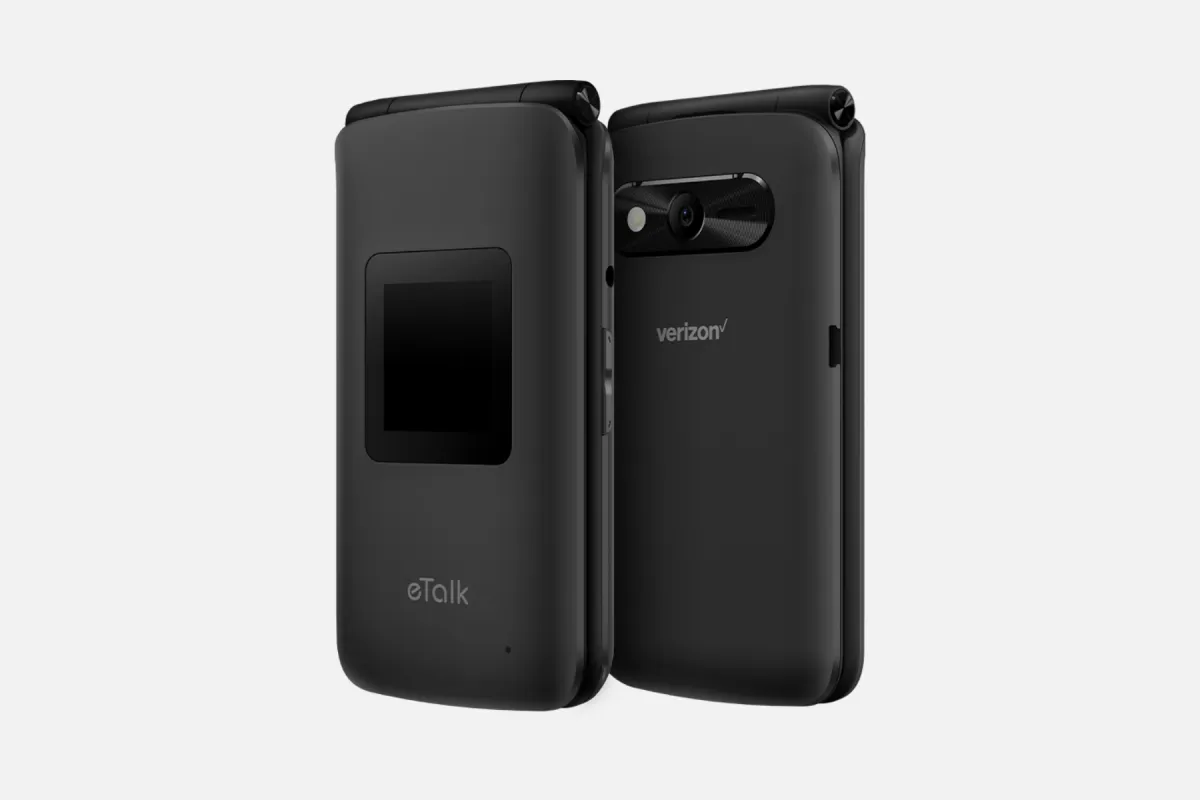
The Kazuna eTalk is a basic 4G flip phone for Verizon with calls, texts, a camera, and a small web browser. It suits someone on Verizon who wants a low-cost phone that does little, and who can live with older hardware.
It is a stronger step than a launcher, but it keeps a browser. If you want no internet at all, best phones without internet access lists the options.
Who the Kazuna eTalk is for
The Kazuna eTalk suits someone on Verizon who wants a plain flip with big keys, a small screen, and few apps. Kazuna pairs it with Verizon’s prepaid plans, and Verizon sells it as well.
It also suits someone who needs hearing aid support. Verizon lists a hearing aid rating, Real-Time Text, and Live Caption for the phone.
Skip it if you use another carrier, because Kazuna’s page speaks only of Verizon. Skip it, too, if you want 5G, WhatsApp, or maps, because the user guide lists no app store.
Price and availability
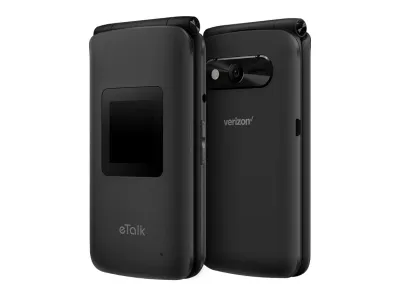
Kazuna
eTalk
Available$80
- Network
- 4G
- Wi-Fi
- Yes
- Battery
- 1,500 mAh
- Screen
- 2.8 in
4G · Wi-Fi · GPS · Hotspot · Camera · Headphone jack · Music
Verizon sells the eTalk with a payment plan or in full. Verizon’s page says it waives the activation fee for new customers and Loyalty members. Otherwise a one-time fee may apply.
Kazuna’s page and its user guide both carry a 2019 copyright line, so this is an older design, and the dated parts show up below.
What matters
Calls and Wi-Fi calling
Kazuna lists VoLTE calling and Wi-Fi calling. Verizon’s page says the same. The user guide says Wi-Fi calling places calls over Wi-Fi when the mobile network is not available.
Check that Wi-Fi calling is on before you rely on it. The user guide puts the setting in the Call settings menu.
Verizon network fit
Kazuna lists LTE bands 2, 4, 5, and 13, plus UMTS and GSM. Those are the bands that Verizon’s page names, and Kazuna’s page speaks only of Verizon.
If you want to try the phone on another carrier, ask that carrier about its bands first. Without a matching band, calls and data may fail.
The browser
The user guide lists an Internet app, which takes a web address or a search. It also offers bookmarks, history, and a desktop-site option, and the guide says access depends on your service provider.
The guide says it reaches news, sports, weather, and email, so this is a limited-internet phone, not a no-internet phone. The small screen and the keypad slow you down, and the guide says you can turn off mobile data so the browser works only on Wi-Fi.
Apps and tools
The user guide lists a calendar, alarm, world clock, timer, stopwatch, calculator, notepad, voice recorder, file manager, and music player. Verizon adds its own account app and Verizon Cloud.
It lists no app store, no maps app, and no third-party messaging app. So plan on no WhatsApp and no authenticator app.
The two screens
The phone has a main screen inside and a small external display on the lid. The guide says the external display is of lower quality, and it shows the time, the caller, missed calls, and the battery level.
By default, opening the flip answers a call. You can read who is calling without opening the phone.
Camera
Kazuna lists a 2 MP rear camera with an LED flash. A camera key on the right side opens the camera when the flip is open.
Treat it as a snapshot camera, because a 2 MP sensor will not match a smartphone.
Hotspot, Wi-Fi, and ports
Kazuna says you can share the phone’s connection with a mobile hotspot, and the user guide covers the setup. Wi-Fi is 2.4 GHz only, and Bluetooth is version 4.2.
The charging port is micro USB, not USB-C. Check your cables before you buy.
Battery and storage
The battery is removable, so you can swap in a spare. Kazuna lists 4 GB of internal storage and a microSD slot for cards up to 32 GB.
Verizon lists usage and standby times for the phone. A removable battery means you can carry a spare.
Audio
The phone has a 3.5 mm headset jack that Kazuna says is CTIA-compliant, and it plays music through a built-in player. That suits wired headphones and a few files on a microSD card.
The guide lists no streaming service, only a music player for files you transfer or download.
Accessibility
The guide covers Real-Time Text, closed captions, and the hearing aid rules that the FCC sets for phones. Verizon lists hearing aid support alongside Live Caption and Real-Time Text.
Those tools matter if calls are hard to hear.
Software and updates
Kazuna lists an AOSP-based system, and the guide includes a Software update menu. Kazuna’s page lists no update schedule.
The guide says updates keep the phone current, but Kazuna’s page lists no update schedule. Ask Verizon how updates reach the phone.
Limitations
The phone is old. It has no 5G, 2.4 GHz Wi-Fi only, a micro USB port, and a small camera.
It is also built around Verizon, and the browser stays on the phone. The guide lists no app store, so plan on no WhatsApp or banking app.
If you want a newer flip with more tools, choose one instead.
Pros
- VoLTE and Wi-Fi calling on a plain flip
- Removable battery, a microSD slot, and a 3.5 mm headset jack
- Mobile hotspot, a camera, and a small external display
- No app store listed in the user guide
Cons
- Older design with no 5G and 2.4 GHz Wi-Fi only
- Kazuna's page speaks only of Verizon
- A web browser stays on the phone, though you can turn off mobile data
- No WhatsApp, maps, or authenticator app
- No update schedule from Kazuna
Alternatives
Pick the Sunbeam F1 Pro if you want a flip with no browser, because Sunbeam leaves out the browser and the app store. It costs far more than a basic flip, and its models add maps or email.
Choose a newer flip from best cheap flip phones if you want 5G or a larger tool set. Lively’s Jitterbug Flip3 is on that list. Its user guide lists no browser, but the phone works only on Lively’s service.
Best phones that only call and text lists phones with the fewest extras. A minimalist launcher is the lighter step if you only want fewer apps on the phone you own.
Common questions
Does the Kazuna eTalk only work on Verizon?
Kazuna names only Verizon. Its page speaks only of Verizon and lists LTE bands 2, 4, 5, and 13. Another carrier may not match them, so ask it about its bands before you try the phone.
Does the Kazuna eTalk have a web browser?
Yes. The user guide lists an Internet app that takes a web address or a search, and access depends on your service provider. You can turn off mobile data so the browser works only on Wi-Fi.
Does the Kazuna eTalk have Wi-Fi calling?
Yes. Kazuna and Verizon both list VoLTE and Wi-Fi calling. Turn it on in the Call settings menu, so calls use Wi-Fi when the mobile network is not available.
Can you use the Kazuna eTalk as a hotspot?
Yes. Kazuna lists a mobile hotspot, and the user guide covers the setup. Ask Verizon whether your plan allows tethering.
Does the Kazuna eTalk have a removable battery?
Yes. Kazuna lists a removable battery and a microSD slot for cards up to 32 GB. A spare battery is easy to carry.
Does the Kazuna eTalk have WhatsApp or an app store?
No. The user guide lists no app store and no third-party messaging app. The phone has a browser, but WhatsApp needs an app.
Final thoughts
The eTalk is a cheap way to try a flip on Verizon. It pauses your phone because it is plain and old, not because it blocks anything.
If you want something newer or stricter, the Dumbphone Finder can narrow the field by form and network.