Iris Easy Flip 2 Review: Consumer Cellular's 5G Flip
By Finn Albar
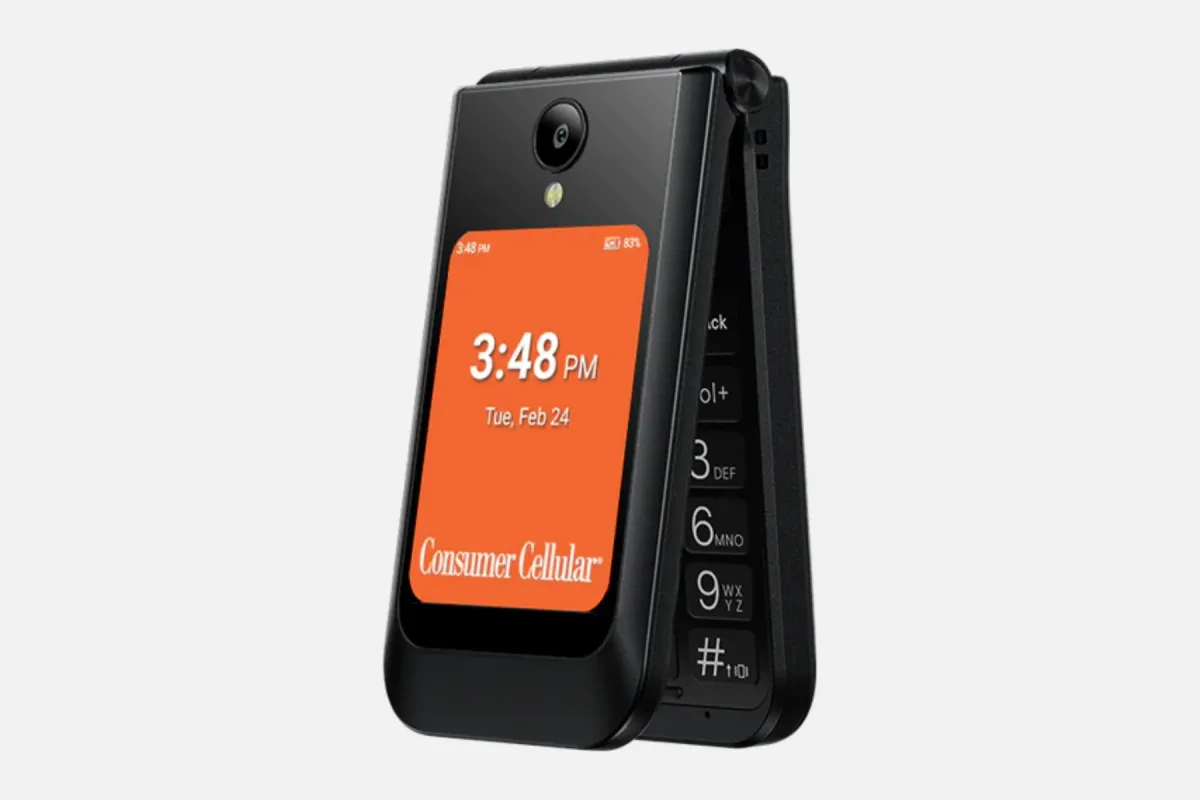
The Consumer Cellular Iris Easy Flip 2 is a 5G flip phone with large backlit keys, a favorites key, and an ICE contact setting. It suits someone who wants a plain phone and a Consumer Cellular plan, but Consumer Cellular says activation on its network is required.
It is a stronger step than a launcher, and its pages list no browser or app store. If carrier fit matters more than this phone, best cheap flip phones compares flips by network.
Who the Iris Easy Flip 2 is for
The Iris Easy Flip 2 suits a parent or grandparent who wants large backlit keys and a home screen of large icons. Consumer Cellular’s page describes list or grid menus, plain labels, and the most common applications.
It also suits someone who already pays Consumer Cellular for service, or plans to switch. The phone is sold with a plan, and the carrier’s page says a data plan is required.
Skip it if you want to keep another carrier, because Consumer Cellular says activation on its network is required. Skip it, too, if you want WhatsApp, maps, or a browser, because the page and the user guide list none of them.
Price and availability
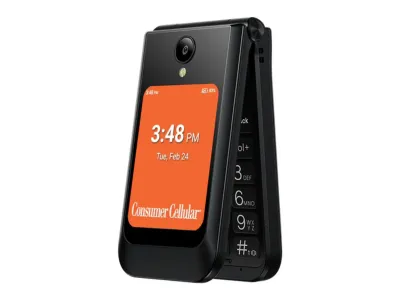
Consumer Cellular
Iris Easy Flip 2
Available$100
- Network
- 5G
- Wi-Fi
- Yes
- Battery
- 3,000 mAh
- Screen
- 3.2 in
5G · Wi-Fi · Camera · Headphone jack · Music · FM radio · Keypad
Consumer Cellular sells the phone new or certified refurbished, and its page says a data plan is required for purchase. The page offers a 0% interest installment plan called EasyPay and lists free shipping on online orders, marked with an asterisk.
Consumer Cellular’s plan page says data plans start at $20 a month, which includes unlimited talk and text, with no long-term contract. It also lists $35 a month for a single line with 35 GB of high-speed data. Its product page notes that age validation is required for customers 50 and older.
Its plan data prices the same 35 GB single line at $60 for ages 18 to 49. That matters if an adult child opens the line.
Consumer Cellular’s device policies page sets the return terms. It shows “LAST UPDATED: June 25, 2025” and says it “may be modified or changed without notice”, so it predates this phone’s August 2026 blog post.
Under that page, new customers get 30 days from shipment to return a device bought online or by phone. Active memberships like AARP and USAA get 45 days. The device must come back like new in its original packaging with every lock and passcode removed, and original shipping is not refunded.
The page gives existing customers 14 days, and it says the refund covers the device only. It also lists a one-year warranty for new devices and six months for certified refurbished ones.
The page says that if you cancel service within 30 days of activation, it waives the monthly service charges and one-time activation fees for new lines. That holds only if data use stays at 500 MB or less.
What matters
Consumer Cellular plans and carrier lock
Consumer Cellular’s blog post on the phone says activation of the device on its network is required. Its device policies add that a phone bought from Consumer Cellular may carry a SIM lock that blocks other carriers.
The page says Consumer Cellular will unlock a phone on request. Its criteria include payment in full, 30 days of activity, and good standing. The list is not complete, because Consumer Cellular must also hold or be able to get the unlock code.
It honors requests only from the original buyer, and it may allow a fee in lieu of the criteria. The pages list no other carrier for this model, so treat it as a Consumer Cellular phone.
The network disclosure says Consumer Cellular resells service on the facilities of nationwide network operators, which it calls Underlying Carriers, and it names none on that page. Use the coverage map for your home before you order.
Activation, SIM, and eSIM
Consumer Cellular’s activation page says a device bought from it already has a physical SIM or an eSIM and is ready to activate. It lists four ways to do it: call, use your online account, enter an activation code, or visit a store.
The user guide describes a nano-SIM tray and an eSIM step in first-run setup, and Consumer Cellular says an eSIM install needs Wi-Fi. Setup also asks you to turn background location on. The guide adds that a 9-1-1 call works even with no SIM card.
To keep your number, the activation page asks for your account number, billing address, and transfer PIN from your current carrier. It says not to cancel the old service until activation is complete.
Calls, 5G voice, and Wi-Fi calling
Consumer Cellular’s page says the phone uses 5G voice technology for clearer, more reliable calls and texting. The user guide lists 5G bands beside its LTE bands, so this is a 5G phone and not only a 4G one.
Consumer Cellular’s pages list no Wi-Fi calling for this model, and the guide’s Call settings menu holds no such switch. That menu covers answer options, speed dial, voicemail, blocked numbers, call duration, and call forwarding.
The guide’s hearing aid table does list a Wi-Fi air interface with voice codecs, so ask Consumer Cellular before you count on Wi-Fi calling at home.
The guide lets you answer by flipping the phone open, pressing any key, or both. A long press on a number key starts a quick call, and you can add a call to make a three-way call.
Keys, screens, and typing
Consumer Cellular’s page lists a backlit keypad with large letters and a favorites key. The user guide adds a speaker key that mutes the ringtone and a flash key that turns on the flashlight when the phone is open.
Typing uses the keypad. The guide lists a predictive mode called KT9, plus ABC, Abc, abc, and 123 modes, and the # key switches between them. Texts can be SMS or MMS with a photo.
The phone has an inner and an outer screen. With the flip closed, one press of the side button turns the screen on, and the Display menu switches the menu between grid and list.
The favorites key and the ICE contact
Consumer Cellular’s page describes a setting for an In Case of Emergency (ICE) contact, so help is always easy to reach. The blog says help is just a button press away. The page also lists a favorites key and an emergency contacts group.
The user guide has no section on ICE. In it, the Favorites button opens your favorites with options to view, call, message, or remove a contact. The pages describe no monitored service or operator, so if a parent needs one, choose a different phone.
Hearing aid compatibility and accessibility
Consumer Cellular lists the phone as hearing aid compatible under the ANSI 2019 standard. The user guide says that standard no longer uses M and T ratings. It lists the lowest conversational gain as 11.70 dB with a hearing aid and 16.90 dB without one.
The guide’s hearing aid table marks some voice codecs No for RF, T-coil, or volume control, including every codec on its NR and Wi-Fi row. It also says newer wireless technologies in the phone may not be tested yet. So try calls with your hearing aid or cochlear implant, and use the return window if they sound wrong.
The Accessibility menu lists Readout, which reads selected items aloud, a Hearing aids switch, and RTT, which stands for real-time text.
The magnifier, flashlight, and camera
Consumer Cellular’s page and blog say the magnifier shows small details up close through the camera. The user guide documents the flashlight and its flash key but has no magnifier section, so the page and blog are the only sources for it.
Consumer Cellular lists a 5 MP camera with an LED flash. The guide covers photo and video modes, a zoom set with the * and # keys, and sharing by MMS or Bluetooth. Treat it as a snapshot camera.
What it leaves out
Consumer Cellular’s page and the user guide list no browser, app store, email app, or maps app. The guide covers Phone, Contacts, Messages, Camera, Gallery, a calculator, and a clock with alarm, timer, and stopwatch.
The guide and pages list no WhatsApp, maps, or authenticator app for two-factor codes. Check your bank and your doctor’s portal before you order.
Battery and charging
Consumer Cellular rates talk time at up to 15 hours and standby at up to 12 days. It adds that battery figures are approximate, for a median user in optimal network conditions.
The phone charges over USB-C, and the box holds a 10-watt charger and a USB-C to USB-C cable. Consumer Cellular says the charger delivers up to twice the charging speed of the first-generation Easy Flip.
Storage, Wi-Fi, and audio
Consumer Cellular lists 32 GB of storage and a microSD slot for cards up to 32 GB, sold separately. The guide warns that some cards may not work. The guide also lists Wi-Fi and Bluetooth 4.2.
The page also lists a 3.5 mm headset jack and an FM radio. The guide has no section on the radio or a music app, so how the radio works is not documented.
Software updates
The user guide puts updates under Settings, then Software Update, and says updates may become available from time to time. It asks for a good signal and a battery at least half charged, and it warns that a failed update may disable the phone.
Consumer Cellular’s page and the guide name no operating system and list no update schedule or security update policy. Ask Consumer Cellular how long it supports the phone before you buy.
Limitations
The carrier comes first. The phone needs Consumer Cellular service. The carrier’s policies say a phone bought there may carry a SIM lock, so you cannot count on moving it to another plan.
The pages and guide list no browser, app store, or maps, and they describe no monitored help service. They also list no Wi-Fi calling and no update schedule. If your bank, family chat, or doctor’s portal needs an app, a minimalist launcher on a phone you own is the lighter step.
Pros
- Large backlit keys and a favorites key for one-button calling
- A USB-C charger and a long talk-time rating from Consumer Cellular
- An ICE contact setting and a magnifier, per Consumer Cellular's page
- Listed as hearing aid compatible under the ANSI 2019 standard, with Readout and RTT
- A 30-day return window for new customers under Consumer Cellular's device policies
Cons
- Needs a Consumer Cellular plan, and may carry a SIM lock
- No browser, app store, WhatsApp, or maps listed
- No monitored help service described
- The guide's hearing aid table marks some voice codecs No, including its NR and Wi-Fi row
- No Wi-Fi calling or update schedule listed
Alternatives
Pick by carrier from best cheap flip phones if you want a different network. That list covers flips on 4G and 5G with no open app store, and it notes which ones are tied to a single carrier.
Choose Lively’s Jitterbug Flip3 from that list if a parent needs a help button that reaches an operator. Lively disables the button without its Urgent Response service, and the phone works only on a Lively plan, so it asks for a carrier move too.
Best phones that only call and text lists the simplest phones, and best dumbphones compares the wider field. A minimalist launcher is the lighter step if you only want fewer apps.
Common questions
Does the Iris Easy Flip 2 only work on Consumer Cellular?
Consumer Cellular says activation on its network is required, and its pages list no other carrier for the phone. Its device policies say a phone bought there may carry a SIM lock, which it removes only on request and only for the original buyer. For flips you can compare by network, see best cheap flip phones.
Does the Iris Easy Flip 2 have Wi-Fi calling?
Consumer Cellular’s pages list no Wi-Fi calling for this phone, and the guide’s Call settings menu has no switch for it. The guide’s hearing aid table does list a Wi-Fi air interface with voice codecs, which is not a feature claim. Confirm it with the carrier before you rely on it at home.
Does the Iris Easy Flip 2 have WhatsApp or a browser?
Consumer Cellular’s page and the user guide list neither. They also list no app store or messaging app beyond texts, only calls, texts, a camera, a gallery, and a few tools. For harder limits, best phones that only call and text lists the simplest phones.
Is the Iris Easy Flip 2 hearing aid compatible?
Consumer Cellular lists it as hearing aid compatible under the ANSI 2019 standard, which uses conversational gain figures instead of M and T ratings. The guide’s table marks some voice codecs No, including its NR and Wi-Fi row, so try calls with your hearing aid inside the return window. The Accessibility menu adds Readout and RTT.
What is the ICE contact on the Iris Easy Flip 2?
Consumer Cellular’s page describes an ICE contact setting, and its blog says help is just a button press away. Neither describes a monitored service or an operator. For a help button that reaches one, the Jitterbug Flip3 on best cheap flip phones has one that works only with Lively’s Urgent Response service.
Can you return the Iris Easy Flip 2?
Yes, with conditions. Consumer Cellular’s device policies page, last updated June 25, 2025, gives new customers 30 days from shipment and existing customers 14 days. The phone must come back like new with every lock removed, and original shipping is not refunded.
Final thoughts
The Iris Easy Flip 2 is a plain flip for someone who wants big keys and only the tools its guide lists. It pauses your phone through what its pages leave out, such as a browser and an app store. The cost is a move to Consumer Cellular, and the pages list no WhatsApp or maps.
If you want a different carrier or a stricter phone, the Dumbphone Finder can narrow the field to phones for older adults.