Orbic Journey Pro Review: A Verizon KaiOS Flip
By Finn Albar
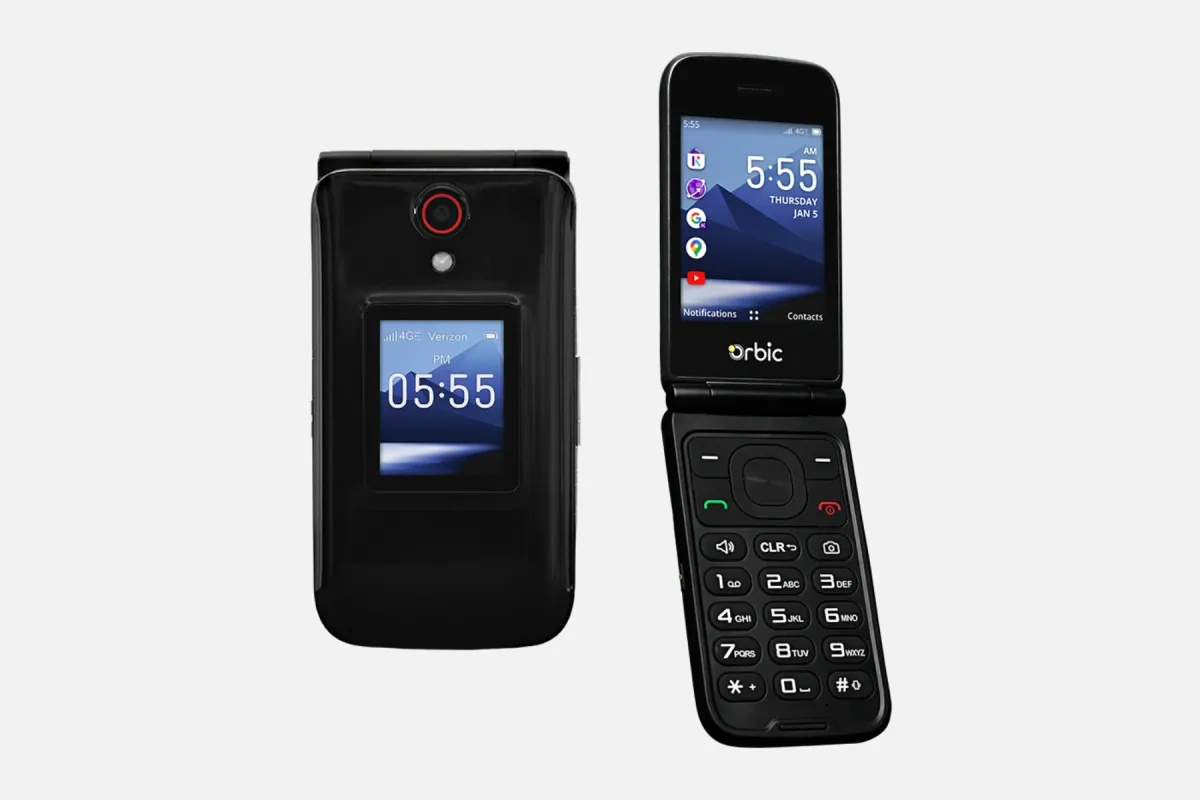
The Orbic Journey Pro is a KaiOS flip phone that Verizon sells, with an outer display, a camera, and a removable battery. It suits someone on Verizon who wants a plain flip, but it keeps a browser and an app store and starts out locked.
It is a stronger step than a launcher and a softer one than a phone with no internet. If you want the browser gone, best phones without internet access lists the options.
Who the Orbic Journey Pro is for
The Orbic Journey Pro suits a Verizon customer who wants a flip with a second screen and a camera key. Orbic describes a well-spaced keypad, shortcut keys for favorite contacts and messages, and a camera button on the side.
It also suits someone who wants a few tools on a keypad phone. The user guide lists Email, Calendar, KaiWeather, a News app, and a Store.
Skip it if you use another carrier, because Verizon says the phone is designed for its network. Skip it, too, if you want WhatsApp or no browser at all, because the phone has a browser and Verizon support calls WhatsApp unlikely.
Price and availability
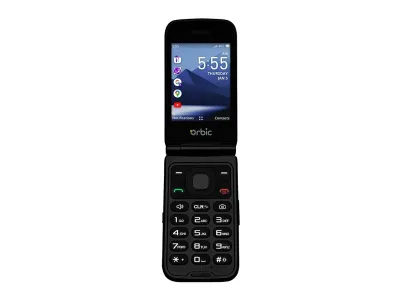
Orbic
Journey Pro
Available$80
- Network
- 4G
- Wi-Fi
- Yes
- Battery
- 1,850 mAh
- Screen
- 3.2 in
4G · Wi-Fi · GPS · Camera · Headphone jack · Keypad · Hearing aid
Orbic’s page sends you to Verizon to buy the phone, and Orbic’s FAQ says its Verizon pages link out to the Verizon store. Verizon sells it with a payment plan or in full.
Verizon’s return policy says wireless devices bought from Verizon can be returned or exchanged within 30 days, and a restocking fee applies. An exchange needs the original box and like-new condition, and an authorized retailer’s own policy governs its sales. Orbic’s exchange policy covers only items bought on orbic.us, and its Journey Pro page points you to Verizon.
Orbic’s limited warranty runs 12 months from purchase with proof of purchase, or 15 months from the manufacture date without it. Orbic repairs or replaces a defective phone at its discretion, and the warranty excludes software, liquid damage, and wear. It covers the original purchaser only, and disputes go to binding arbitration.
What matters
Verizon network and the carrier lock
Verizon support says the phone is designed for the Verizon network, and Orbic’s FAQ names Verizon as its carrier partner. Verizon’s spec table lists 4G with LTE bands 1, 2, 4, 5, 12, 13, 25, 26, 41, 66, and 71, and it lists no 5G. It also marks the phone as not a world device.
Verizon’s unlocking policy says a newly purchased device is locked to its network. A postpaid device unlocks automatically when you pay full price or pay off the financing. A prepaid device unlocks after 365 days of paid and active service.
Verizon adds that an unlocked Verizon device may work only in part, or not at all, on another carrier’s network. So plan on using it with Verizon, and ask any other carrier about this exact model first.
Calls and Wi-Fi calling
The user guide covers the basics: a call key, speed dial on keys 2 through 9, and a voicemail setup that starts with *86. Opening the flip answers a call if the Answer Mode setting is on, and closing the flip ends a call.
Orbic’s page lists Wi-Fi calling, and the guide puts the switch in the Network & Connectivity menu. Once you turn it on, the phone asks for an emergency location, and you can pick cellular preferred or Wi-Fi preferred.
The guide also lists five ICE contacts and a Wireless Emergency Alerts menu, where presidential alerts cannot be turned off.
Typing and texts
You type on the keypad. Press a key repeatedly until the letter appears, press 0 for a space, and press # to change case. Verizon support says the phone has T9 texting.
The guide covers SMS and MMS, and it says a text over 160 characters is billed as several messages. Verizon support says the phone does not support RCS, so expect plain SMS and MMS.
The two screens
Orbic’s page describes an outer display for quick notifications and an inner LCD you can customize. The user guide says the outer display shows notifications and messages.
Neither screen takes touch input, because Verizon support says the phone has no touch screen. You steer with the navigation key, and in the browser it moves a cursor.
The Notifications menu lets you hide message contents on the lock screen. It also lets you switch notifications off for each app on its list, which includes Calendar, Call Log, Cloud, and KaiPay.
Browser, app store, and WhatsApp
The phone has an Internet app that takes a web address or a search. Orbic’s page says you can browse the internet, book appointments, and check reviews.
The guide’s browser home lists a Facebook shortcut beside Search, History, and Store. A Store app comes installed, and Verizon’s page points you to the KaiOS store site to see which apps the platform supports.
The guide lists a Data connection switch for mobile data, a Wi-Fi switch, and Airplane mode, which it says disables all wireless connections. Turning them off cuts the connection, though the guide lists no way to remove the browser or its shortcuts.
The guide also lists Email, KaiWeather, a News app, Music, and Video, so the phone keeps more than calls and texts. Verizon support says the browser and apps are more limited than on a smartphone.
Verizon support calls WhatsApp unlikely to work and says Life360 is not supported. Neither Orbic’s page nor the user guide names YouTube or a maps app, so check the KaiOS store before you count on either.
Hotspot and Wi-Fi
Verizon’s spec table lists a hotspot, Wi-Fi 802.11 b/g/n, and Bluetooth 4.2. The user guide has a Mobile Hotspot and USB Tethering setting, and it says the setting shares the connection with a single USB-connected device.
Turning it on switches the phone’s Wi-Fi off, the guide adds. One Verizon support answer says “No it does not” to a question about a hotspot and internet, though other Verizon answers say the phone has a browser. Treat the hotspot as unsettled and confirm it with Verizon before you buy.
Camera
Verizon’s spec table lists a 5 MP camera, and the user guide lists a flash with auto, on, and off modes. The side camera button works with the flip closed and the screen on: two short presses turn the camera on or off.
The guide lists photo resolution settings, a self timer, a grid, zoom, and a video mode. In the Gallery you can adjust exposure, rotate, crop, and add filters.
We would expect snapshots rather than smartphone photos, and Verizon’s table lists FF under camera modes, which we read as fixed focus. Verizon support says the phone has no flashlight, only the camera flash.
Battery and charging
The battery is removable, and the user guide’s Installing Battery section starts with lifting the back cover. Orbic’s booklet says to use only the battery and charger the manufacturer approves. Verizon’s spec table says the box holds a battery, a charger, a USB cable, and a pre-installed SIM.
Orbic’s page lists up to 9 hours of talk time and 4 days of standby. Verizon lists up to 5.6 hours and up to 6 days, and it calls battery claims approximate, so the two pages disagree.
The phone charges over USB-C, and Verizon’s table says it has no fast charging and no wireless charging. A Power saving mode in the Battery settings turns off data, Bluetooth, and location. It can start on its own at a charge level you pick.
Hearing aid and accessibility
Orbic’s safety booklet lists a hearing aid rating of M4 and T4. The user guide differs: it says the 2019 ANSI standard does not use M and T ratings, and it gives conversational gain figures instead. Verizon’s spec table lists hearing aid compatibility as a pass.
Orbic also says to try the phone’s features in different places with your hearing aid, to listen for interfering noise. Verizon support says compatibility with a hearing aid app depends on the app.
The Accessibility menu lists invert colors, large text, captions, and readout. It also lists mono audio, volume balance, keypad vibration, a hearing aid switch, and Real-Time Text.
Software updates
The user guide lists a System updates screen where you can check for updates and see the update history. It also lists a USB update option for a Software Upgrade Assistant tool.
Neither Orbic’s page nor Verizon’s listing gives an update schedule or a security patch period. The warranty also excludes software, so ask Verizon how updates reach the phone.
What it leaves out
Verizon’s spec table lists no 5G, and Verizon support says the phone has no touch screen and no RCS. WhatsApp is unlikely and Life360 is unsupported, Verizon support adds.
The user guide lists no maps app. Its Geolocation page says KaiOS uses GPS and other signals to approximate your location, so the phone has GPS-based location. Verizon support told one reader the phone has no navigation tracking.
The guide also lists no authenticator app, so check the store before you rely on app-based codes. Orbic’s safety booklet says the phone, battery, and charger are not waterproof.
Limitations
The first limit is the carrier. The phone is built for Verizon and starts out locked, so it will not move to another carrier without an unlock.
The second is that the web stays reachable. The guide lists no way to remove the browser or its Facebook shortcut, only switches that cut the connection. So the phone sits between a basic flip and a smartphone, and you should choose a phone with no browser if that matters.
The last is the gaps in the maker’s statements. Orbic and Verizon disagree on battery life. Verizon’s listing and its support answers disagree on the hotspot, and neither gives an update schedule.
Pros
- Removable battery, microSD slot, and a USB-C port
- Outer display and a side camera button that works with the flip closed
- Hearing aid compatibility listed by Orbic and Verizon, plus a Real-Time Text setting
- Wi-Fi calling, plus a hotspot setting that Verizon's spec table lists (one USB device, per the guide)
- Per-app notification switches and a 12-month Orbic warranty
Cons
- Locked to Verizon at purchase
- The guide lists no way to remove the browser or its Facebook shortcut
- WhatsApp is unlikely, and Verizon support says no RCS
- No maps app or authenticator app listed
- Hotspot status conflicts across Verizon's own pages
- No update schedule, and Orbic and Verizon disagree on battery life
Alternatives
Pick the Sunbeam F1 Pro if you want a flip with no browser or app store, as our Sunbeam F1 Pro review explains. Sunbeam says its phones are unlocked and lists Verizon in its carrier chart, but its models cost far more than a KaiOS flip.
Choose another phone from best cheap flip phones to compare Verizon flips such as the TCL Flip 3, or flips for other carriers.
Pick the Wisephone II if WhatsApp decides it, because it keeps WhatsApp inside a locked system. It needs a WiseOS plan every month, as our Wisephone II review explains. A minimalist launcher is the lighter step if you only want fewer apps on the phone you own.
Common questions
Does the Orbic Journey Pro only work on Verizon?
It is built for Verizon, and it starts out locked. A postpaid device unlocks when you pay full price or pay off the financing, and a prepaid device unlocks after 365 days of paid and active service. Verizon warns an unlocked phone may not work at all on another network, so best cheap flip phones lists flips for other carriers.
Does the Orbic Journey Pro have a web browser?
Yes. Verizon support tells buyers to open the Browser icon from the main menu, and the guide lists no way to remove it. Switches such as Data connection and Airplane mode cut the connection, and best phones without internet access lists phones with no browser.
Does the Orbic Journey Pro have WhatsApp or YouTube?
WhatsApp is unlikely, Verizon support says, and Life360 is not supported. Neither Orbic’s page nor the user guide names YouTube, so the sources give no answer on it. If WhatsApp decides your phone, the Dumbphone Finder has a WhatsApp filter.
Can you use the Orbic Journey Pro as a hotspot?
It is unsettled: Verizon’s spec table lists a hotspot, and the user guide describes sharing with one USB-connected device. One Verizon support answer says “No it does not” to a hotspot and internet question. Confirm it with Verizon, or filter for hotspot phones in the Dumbphone Finder.
Does the Orbic Journey Pro have GPS or a maps app?
It has GPS-based location, but the sources list no maps app. The user guide’s Geolocation page says KaiOS uses GPS plus Wi-Fi and mobile networks to approximate your location. Verizon support told one reader the phone has no navigation tracking.
Does the Orbic Journey Pro have a removable battery?
Yes. Orbic’s page lists a removable battery, and the guide’s Installing Battery section starts with lifting the back cover. Orbic’s booklet says to use only the battery and charger the manufacturer approves, and the SIM and a microSD slot sit under the cover.
Final thoughts
We would expect the keypad and small screens to slow you down more than a smartphone does. The guide lists no way to remove the browser, store, email, or news app, so the pause comes from the form, not from a block.
If you want something stricter or on another carrier, the Dumbphone Finder can narrow the field by form and features.