Two Phones, One Number: Add a Dumbphone, Keep Your Line
By Finn Albar
Of the three big US carriers, only T-Mobile describes two phones sharing one number. Its paired DIGITS line puts your number on a second SIM, if your plan can add one. AT&T and Verizon share a number with watches, not a second phone, so the other routes are call forwarding, Google Voice, or the dumbphone maker’s own sync app.
This suits you if you leave the smartphone at home for an evening, a weekend, or a workday and still want family calls to reach you. Most setups still tie texts, two-factor codes, or the number people see when you call to one phone.
Call forwarding is the lightest setup, and you can turn it on tonight. Moving your number to the dumbphone for good is the stronger step, and how to switch to a dumbphone walks through it.
Why one number usually stays on one phone
Your number lives on the SIM or eSIM in your smartphone. Each setup does one of three things: it sends calls to a second line with its own number, adds a twin SIM, or moves your SIM. Only the twin SIM and the swap put your number on the dumbphone itself.
What each setup carries, in short:
- Call forwarding: calls only. Texts stay on the smartphone, and calls you make show the dumbphone’s own number.
- A maker’s sync app: calls and texts, but only on that maker’s phone, and parts of it still need the smartphone switched on.
- T-Mobile paired DIGITS: calls and texts on your own number, but most short codes, such as one-time PINs, reach only the primary SIM.
- Google Voice: calls and forwarded texts on any phone you link, after a $20 port fee. It cannot text short codes, and its free version cannot call 911.
- SIM swap: everything, on one phone at a time. It does not work with a phone that takes only an eSIM, such as a US iPhone 14 or later.
We would start with forwarding, because one dial code turns it on and one turns it off. Pay for a service only once forwarding leaves a gap you notice.
AT&T and Verizon share a number with watches, not phones
AT&T NumberSync lets other devices make and take calls on your smartphone’s number, and that number shows when you call out. Compatible devices include select Apple Watch, iPad, and Mac models, Android watches, and select BMW, Rolls-Royce, and MINI cars. No phone is among them.
NumberSync costs nothing extra, though a cellular Apple Watch needs its own plan. Prepaid accounts also can’t use it. Even on a watch, plain texts need the iPhone switched on and connected.
Verizon’s Number Share sets a narrower rule. The host must be an HD Voice smartphone. Connected devices include smartwatches from Apple, Google, Samsung, and a few other makers, but no flip or basic phone.
Each wearable on Number Share costs $15 a month plus taxes and fees, and one host line can share with up to 5 connected devices. The service is not available for prepaid accounts, and it works only on Verizon’s LTE network.
So a flip phone cannot join either service, as the host or as the second device. On AT&T or Verizon, a second phone means forwarding, a maker’s app, Google Voice, or a SIM swap.
Ask T-Mobile for a paired DIGITS line
T-Mobile’s Data with Paired DIGITS is another SIM with the same number as your existing line, for calls and messages. It rings on every paired device, and T-Mobile designed it for smartwatches and other devices.
You need a second SIM or eSIM device that can call and text on T-Mobile’s network. You pair it with your main number in the myDIGITS portal, and up to 5 devices can share it. Roaming works only in the US, Mexico, and Canada.
Phones count too. With T-Mobile’s business DIGITS, two phones can use one number, with calls and texts going to both. The Light Phone also works with T-Mobile DIGITS, and the carrier sends a SIM card for it once you sign up.
The catches sit in T-Mobile’s fine print. One-time PIN codes reach only the primary SIM, not a paired one. Also, 911 calls and texts work best from your primary number, and others sharing your DIGITS line may answer an operator’s callback.
T-Mobile no longer has a consumer DIGITS offer page, and whether picture or group texts reach a paired SIM is not published. So ask whether your plan can add a paired line for a phone, what it costs, and how group texts behave. On T-Mobile, we would make that call first.
Forward calls from the smartphone
Call forwarding sends calls for your number on to the dumbphone’s own number. Pick one of two modes: all calls, so the smartphone stays silent, or only the calls you miss, so it rings first. On Verizon, the phone won’t ring at all while it forwards every call.
Dial the code on the smartphone, followed by the dumbphone’s 10-digit number:
- Verizon:
*72and the number forwards all calls, and*71and the number forwards only the calls you don’t answer. Dial*73to stop. - T-Mobile:
**21*1, the number, and#forwards all calls. Use**61*1for unanswered calls, or**62*1for when the phone is off or out of range.##21#,##61#, or##62#turns each one off, and##004#resets forwarding to the default. - AT&T: look up the forwarding steps for your smartphone model on AT&T’s device support pages, or ask AT&T for the code.
Set it up before you leave, because on Verizon you can’t manage Call Forwarding without your mobile phone. If the smartphone will be off, forward all calls. With dumb.co, for example, you pick its dumbphone-only forwarding before you power the phone down.
On an iPhone, Live Voicemail can get in the way. On iOS 17 and newer, it answers missed calls before Verizon’s forward-if-no-answer can send them on. The fix is to turn off Live Voicemail under Settings, Apps, Phone.
Forwarding moves calls, not texts. Calls you make from the dumbphone show its own number, so Commodore suggests hiding that phone’s caller ID in its settings. On plans without unlimited minutes, Verizon bills forwarded calls as if you had answered them on the smartphone.
Sync texts with the dumbphone maker’s app
Texts are the hard part, because forwarding skips them. Apple’s Text Message Forwarding reaches only a Mac, iPad, or Apple Vision Pro, and the iPhone must stay on. Two dumbphone makers fill the gap with their own sync.
The Dumbphone 2’s companion setup
The Dumbphone 2 from dumb.co syncs with your smartphone on two of its three plans, called dumb and dumber. Calls reach it through carrier forwarding, and calls you make come from the flip’s own number. Its maker promises that people you text through its smart txt app won’t be able to tell the difference.
You need a second number to keep the smartphone, because moving your number to dumb.co ends service on the current phone. The flip takes only dumb.co’s own SIM, and its plans carry a 4-month minimum commitment.
With the iPhone off, forwarded calls and iMessage still arrive. Green-bubble texts and Google Messages for Android need the smartphone on. Our list of dumbphones with WhatsApp covers how the flip links WhatsApp from your phone.
Sunbeam NumberLink
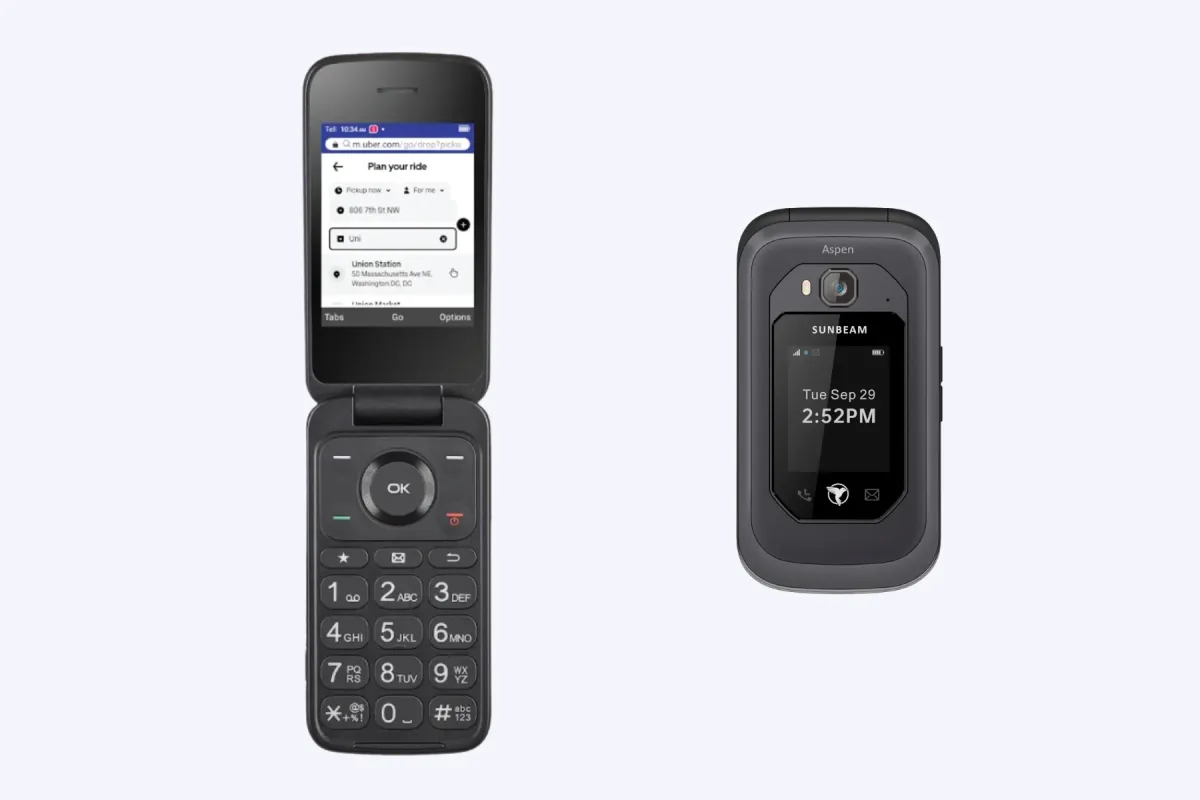
NumberLink shares one number from a host phone with your other devices. The host must be a Sunbeam phone or an Android smartphone, so an iPhone can join as a client but cannot share its own number. Every device needs a fast, stable data connection, over Wi-Fi or cellular data.
It syncs SMS and MMS, but not RCS. For incoming calls, NumberLink turns your carrier’s call forwarding on or off from any signed-in device. Calls you place run as a conference call: the host calls you, dials the other person, and merges the two.
All NumberLink calls and texts go through the shared number, but do not use NumberLink to call emergency services. It costs $4.50 a month or $50 a year after a 30-day free trial.
Sunbeam’s own example is a work Android phone left at the office while a Sunbeam phone takes the important texts and calls. Our Sunbeam F1 Pro review covers the phone itself.
Both setups lean on the smartphone staying on for some messages. So we would treat them as a setup for a workday or an evening, not a week away.
Move the number into Google Voice
Google Voice can hold your number and ring every phone you link to it. Porting a mobile number into Google Voice costs a $20 fee. Your carrier then cancels that phone service, so the smartphone and the dumbphone each need a line of their own.
You can link up to 6 numbers, and calls to your Google Voice number ring on each one. For texts, a Voice setting called Forward messages to linked numbers sends them to the phone’s own texting app.
Don’t cancel your phone plan until Google confirms the port is complete. A port can take up to 48 hours, and texts up to 3 business days.
The catches are firm:
- Short codes: you can’t send texts to five- or six-digit short codes, and some banks won’t text a Google Voice number.
- 911: you can’t make emergency calls with Google Voice, so dial 911 from the phone’s built-in Phone app.
- Your outgoing number: which number people see when you call or reply from a basic phone you linked is not published. Test it with a friend first.
- The Dumbphone 2: the flip does not sync with smartphones on Google Voice.
Google Voice is the most flexible setup on any carrier, but it means three numbers and two plans. We would use it only if you already want your number off the carrier.
Swap the SIM between phones
A SIM swap moves your whole line, so the dumbphone gets every call and text, and calls out as you. That keeps you on one number, and the Light Phone needs a restart after each swap. It works only when both phones take a physical SIM and your carrier supports the dumbphone.
US iPhone 14 models and later activate only with an eSIM, and a phone that supports only eSIM cannot swap this way. The Light Phone III’s eSIM is also still under development, and our Light Phone III review covers the carriers Light supports.
With an eSIM, each move goes through the carrier. AT&T asks for a one-time PIN and for Wireless Account Lock to be off. T-Mobile asks you to turn off SIM Protection and enter the new device’s IMEI.
Turn off iMessage before the SIM moves, or texts from people on iPhones may not arrive. Moving an old SIM into a dumbphone can also break group chats. We would keep the swap for whole weekends, not single evenings.
Check codes, 911, and group texts before you leave
Calls are the easy part. Before you leave the smartphone behind, check three things that each setup handles in its own way:
- Two-factor codes: most setups leave text codes on the smartphone. On paired DIGITS, most short codes reach only the primary SIM, some banks won’t text a Google Voice number, and forwarding moves no texts at all. Move them to an authenticator app or a hardware key, as 2FA without a smartphone explains, and keep backup codes.
- 911: any phone can reach emergency services, even one without a plan, so a dumbphone on its own line dials 911 from its phone app. On DIGITS, update your E911 address when you use it somewhere else. Free Google Voice cannot call 911, and NumberLink is not for emergency calls.
- Group texts: NumberLink does not support RCS, and the Commodore Callback 8020 does not support group MMS yet. Sunbeam’s fix for broken threads is to delete the old group, make sure everyone has RCS off and SMS and MMS on, and start a new group.
Run one test of each before the first day away. A missed code at a bank sign-in costs more than a missed call.
Pick a setup by how often you leave the phone
The right setup depends on how long the smartphone stays at home, and on your carrier:
- An evening or a weekend, on any carrier: forward calls, and ask close contacts to text the dumbphone’s number. If you want your texts too, pick a phone with its own sync, such as the Dumbphone 2, or a Sunbeam phone with NumberLink if your smartphone runs Android.
- Whole days on T-Mobile: ask for a paired DIGITS line, so the dumbphone rings and texts as you.
- One number on any carrier, with two lines anyway: move the number into Google Voice, and link both phones.
- One phone at a time: swap a physical SIM, and turn off iMessage first.
We would try forwarding for one week before you pay for anything. Keep a note of each call or text you missed. If the list stays short, forwarding is enough, and if it fills up, the note tells you which gap to close.
When a second phone is not enough
If you end up carrying both phones, or codes keep pulling you back, a second phone adds a bill without adding a pause. Two other steps fit better.
The lighter step keeps one phone and makes it quieter. How to turn an iPhone into a dumbphone uses Apple’s own settings, from a Focus to Assistive Access, with no new phone.
The stronger step moves your number to the dumbphone for good. Move codes, contacts, and iMessage first, then port the number.
A cellular watch is the one second device all three carriers share a number with. But on AT&T, plain texts on the watch still need the iPhone switched on.
Common questions
Can two phones have the same number at the same time?
Only with a carrier twin SIM, such as T-Mobile’s Data with Paired DIGITS, which rings every paired device. AT&T and Verizon share a number with watches and some other devices, not phones. Every other setup sends calls or texts on to a second number.
Does call forwarding forward text messages?
No. Call Forwarding moves only calls, not texts. For texts, use a maker’s sync app, a paired DIGITS line, or the Forward messages to linked numbers setting in Google Voice.
Can I use NumberSync or Number Share with a flip phone?
No. NumberSync works with select Apple Watch, iPad, and Mac models, Android watches, and some cars, and Number Share works with smartwatches. Neither service supports a flip phone, and Verizon requires a smartphone as the host.
Can my flip phone have the same number as my iPhone?
Yes, but unless you are on T-Mobile, only one of them holds it at a time. Turn off iMessage, then ask your carrier to move the line, since a US iPhone 14 or later activates only with an eSIM. On T-Mobile, ask about a paired DIGITS line instead.
Will two-factor codes reach the second phone?
Usually not. On paired DIGITS, most short codes reach only the primary SIM, some banks won’t text a Google Voice number, and forwarding leaves texts on the smartphone. A SIM swap is the exception, because the codes follow the SIM.
Final thoughts
Start with call forwarding: one dial code sends your calls to the dumbphone, and one code brings them back. On T-Mobile, ask about a paired DIGITS line before you pay for anything else. Use Google Voice only if you want the number off your carrier anyway.
Whatever you pick, test a call, a text, a code, and a group thread before you leave the smartphone at home. Then choose the phone you will carry.