Best Alarm Clocks to Replace Your Phone Alarm: 9 Picks
By Finn Albar
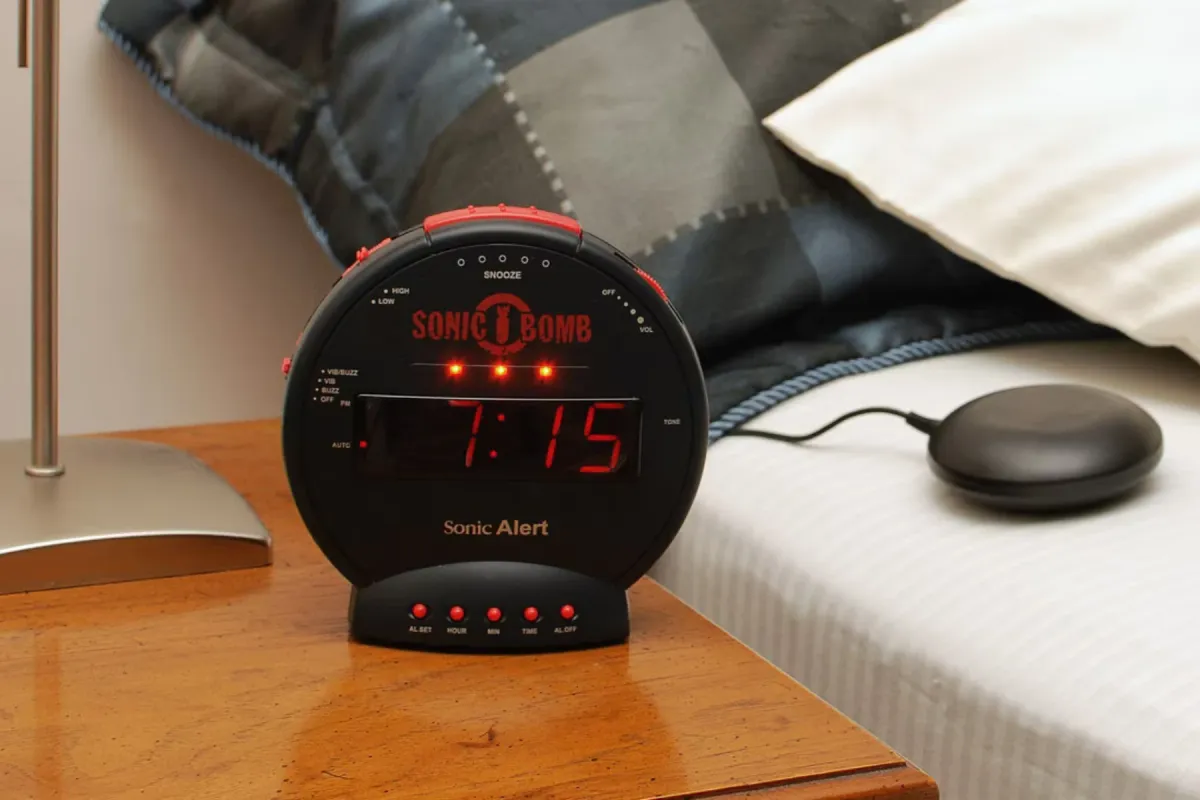
The best alarm clocks for a phone-free bedroom are the Sonic Bomb for heavy sleepers, the Philips SmartSleep for light, and the Braun BC12W for nothing to connect. A clock suits you if the phone sits on the nightstand only to wake you, but it cannot show calendar alerts or weather.
It moves one job off the phone, so it sits above an app blocker and below a simpler phone. How to make your phone less distracting puts all five steps in order. If the phone still pulls you at night, the best dumbphones are the next step.
Alarm clocks for heavy sleepers: loud and vibrating
A heavy sleeper often needs more than one signal: a loud alarm, a bed shaker under the pillow or mattress, and a flashing light. Check whether the alarm still sounds in a power cut, because several backups here keep only the time and settings.
The decibel figures below are the makers’ own. Bellman measured at 4 in from the clock, while Sonic Alert gives no distance, so compare them loosely.
Sonic Bomb with Super Shaker: the loudest here
The Sonic Bomb Alarm Clock with Super Shaker is for people who sleep through ordinary alarms. It has an adjustable alarm rated up to 113 dB, strobe lights, and an included 12V bed shaker, for $45.
It has two alarms, an alarm that rings for 1 to 59 minutes, and a snooze you set from 1 to 30 minutes. A test mode checks the alarm and the shaker.
A battery backup keeps your settings through a power outage. Whether the alarm still sounds is not promised, and there is no app, Wi-Fi, or subscription.
The trade is the room. A loud siren and a strobe can wake a partner too, so we would skip it if one of you sleeps lightly.
Sonic Bomb Junior: a smaller shaker for less
The Sonic Bomb Junior costs $35 and keeps the core of the Sonic Bomb in a smaller case. So you get an adjustable alarm rated up to 102 dB, a flashing alert light, and a compact 6V bed shaker.
It has one alarm, and the snooze is fixed at nine minutes. A battery backup keeps the settings, and a USB port charges a phone.
That port is the catch for this job, because it invites the phone back to the nightstand. We would leave it empty and charge the phone in another room.
Bellman & Symfon Alarm Clock Pro: keeps ringing in a power cut
The Bellman & Symfon Alarm Clock Pro pairs a rising sound that sweeps through frequencies with flashing LEDs and a bed shaker. Bellman rates the sound at up to 100 dB at 4 in, and the clock costs $150.
Its built-in rechargeable battery is the difference. When the power goes out, it keeps the time, the alarm sound, the shaker and the flash working. The snooze shortens from 9 to 2 minutes in two-minute steps.
It costs more than three times as much as the Sonic Bomb, and its stated volume is lower. Bellman’s Alarm Clock Classic costs the same but makes the battery an optional extra, so we would take the Pro.
Sonic Shaker: vibration without the siren
Sonic Alert’s Sonic Shaker costs $35 and clips a bed shaker to your pillow. Its alarm will buzz, vibrate, or both, so you can choose vibration alone when a siren would wake a partner.
It runs on a rechargeable battery, with a small pop-up display that closes for travel and a test mode. There is no published decibel figure for the buzzer, so pair it with a louder clock if vibration alone is not enough.
Bellman’s $90 Vibio is another silent bed shaker, but you set its alarms in a phone app. It keeps its saved alarms if the phone is off, yet setup still runs through the phone.
Braun BC12W: nothing to connect
The Braun BC12W is a plain analog alarm clock for $40. It has a quiet quartz movement, a crescendo beep alarm, luminous-tipped hands, a matt case, and a snooze and light function. It takes an AAA battery that is not in the box, and it has no app, no Wi-Fi, and no screen.
That makes it the clearest answer if you want nothing that connects, with no setup at all. The beep has no published loudness, so a heavy sleeper should look at the Sonic Bomb. There is also no sunrise light and no choice of sounds.
For travel, Braun sells the BC02X travel alarm clock for $30. It has a 5.7 cm square case, and the AA battery it needs is not included.
Philips SmartSleep HF3520: a wake-up light with no app
The SmartSleep Wake-up Light HF3520 is Philips’ best-selling wake-up light, at $109. No iPhone app controls it, so you set everything on the clock. That gives the phone no reason to come to bed.
The light rises over 30 minutes from soft red through orange to bright yellow, and you can set 20 to 40 minutes. At the wake-up time, one of five natural sounds plays and reaches your volume within 90 seconds. It also has FM radio, two alarms, and tap snooze.
During snooze, the lamp stays on while the sound stops for 9 minutes.
It runs on wall power. In a power failure, the clock saves its time for up to 8 hours, but no battery keeps the alarm going.
Dreamegg Sunrise 1: the budget light and sound
The Dreamegg Sunrise 1 costs $65 and combines a sunrise alarm, a sound machine, and a night light. You get 29 sounds and nine light colors. The clock needs no Wi-Fi or app, while the Sunrise 1+ is the model with app control, at $75.
Its sunrise moves from a faint glow to full daylight, with progressive natural sounds instead of harsh alarms. There is a one-touch snooze, but no published sunrise length, snooze length, or battery backup.
It is corded, and it should stay connected to power.
Choose it over the Philips for a sound machine at a lower price. Choose the Philips if you want documented alarm details, such as two alarms and a stated snooze time.
Ambient’s $249 Dreamie sunrise clock needs no phone, app, or account. Still, it uses 2.4 GHz Wi-Fi for updates and the time.
Loftie Clock: a sound machine with a backup battery
The Loftie Clock costs $200 and is built around a two-phase alarm. Phase one plays soft sounds that fade after 30 seconds, and phase two plays a continuous melody 3, 6, or 9 minutes later. It is not a sunrise alarm, but the nightlight can turn on with your alarms.
You need Loftie’s app for the first setup, and the clock needs 2.4 GHz Wi-Fi for setup and updates. After that, everything in the app is available on the clock, and No Wi-Fi Mode runs it without a connection.
A backup battery is rated for about 5 to 7 hours without wall power, but the clock should stay plugged in. Also, the alarm, the 100-plus sounds, and a feature called Drift need no subscription.
Drift locks the apps you choose when your phone enters the bedroom, through a Bluetooth signal to the Loftie app, until you leave. That suits you if the phone must stay in the room, but it keeps the Loftie app on your phone.
OneClock is the disconnected alternative. The $349 analog clock has no screen, Bluetooth, Wi-Fi or app, and wakes you with music. It has one alarm and no snooze, and OneClock puts its top volume at about 80 dB at arm’s length, so it suits a light sleeper.
Hatch Restore 3: the app-first clock
The Hatch Restore 3 costs $170 and adds light to sound. Its sunrise alarm moves from red to orange to white before your chosen sound plays.
You need the free Hatch Sleep app to set up the clock, and you build your wake-up routines there. After that, you can use it phone-free from the device. A tap on the Big Button snoozes, a long press turns the alarm off, and an alarm toggle switches alarms off.
It requires 2.4 GHz Wi-Fi, and it should stay plugged in at all times. So it is not a travel clock.
Hatch+ costs $6 a month or $60 a year, with 30 days included. Without it, the Restore still works, but with basic features and core content only.
How to move the alarm off the phone
Do the move in one evening, in this order.
- Set and test the clock. Sonic Alert’s clocks have a test mode. On any clock, set an alarm a few minutes ahead and listen for it from bed.
- Turn off the phone’s alarms. Once the clock passes, open the Clock app so two alarms do not compete, or keep one as a backup.
- Pick a charging spot. Use the kitchen, a hallway, or the far side of the room.
- Let calls through on iPhone. Open Settings, Focus, then a Focus such as Do Not Disturb, then People. You can allow calls from groups of people and repeated calls (two or more within 3 minutes). Emergency Bypass lets one contact’s calls sound when silenced.
- Let calls through on Android. On Android 14 and up, open Settings, Modes, a mode, Notification filters, then People to allow calls. Allow repeat callers lets a second call within 15 minutes through, and Bedtime mode can start when the phone charges. Settings can vary by phone.
- Watch the result. How to check screen time on iPhone and Android shows whether your morning phone use changed.
Android also has an Alarms & other interruptions filter that can block alarms, so check it if you keep a phone backup.
What you give up
A clock does one job, so the rest stays on the phone. None of these clocks shows calendar alerts or weather. The Philips and the Sonic Bomb have two alarms, while OneClock and the Sonic Bomb Junior have one, so a third wake-up time means the phone or a second clock.
Snooze changes too. On the Philips the light stays on, on the Hatch you tap the Big Button, and OneClock has no snooze at all.
Power is another gap. The Restore 3 should stay plugged in, and neither the Dreamegg nor the Philips has a documented battery. The Loftie’s battery is rated for 5 to 7 hours, the Braun runs on a battery, and Bellman’s Alarm Clock Pro keeps its alarm working in an outage.
Night calls are the last gap. With the phone in another room, a call can ring where you cannot hear it, so set the allowed callers first.
When an alarm clock is not enough
A clock moves the alarm, not the pull. If you still carry the phone to bed or reach for it first in the kitchen, the best app blockers change what the phone shows.
If you still reach for the phone after that, a simpler phone removes the choice. A clock then does the job it was built for.
Common questions
Do I need a smartphone alarm as well as a clock?
Not every day, but a backup helps on mornings you cannot miss. Most plug-in clocks here keep only their time or settings in a power cut, so a phone alarm covers that gap. Bellman’s Alarm Clock Pro and, for 5 to 7 hours, the Loftie are the plug-in exceptions.
Do alarm clocks need Wi-Fi or an app?
Some do. The Braun, the Philips, the Dreamegg Sunrise 1, the Sonic Bomb, and OneClock need neither. Hatch needs its app and 2.4 GHz Wi-Fi, and Loftie needs the app and Wi-Fi for setup and updates.
What alarm clock should a teen or a child use?
Pick one that needs no phone app, so the phone can charge outside the bedroom. A teen who sleeps through alarms gets a bed shaker with the Sonic Bomb, while the Braun suits a light sleeper.
Sonic Alert’s Sonic Glow clocks suit a younger child, with moon, soccer and baseball designs and an alarm that can play a message you record. For the phone itself, see the best dumbphones for kids.
Can an alarm clock replace my phone alarm when I travel?
Yes, if it runs on a battery. Braun’s BC02X is a $30 travel clock on an AA battery, and the Sonic Shaker charges and closes its display for the bag. The Hatch, Philips, and Dreamegg need an outlet.
What is a good Loftie alternative?
It depends on what you liked about the Loftie. For a gentle wake with no app at all, the Philips HF3520 uses light and OneClock uses music, while the Dreamegg Sunrise 1 adds sleep sounds for less. The Hatch Restore 3 is the closest match, but it needs its app and Wi-Fi.
What goes on the nightstand
Take the Sonic Bomb if nothing wakes you, and the Bellman Alarm Clock Pro if the alarm must survive a power cut. The Braun suits a bedroom where nothing may connect, and the Philips or Dreamegg gives you light without an app. Take the Loftie or Hatch if you can accept a setup app.
Whichever you pick, the charger’s new home keeps the phone out of reach. If the phone still pulls you after that, the next step is a dumbphone.
If music is the next job you want off the phone, see the best MP3 players.