Brick vs Unpluq vs Bloom: NFC Phone Blockers Compared
By Finn Albar
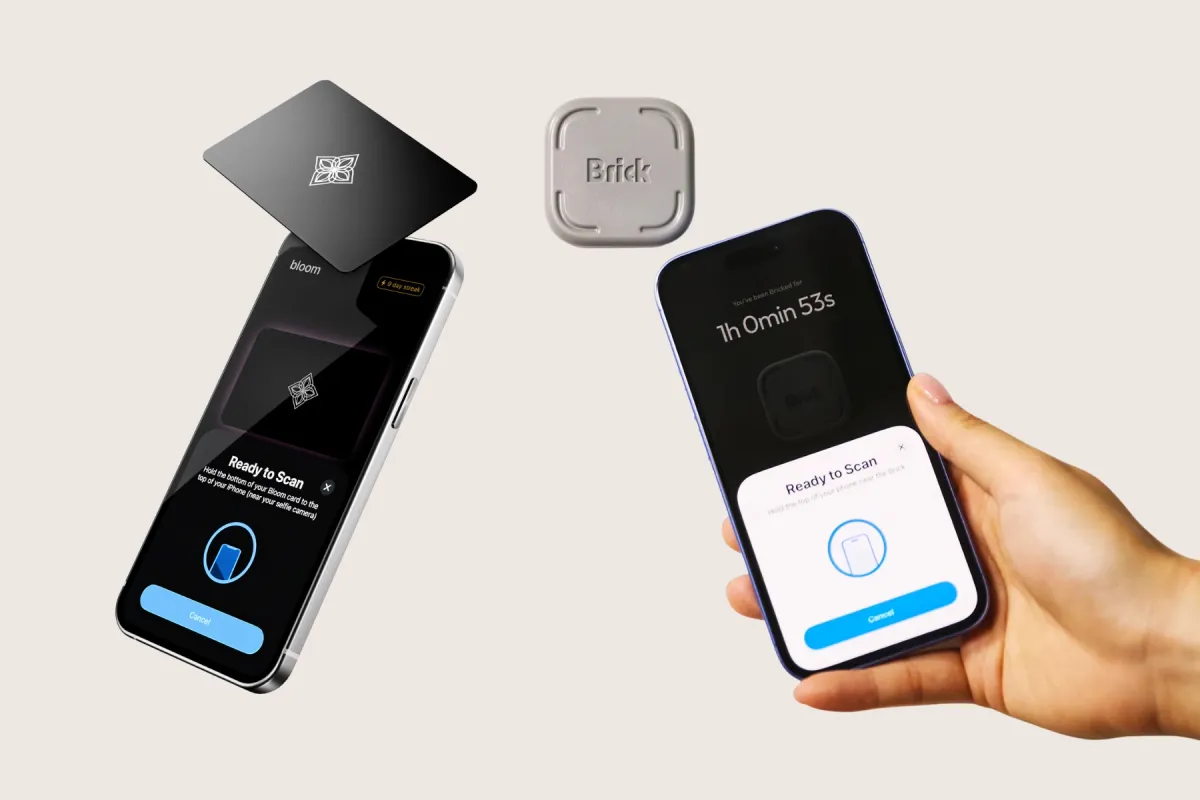
Brick and Bloom both sell a key you tap to lock apps, and you buy it once with no subscription. A Brick key costs $59, and a Bloom card costs $39. Unpluq’s Tag works only with a paid Premium plan, so it costs the most over two years.
Pick Brick or Bloom if you want a session that ends only when you walk to the key. Pick Unpluq if you want apps blocked on a schedule, with a small task that opens them for a set time. All three keep an emergency exit by default, so a key adds effort, not a wall.
A key sits one step above a free app blocker and one step below a simpler phone. If you have not tried a free one yet, try that first.
How each one locks and unlocks
Brick and Bloom work like a switch. You tap your phone on the key to block the apps you picked, and tap again to open them. With Brick, the key has to be there to turn your apps back on.
On both, you can start a session from the app without the key. But on Brick, you still need the device to end it. Bloom also offers 5-minute breaks, and you set limits on how often and how long you take them.
Unpluq works the other way around. Apps stay blocked during a schedule, and you open one for a time you set by passing what Unpluq calls a distraction barrier. The Tag is one barrier, and the others include shaking the phone for 5 seconds, tapping 7 buttons, and scanning a QR code.
Winner: Brick or Bloom, if you want a hard stop that only the key ends. Pick Unpluq if you want short, rationed access instead of hours without an app.
Price over two years
Brick and Bloom charge once. Brick’s price includes lifetime use of its app, with no subscription and no monthly fees. Bloom’s app has no hidden fees or subscriptions either.
Bloom also sells the Pod, a $59 magnet that comes with a free card. Brick charges shipping on a single key and ships two or more free. You can pay for either with HSA or FSA funds.
Unpluq is the one with a subscription. The Tag only works with Unpluq Premium, and the free plan offers two other barriers: shaking the phone or tapping buttons.
You can buy Premium in two ways. Unpluq’s shop sells 12 months with a Tag for $81 and a 12-month renewal without one for $76. In the US App Store, Premium costs about $60 a year or $7 a month, and the shop sells the Tag alone for about $27.
| Option | Two-year cost | What it covers |
|---|---|---|
| Bloom card | $39 | One card, plus shipping |
| Brick | $59 | One key, plus shipping on a single unit |
| Bloom Pod | $59 | A magnet with a card included |
| Unpluq, shop | $81 + $76 = $157 | Tag in year one, renewal without a Tag |
| Unpluq, App Store yearly | About $146 | A Tag from Unpluq’s shop, plus two years of Premium in the app |
| Unpluq, App Store monthly | About $194 | A Tag, plus 24 months of Premium with no yearly commitment |
Brick reserves the right to add subscriptions later, but any would be opt-in.
Winner: Bloom. Its card is the cheapest way in, and nothing renews. Unpluq costs more than twice as much as a Brick over two years.
Loopholes and how to close them
Deleting the app is the first loophole. By default, deleting Bloom unblocks all your apps. Its optional strict mode, in settings, prevents deleting any app during a focus session.
Brick’s Strict Mode prevents deleting the Brick app during a session, and on Android it needs Device Admin permission to do that. Unpluq has a Block Uninstall setting under Advanced Settings.
Settings are the second loophole on iPhone. All three makers point you to an Apple Shortcuts automation that blocks Settings, or its Screen Time page, while a session runs.
Brick also suggests asking a trusted friend or family member to set your Screen Time passcode. How to check and limit screen time on iPhone and Android shows where that passcode lives.
Other keys are the third loophole. One phone can work with any Brick device in the world, so a friend’s Brick ends your session as well as yours does.
Winner: Brick, narrowly, because Brick spells out Strict Mode on both iPhone and Android. It still adds effort rather than a wall, since a second Brick or an emergency exit ends a session.
Emergency exits
Brick gives you five Emergency Unbricks, which unblock all apps without the key. Once you reach zero, you can request more in the app after a short survey, and they reset within one business day.
You can also email Brick for more. Still, Brick intends the exits for emergencies, not daily use.
Bloom gives you three emergency exits, plus one more each month. Its Child Mode turns the exits off.
Unpluq’s Emergency Mode opens Unpluq for 5 minutes once a day, so you can change your settings. You can also switch Emergency Mode off entirely.
Winner: Bloom, for the tightest default: three exits that refill by one a month. Unpluq is stricter only if you turn Emergency Mode off, and Brick’s survey makes its exits the easiest to renew.
What happens if you lose the key
Brick’s answer is the five Emergency Unbricks. Because any Brick works with your phone, a second Brick ends a session too. Brick’s lifetime replacement covers manufacturing defects and hardware failure.
Bloom points to its emergency exits as well. One phone can work with several Bloom cards, and Bloom suggests keeping one at home, in the car, or at work.
Unpluq has a lost-Tag switch in its app. It moves your schedules to a barrier that needs no Tag until you mark the Tag found. Unpluq allows it 5 times in the life of your account.
Winner: Unpluq, for a built-in lost mode and the cheapest replacement, a Tag at about $27. With Brick or Bloom, a second key kept somewhere else is the simplest backup.
iPhone and Android
| Blocker | iPhone | Android |
|---|---|---|
| Brick | iOS 18 or later | Android 12 or later, with NFC |
| Bloom | iOS 17.6 or later | Android 7.0 or later |
| Unpluq | iOS 16 or later | Android 7.0 or later |
Brick asks for iOS 18 in the App Store, though its help center still gives iOS 17. The Unpluq Tag needs an iPhone 8 or later, or an Android phone with NFC.
On Android, Brick needs the accessibility service, and Bloom uses it to block websites. Android’s Advanced Protection mode restricts accessibility services to verified tools, so ask Brick or Bloom before you turn it on. For Unpluq, exempt the app from battery optimization.
Websites differ too. Bloom blocks each app’s matching website on iOS, while Unpluq blocks sites only in Safari on iPhone and none on Android yet. Bloom’s blocking of adult content, in-app purchases, and app installs also works on iOS only.
Winner: Bloom, because it runs on Android 7.0 and adds extra blocks on iPhone. Unpluq reaches back further on iPhone, to iOS 16, while Brick asks for the newest versions of the three.
Schedules and modes
Brick sets blocks by mode, and you can create up to 10 custom modes, such as work or sleep. Schedules start and end a session at set times. But unbricking during a schedule ends that schedule.
On iPhone, Apple’s app picker caps each Brick mode at 50 apps. Bloom has schedules that start and end on their own, plus its breaks.
Unpluq Premium adds unlimited schedules and a list of contacts whose notifications always get through. The free plan allows 2 apps on 1 schedule.
Winner: Unpluq, because schedules are its core design and Premium sets no cap on them. Brick is close if you want separate modes for work and home.
Sharing with a family or a second phone
Any number of phones and people can use one Brick. Each person needs their own account with a separate email. Brick suggests a trick some parents use: spending all five Emergency Unbricks on a child’s phone upfront, to remove that exit.
Bloom sells a 3-card bundle for $75, which it pitches as one card for each person in your family. On a child’s phone, Child Mode prevents app deletion, turns off exits, and locks schedules. Only the parent’s card can change settings.
Unpluq’s subscription covers one phone and one tablet. Unpluq Family costs about $80 a year for up to 3 phones, or about $100 a year for unlimited phones, and both plans renew automatically. Its terms cap fair use at 25 devices.
Winner: Brick, because one key covers every phone in the house with no fee. If you are choosing a child’s first phone, the best safe phones for kids compares phones built for that job.
Accounts and privacy
Brick requires an account, but your block lists stay on your phone, and Brick cannot see them. Its App Store label links email, user ID, product interaction, and crash data to you.
Bloom can see your total focus time and whether a session is running, but not the apps you block. You can revoke that access and delete your data in settings.
Bloom’s two store labels disagree. Its App Store label links email, phone number, and product interaction to you, while its Google Play listing claims no data collection.
Unpluq’s App Store label marks identifiers as data used to track you. On Google Play, it declares that it shares user IDs.
Winner: Brick, because it keeps block lists on the phone and is plain about it. If privacy decides it for you, read both of Bloom’s labels before you sign up.
Returns, warranty and shipping
Brick gives you 30 days, no questions asked, and it sends a prepaid return label. You then have 28 days to ship the key back. Brick ships worldwide and fulfills orders locally from five countries, including the US and Canada.
Bloom also offers 30 days, but you pay return shipping. Each card carries a lifetime manufacturer guarantee, and shipping abroad is free with 3 or more cards.
Unpluq gives 30 days as well. You ship the Tag back to the US or the Netherlands, and Unpluq cannot provide a label. If you subscribed in the App Store or Google Play, Apple or Google handles the refund.
Unpluq’s terms provide the app as is, without warranties. Shipping takes 14 days or less to most places.
Winner: Brick, for the prepaid label and a free replacement for life if the key fails.
When to pick a free blocker instead
A key is worth buying once a free blocker turns out to be too easy to switch off. Foqos is free on iPhone and starts a block when you tap an NFC tag or scan a QR code. It needs no account and offers only optional tips.
ScreenZen’s halo is a $49 Bluetooth device that blocks the apps you pick while your phone is inside its boundary. It ships only in the US and needs an account. Try Foqos or your phone’s built-in limits before you buy any key.
Where you keep the key matters as much as which key you buy. If your phone is also your alarm, the best alarm clocks let it charge outside the bedroom, along with the key.
If you use the exits every week, a key may not be the right step. A phone with no app store removes the apps instead of locking them, and the best dumbphones compares current options.
Which one to pick
- You want the cheapest key you buy once: a Bloom card.
- You want the strictest key, or one for the whole household: Brick.
- You want apps that open briefly on a schedule, and accept a subscription: Unpluq.
- Your phone is too old for Brick: Bloom from iOS 17.6 or Android 7.0, or Unpluq from iOS 16.
- You tend to misplace small things: Unpluq, for its lost-Tag switch, or a spare Bloom card.
- You are not sure a key will help: Foqos or ScreenZen first.
Each pick gives something up. Any Brick ends a Brick session, and Bloom unblocks everything if you delete it with strict mode off. Unpluq’s Tag works only while you pay for Premium.
Common questions
Does the Unpluq Tag work without a subscription?
No, the Tag only works with Unpluq Premium, from its shop or from the App Store or Google Play. If you subscribe in an app store, you need no activation code to use a Tag. The Android app also offers a 7-day free trial.
Can someone else’s Brick unlock my phone?
Yes, because one phone can work with any Brick device in the world. All setup happens on the phone, so another Brick needs no extra step. If you live or work with other Brick owners, any of their keys can end your session.
Does Brick block phone calls?
No, the Phone app stays open during a session. You can block any iPhone app except Phone, per Apple policy, and any Android app except Phone and the launcher.
What happens if I delete the Bloom app?
By default, deleting the app unblocks all of your apps. Strict mode, a switch in Bloom’s settings, prevents deleting any app during a focus session. Strict mode does not appear in Bloom’s Google Play listing, so ask Bloom before you count on it on Android.
Final thoughts
Bloom is the cheapest key, and Brick is the strictest and the easiest to share across a household. Unpluq costs the most over two years, but it suits you if you want apps rationed on a schedule rather than locked for hours.
We would start with a free blocker, and keep any key you buy in another room. If you keep reaching for the exits, a simpler phone is the next step, and the Dumbphone Finder shows what you can keep.