7 Best Minimalist Launchers to Turn Android Into a Dumbphone (Free & Paid)

Your smartphone screen probably looks like a mess right now. Notification badges demand your attention. Bright app icons pull you in every direction.
The whole setup is designed to keep you tapping, scrolling, and checking. Most people think this is just how a phone launcher works, but if you have an Android device, you can change everything.
Using an android launcher is the first step toward focus.
A minimalist launcher replaces your phone’s default interface with something cleaner and calmer. Unlike iPhones, Android lets you install these apps to completely redesign your home screen.
You don’t need to buy an expensive dumbphone or throw away your device. These minimalist android launchers strip away the noise.
They turn your smartphone back into a simple tool that works for you instead of against you. Finding the best android launchers can save you hours of scrolling time.
Why Icons Are the Enemy
Your brain processes images up to 60,000 times faster than words. When you glance at a bright red notification badge on a colorful app icon, your thumb moves before you’ve even decided to open it.
This happens because visual triggers bypass your conscious thinking. To counter this, many people use icon packs to create a uniform look.
Most smartphone home screens are designed like slot machines. Bright colors, familiar shapes, and those little red circles create automatic responses in your brain. You tap without thinking.
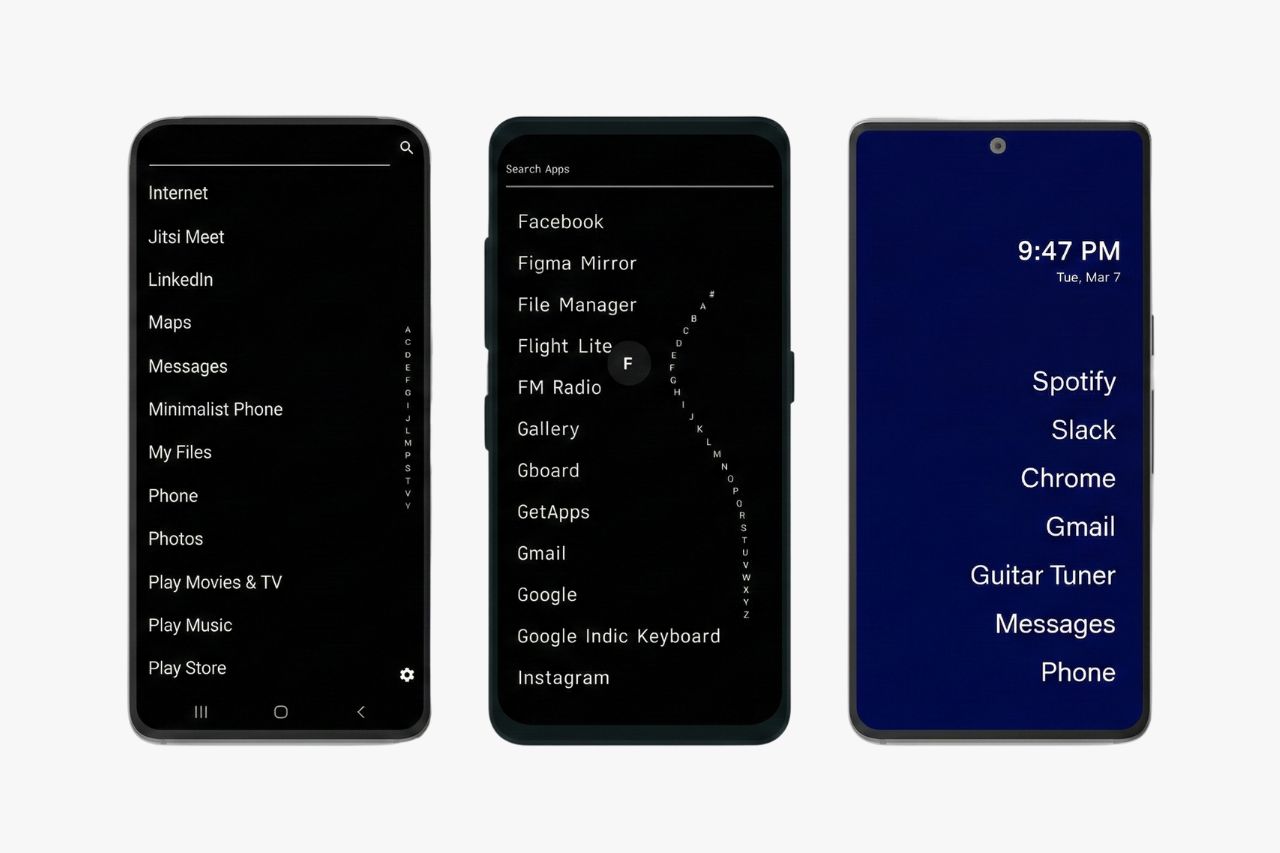
Text-based lists change this completely. When apps appear as simple words on a minimalist home screen, you’re forced to read and think.
You can also apply custom icon packs to further reduce the visual lure of your apps. This creates a small barrier between impulse and action.
That tiny pause gives you time to ask yourself if you really need to check that app right now. A minimalist interface with plain text also makes one-handed use easier since you’re not hunting for icons.
Some launchers even include a notification filter and focus mode to reduce visual noise further.
1. Niagara Launcher
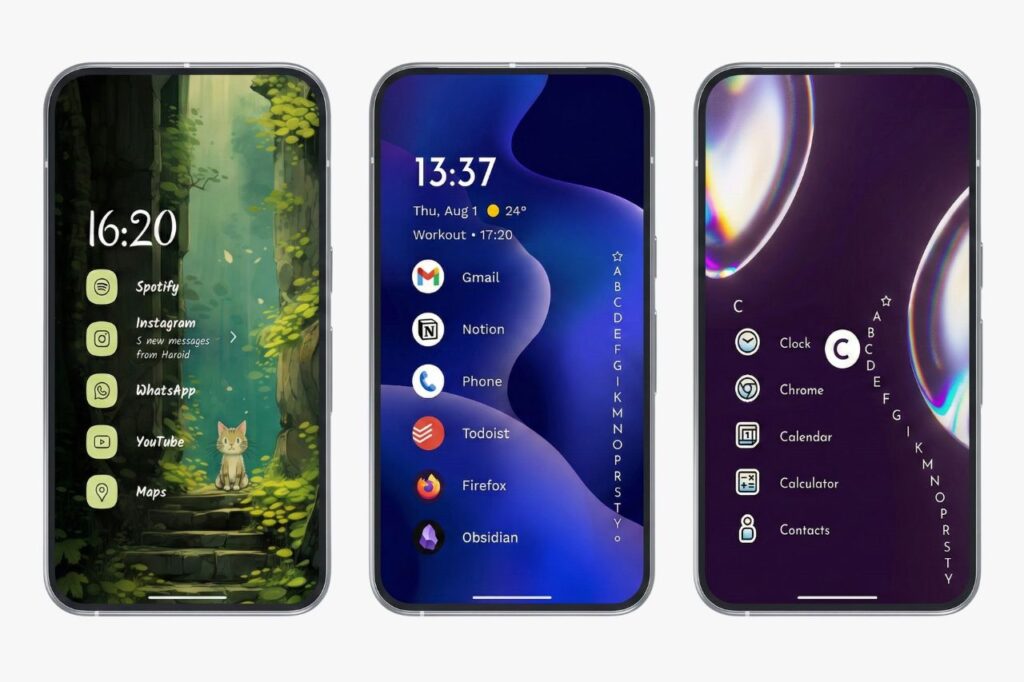
The Vibe: Built for one-handed use.
Best For: Anyone seeking a middle ground between stripped-down simplicity and practical design.
Niagara stands out as one of the most thoughtful launchers you can use. It doesn’t take everything away from you. Instead, it reorganizes your apps into a system that actually makes sense for how phones are shaped today.
The core design uses a vertical list instead of rows of icons. You can place your five most essential apps at the top where your thumb naturally reaches.
Everything else lives in an alphabetical list that you access with a smooth swipe along the screen’s edge.
What makes it work:
- Smart sorting that learns which apps you use most often
- Notification previews that let you read and respond without opening the full app
- Clean icon styles using dots or lines to cut down visual clutter
- One-hand navigation designed for tall modern screens
The notification feature is especially useful. You can handle messages right from your home screen, which keeps you from wandering into the app and losing 20 minutes to distractions.
Niagara doesn’t demand that you give up everything. It just asks you to be more intentional about what deserves your attention.
2. Minimalist Phone
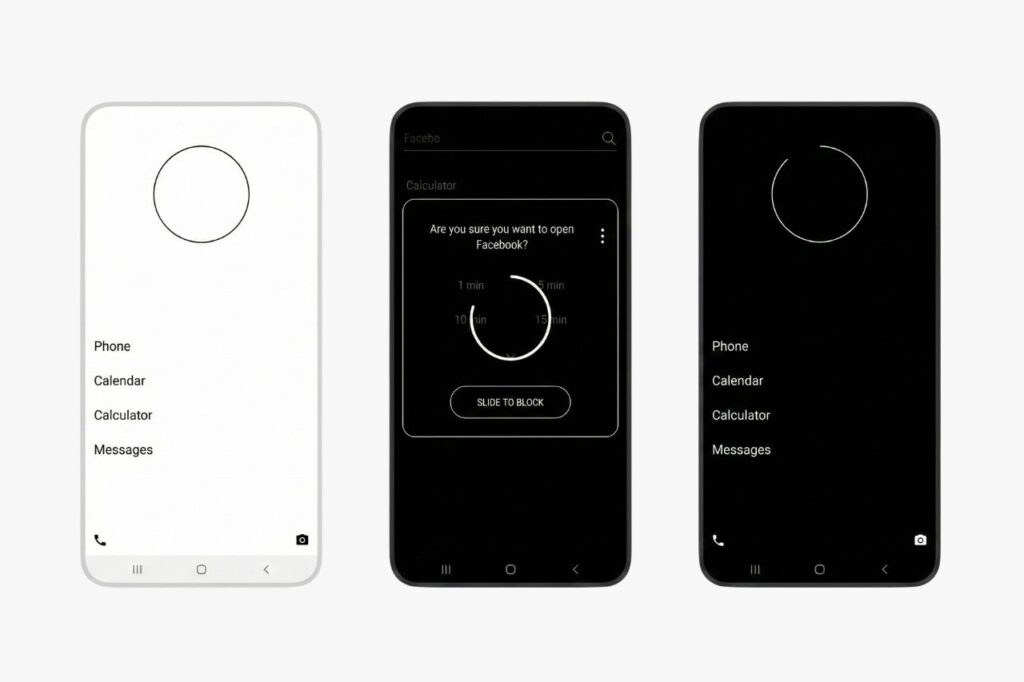
Minimalist Phone acts like a digital intervention for your scrolling habits. This launcher strips away everything that makes your phone appealing to your dopamine system.
The interface shows only black and white text on your screen. No colorful icons exist. No wallpaper appears. Just simple words in a list format.
What makes this launcher different:
- Time Reminder Feature – When you open apps like social media, a prompt asks how long you plan to use it. After your chosen time ends, the app reminds you to stop.
- Mindful Delay Option – You can add a waiting period before apps launch. This pause gives you seconds to reconsider if you really need to open that app.
- Grayscale Filter – The launcher can remove all color from your phone or block certain apps completely.
- Focus Sessions – You can block distracting apps for specific time blocks while you work or study.
This minimalist phone launcher works best if you struggle with compulsive phone checking. It creates friction between you and your habits.
The black and white design alone reduces the visual appeal that keeps you reaching for your device.
3. Before Launcher
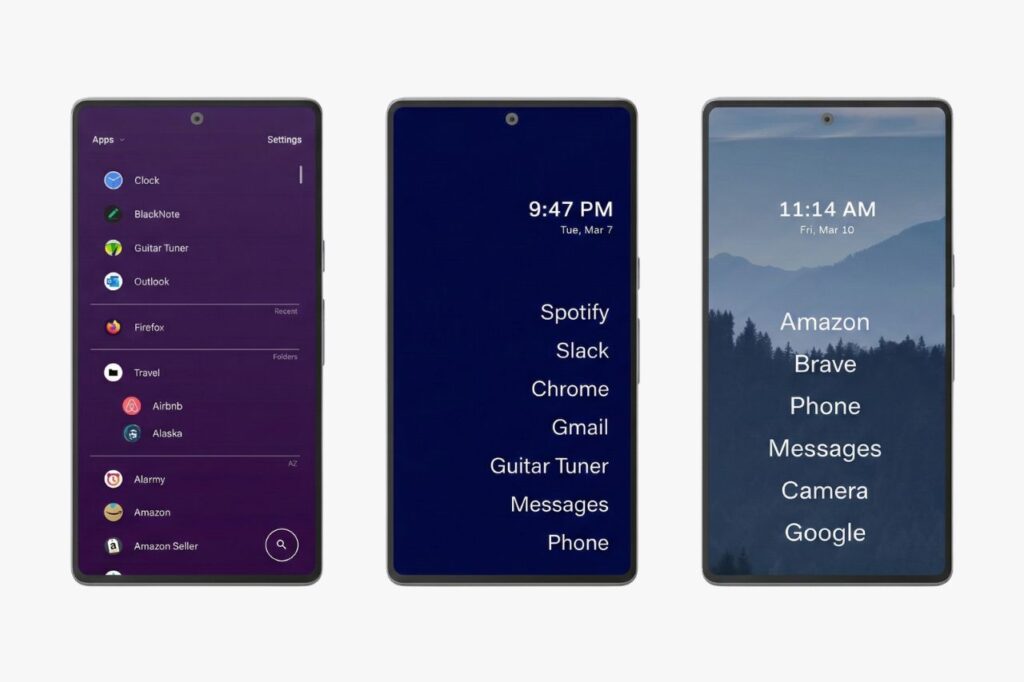
Your home screen might be clean, but what about those notifications piling up in your status bar? That’s where Before Launcher steps in as your digital bouncer.
This launcher takes a different approach to distraction. The home screen shows only text on a solid background, which looks sharp and saves your battery if you have an OLED screen. You get space for about eight apps you use most.
The real power sits on the left screen. Before Launcher catches notifications from apps that don’t deserve your immediate attention. By customizing your notification filters, you ensure only the most important alerts get through.
Social media alerts and random app updates all go into a separate inbox instead of interrupting you. Your phone stays quiet. Your status bar stays empty. You decide when to check these notifications, not the other way around.
The text scaling feature makes everything easier to read without squinting. A universal search bar helps you find any app fast when you need it.
Key benefits:
- Filters notifications into a separate inbox
- Clean text-based interface that saves battery
- Large, adjustable text for easy reading
- Quick search to access any app
4. Olauncher
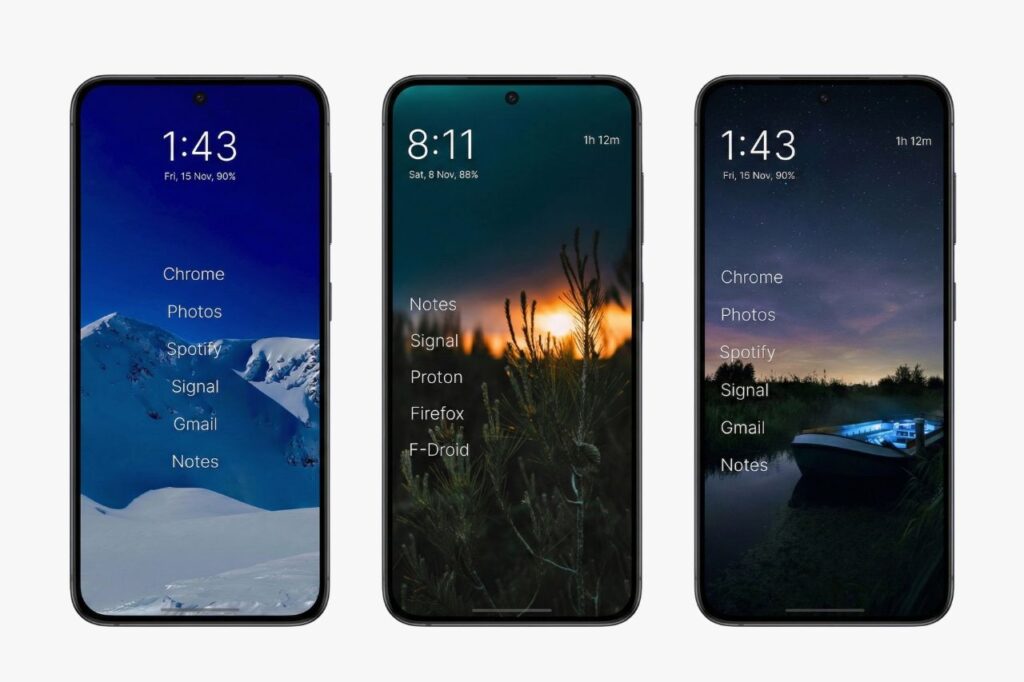
Olauncher strips your phone down to what matters most. It’s built for people who want full control without paying a cent. You won’t find any ads, tracking, or hidden fees. It runs on open-source code, which means your data stays yours.
The design forces you to be deliberate. Your home screen shows up to 8 apps as simple text. Everything else requires typing. Swipe up, type the first letter of what you need, and it appears instantly. You can’t mindlessly scroll through apps anymore. You have to decide what you want before you reach for it.
What makes it work:
- Daily wallpapers from Unsplash keep things fresh
- Gesture controls let you swipe left for your camera and right for calls
- Minimal resource use means your battery lasts longer and your phone runs faster
The entire launcher weighs almost nothing on your system. If you value privacy and want a phone that respects your attention, Olauncher delivers exactly that.
5. Indistractable Launcher
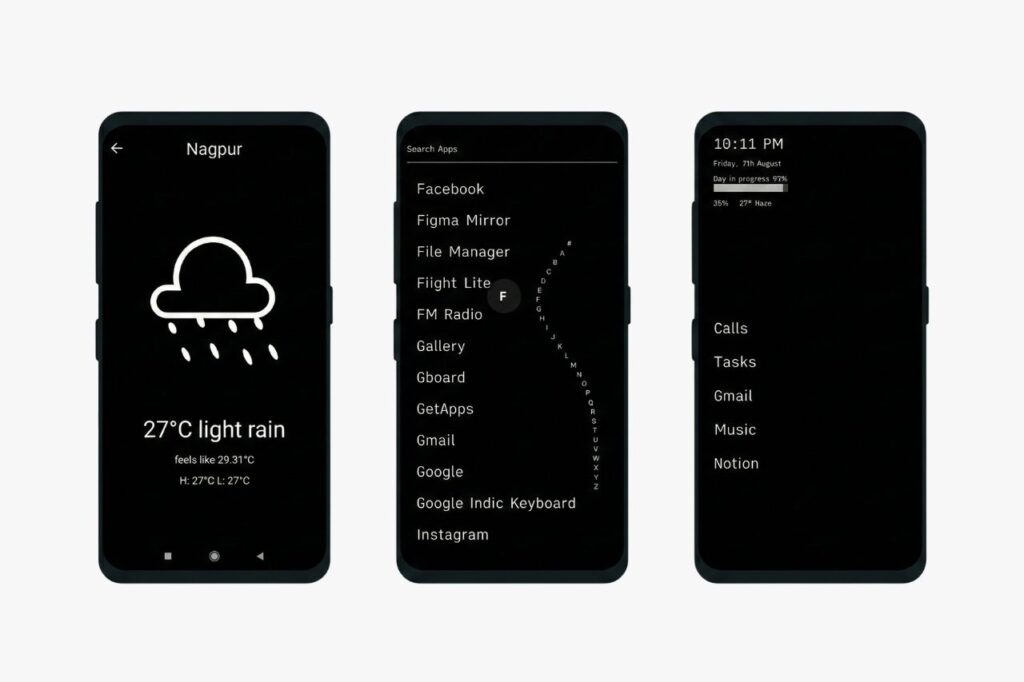
If you’ve ever looked at a Light Phone and wished your Android could feel that clean, this launcher is built for you. Indistractable recreates that stark, purposeful look right on your regular smartphone.
The design relies on strong contrast. You get black backgrounds paired with white text, or the reverse. Your screen displays the time, date, and battery level in clear fonts. Below that sits your list of necessary apps.
What makes it different:
- Task integration — A to-do list lives directly on your home screen
- App hiding — You can completely remove tempting apps from view
- Outdoor readability — The high contrast makes your screen easy to read in bright sunlight
The launcher divides your apps into “Tasks” and “Apps” categories. This small change shifts how you think about your phone. It becomes a tool for getting things done instead of a portal for endless scrolling.
6. Ratio (by Blloc)
The Vibe: The Cyberpunk Organizer
Best For: Tech lovers who need focus but still want powerful features
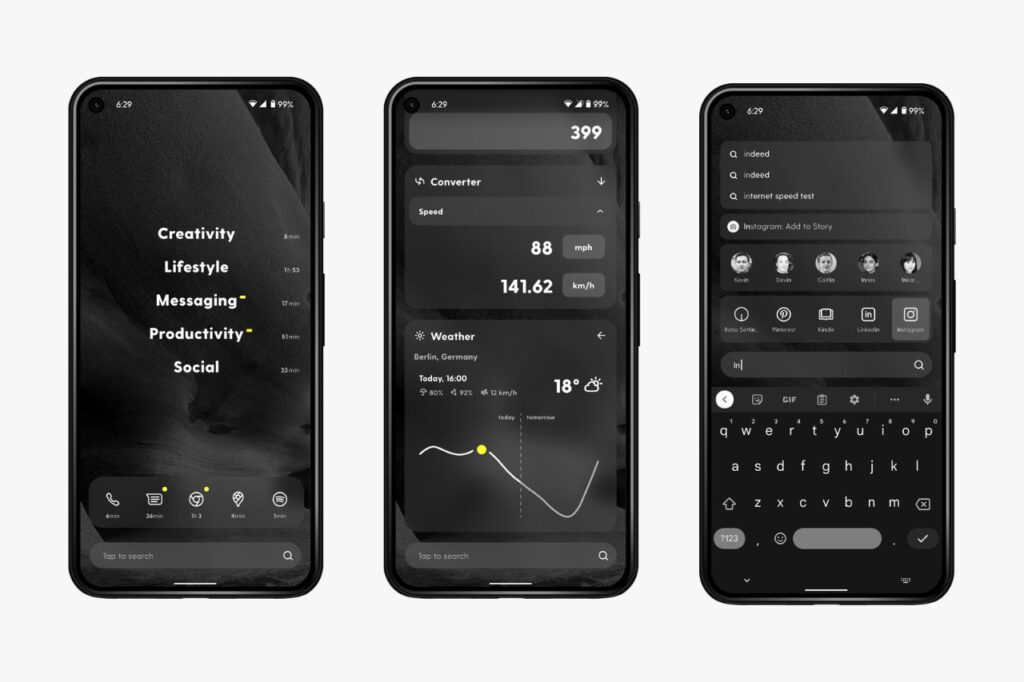
Ratio feels like something from a sci-fi film. Most launchers just show you a list of apps. Ratio does something different. It splits your phone into three separate areas: The Root for widgets and information, The Tiles for your apps, and The Tree for messaging.
What makes this work is how it sorts everything for you. You build custom folders called “drawers” for different app types. Maybe you have one for “Work,” another for “Social Media,” and one for “Tools.” You can collapse these drawers so they disappear until you actually need them.
The design stands out too. Sun Mode and Dark Mode use high contrast to make your phone look like a serious tool instead of a toy.
Key Features:
- The Conversation Hub: This feature tries to bring all your messages from apps like WhatsApp and Telegram into one place
- Focus Mode: Lets you lock certain app drawers for a specific amount of time
- Custom Cards: Clean widgets for weather, notes, and your calendar that match the minimal look
You can download it from the Play Store. It is widely considered a top minimalist android launcher for power users.
7. Unpluq
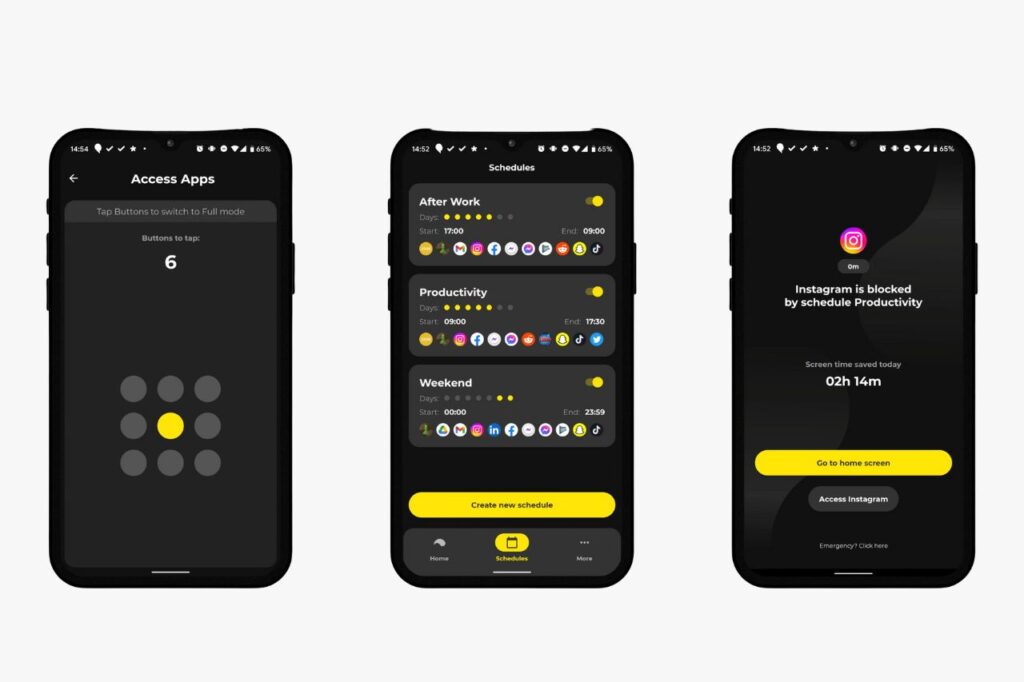
Unpluq takes a different approach than every other launcher you’ll find. It adds a physical barrier between you and your most distracting apps.
You can use Unpluq as just software on your phone. But the real magic happens when you get their physical NFC tag, called the Unpluq Key. This small yellow device becomes your gatekeeper.
When you want to open a distracting app, you need to tap the Unpluq Key against the back of your phone. You can’t just mindlessly open Instagram anymore. You have to find your keys, tap the tag, and then wait for access.
This physical step breaks the automatic habit loop your brain runs on. Most of the time, when you realize you need to go find your key, you’ll decide the app isn’t worth it. If you leave the key at home, you literally can’t access those apps at all.
What makes Unpluq different:
- Physical NFC tag acts as a lock for your apps
- Custom schedules let you set when the barrier turns on
- Adjustable difficulty lets you choose your challenge level, like shaking your phone instead of using the key
The physical friction creates real change in your habits.
Other Notable Minimalist Android Launchers
If the main options don’t fit your style, there are several other android launchers to consider. Each offers a unique way to declutter your digital life.
Kiss Launcher is built for speed and simplicity. It relies heavily on a fast app search bar to help you find what you need without a traditional app drawer.
Aio Launcher skips the fancy graphics and focuses on information. It displays your most important data in a compact, text-heavy layout that avoids distractions.
Lawnchair 2 is perfect if you like the Google Pixel aesthetic. It supports the at a glance feature and allows you to use adaptive icons for a cleaner look.
Nothing Launcher brings a distinct, industrial feel to your device. It uses a dot-matrix aesthetic to maintain a cohesive minimalist interface on your home screen.
Square Home Launcher provides a tile-based layout reminiscent of Windows phones. This is a great minimalist android launcher for those who prefer structured grids.
How to Make It Stick
Getting the launcher on your phone takes two minutes. Actually using it every day is where most people fail.
First, when you hit your home button after installation, Android asks which launcher to use. Pick your new one and tap “Always.” No switching back when things feel weird. You need to fully commit or this won’t work.
Next, go into your launcher settings and hide apps that drain your time. Think Instagram, TikTok, or whatever pulls you in. You don’t have to delete them completely.
Just make them invisible in your app list. When you can’t see the icon, you have to actively search for it. That extra step creates friction, and friction kills mindless scrolling.
The first 72 hours will test you. Your thumb will tap where icons used to be. You’ll feel lost without the colorful grid. Your brain is experiencing withdrawal from the digital detox. That discomfort means it’s working.
By day three, something shifts. The frustration fades. Opening your phone starts to feel peaceful instead of chaotic. Setting up notification filters can also help during this period.
If hiding icons isn’t enough, pair your launcher with an app blocker like Opal or Freedom. These tools physically lock you out during set times. Sometimes you need that hard boundary to truly reduce screen time and reclaim your attention.
Which One Should You Install?
Choosing the best minimalist launcher for android depends on what you need most from your phone right now. You might prefer the app drawer layout of some or the text-based lists of others.
If you want something that feels polished and works smoothly, Niagara Launcher gives you the most balanced experience. It strips away distractions without making your phone hard to use.
Before Launcher works best when you need serious focus. Its notification filtering helps you stay in control when work demands your attention.
For a true stripped-down experience, Minimalist Phone or Olauncher turn your screen into something that looks like an old-school device. These work when you want your phone to feel genuinely boring.
Installing any of these transforms your device from something that pulls you in constantly into a simple tool. When your screen stops calling for your attention, you free up hours you didn’t know you had.