Bigme HiBreak Pro Review: Calmer Screen, Same Apps
By Finn Albar
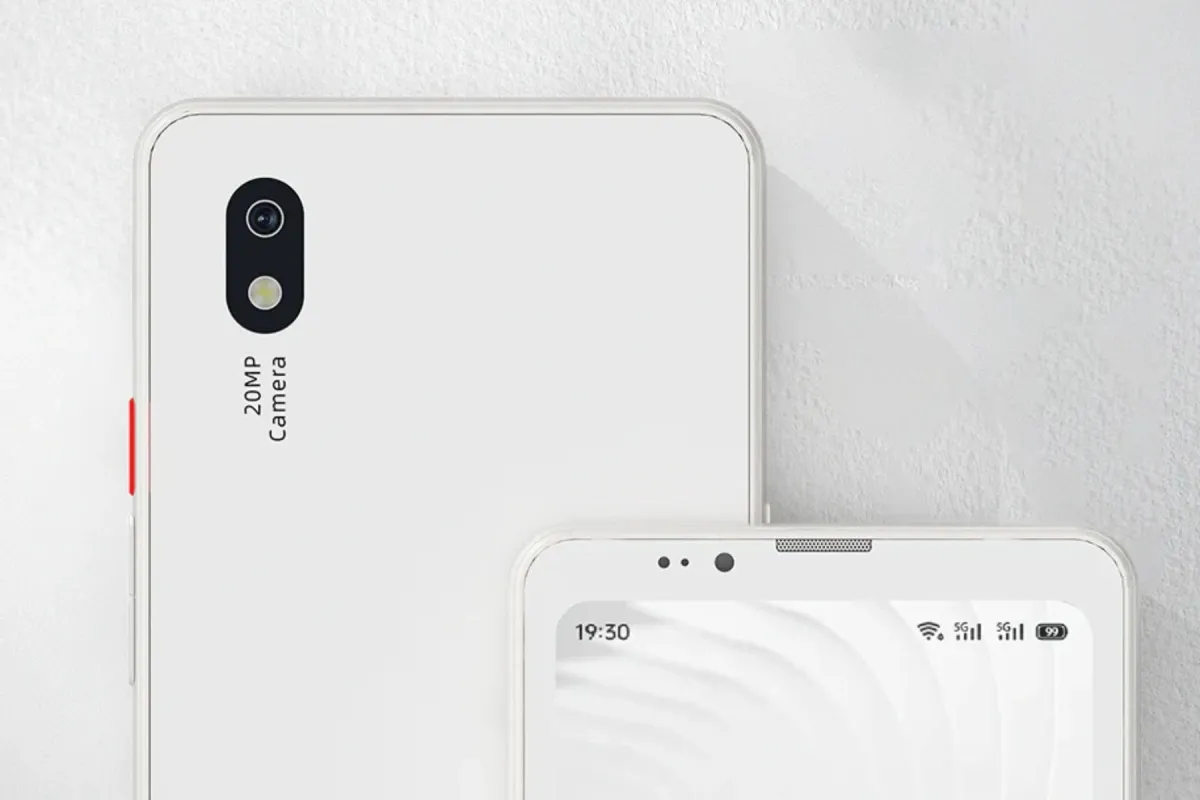
The Bigme HiBreak Pro is an E Ink phone with the Play Store, so it calms the screen but blocks no app. It suits a reader who still needs Android apps, but it gives up any limit on them.
If the apps are the problem, start lighter with best minimalist launchers for Android.
Who the Bigme HiBreak Pro is for
Choose the Bigme HiBreak Pro if you want books, maps, and calls on one E Ink device.
Skip it if the feed itself is the problem. If you want E Ink with no app store, the Mudita Kompakt is the stricter choice.
Price and availability
Bigme sells the HiBreak Pro in black and white and in Color from its own store, in US dollars, and the Color model costs more.
Bigme’s store ships from China and dispatches within three to seven days of an order, and you pay any import taxes or duties. It also sells the phone through a Newegg marketplace storefront. Bigme sells no carrier plan with the phone, so you bring your own SIM.
What matters
The screen and refresh rate
The black-and-white Pro has a 6.13-inch E Ink panel at 300 PPI, with a 36-level warm and cold front light. The Pro Color uses a Kaleido 3 color panel instead, rated at 300 PPI for black and white and 150 PPI for color.
The Pro’s fast refresh runs at 21 frames per second, well under the 60 or more of an ordinary phone screen. That slow redraw is what makes the screen calm.
Apps and the Play Store
The HiBreak Pro runs an open Android 14 system with the Google Play Store pre-installed. So your current apps can install, and no app block is documented.
The June 2026 update pushes the other way. Bigme claims the Pro Color’s new 80 FPS refresh makes social media scrolling smoother and video watchable. The screen slows an app down, but it never stops one.
US carriers and 5G
The HiBreak Pro has 5G and LTE bands with dual-SIM standby, but no US carrier is named, and VoLTE and Wi-Fi Calling go unmentioned. T-Mobile runs LTE bands 4, 5, 12, 66, and 71 and 5G bands n25, n41, and n71. Of those, the phone lacks the 600 MHz layer, band 71 and n71, which T-Mobile calls Extended Range.
For AT&T and Verizon, Bigme gives only the band list. Run your carrier’s compatibility check before you rely on calls.
Battery and charging
The HiBreak Pro has a 4,500 mAh battery with 18 W charging over USB-C. Bigme credits the low-power screen and chip for ultra-long battery life but publishes no rated hours.
Software and updates
The Pro runs Android 14, with no published security-patch date or upgrade schedule. Meanwhile, Bigme’s newest phone, the HiBreak Dual 3, runs Android 16, two versions ahead of the Pro.
Bigme still sends firmware, and its June 2026 update raised the Pro Color’s refresh to 80 FPS. Plan around Android 14, because Bigme promises nothing newer.
Shipping, returns, and warranty
Bigme’s store ships from China, and you can return the phone within 14 days. A change of mind costs a restocking fee, and you pay return shipping to an address in Shenzhen.
Hardware faults are covered for 12 months, and you start a claim by email. On a warranty claim, though, you pay shipping and customs both ways. Bigme’s Newegg listing offers free 30-day returns, but Bigme’s own return policy still applies there.
Black and white or Color
We would buy the black-and-white HiBreak Pro. It costs less. Its refresh runs at 21 frames per second, calmer than the 80 advertised for the Color model.
Both share a Dimensity 1080 chip, 8 GB of RAM, 256 GB of storage, and a 20 MP rear camera that Bigme pitches for document scanning. The Color model adds color content at 150 PPI, half the resolution of its black-and-white content.
Limitations
The HiBreak Pro is not a boundary. Every app and feed that installs on Android is one tap away, and Bigme is making the screen faster, not stricter.
US calls are the open question. Bigme names no carrier, the phone lacks T-Mobile’s 600 MHz layer, and Bigme’s store takes returns in China. Updates are the other gap, because Android 14 comes with no schedule.
Skip it if you want fewer apps, or if you are on AT&T or Verizon and cannot test calls first. Skip it, too, if you need a US return address, which Bigme’s own store lacks.
Pros
- E Ink screen with a front light, built for reading
- Android 14 with the Play Store, so your current apps install
- 5G with dual-SIM standby
- 4,500 mAh battery with 18 W charging
Cons
- No boundary: every app and feed still installs
- No US carrier support stated, and no VoLTE mention
- Android 14 with no update schedule
- Bigme's store ships from China, with a restocking fee on returns
- Slow screen for video and anything that moves
Alternatives
Choose the Mudita Kompakt if the limit matters more than the apps. Our Mudita Kompakt review covers its calls, maps, and sideloading.
Our E Ink phones guide compares the HiBreak Pro with the other E Ink phones you can order, and with the ones no longer sold.
For a lighter step, put a minimalist launcher on the phone you own.
For the strictest boundary, pick a phone from best dumbphones.
Common questions
Does the Bigme HiBreak Pro work with WhatsApp?
Very likely. The phone ships with the Google Play Store, where WhatsApp is a normal download. WhatsApp is not named on Bigme’s Pro pages, and the slow screen suits chat better than video calls, but no limit on either is documented.
Does the Bigme HiBreak Pro work on T-Mobile, AT&T, and Verizon?
Bigme names none of the three. On T-Mobile the phone misses the 600 MHz layer, and for AT&T and Verizon Bigme gives only a band list. Run your carrier’s compatibility check before you rely on calls.
Is the Bigme HiBreak Pro a dumbphone?
No. A dumbphone has no open app store, and the HiBreak Pro has the Play Store. It is a smartphone with a calmer screen, so for E Ink without an app store, see the Mudita Kompakt.
Is there a newer Bigme phone than the HiBreak Pro?
Not a successor: there is no HiBreak Pro 2 in Bigme’s store. Its newer high-spec phones have two screens, such as the HiBreak Dual 3 with Android 16, and the Dual 3 costs more than the Pro.
Does an E Ink phone help you use your phone less?
It slows the screen, not the apps. Scrolling and video stutter on E Ink, which makes them less pleasant, but every app and notification still arrives. If you want a limit, use a launcher or choose an E Ink phone with no app store.
Good for reading, not for limits
The HiBreak Pro suits a reader who wants Android on paper and accepts the app gap. It changes how the screen looks, not what the apps ask of you.
If the apps are the problem, start lighter or go stricter: a launcher on the phone you own, or the Mudita Kompakt for E Ink with no app store.